
Particles
Particles drive effects like fire, smoke, explosions, sparks, rain, and magic.
Estella simulates them on the CPU in the C++/WebAssembly core and renders them
GPU-instanced in a single draw call per emitter, so a scene can run thousands
of particles cheaply. You describe an effect declaratively with one
ParticleEmitter component and control playback through the Particle resource.
How it works
Section titled “How it works”An emitter owns a fixed pool of up to maxParticles. Each frame it spawns new
particles at rate per second (plus optional bursts), and each particle:
- Spawns somewhere inside the emitter shape, with a velocity whose speed and direction are picked randomly between the configured min/max.
- Lives for a random
lifetimeMin…lifetimeMaxseconds, during which its color and size animate from their start value to their end value. - Moves under its own velocity plus
gravityanddamping, optionally spinning (angularVelocity). - Dies and returns to the pool when its lifetime elapses.
Everything is randomized per particle between a …Min and …Max pair — set
them equal for a uniform look, or spread them apart for variety. Over-life
animation uses startColor/endColor + startSize/endSize with an easing
curve by default, or a full gradient/curve for precise control (see below).
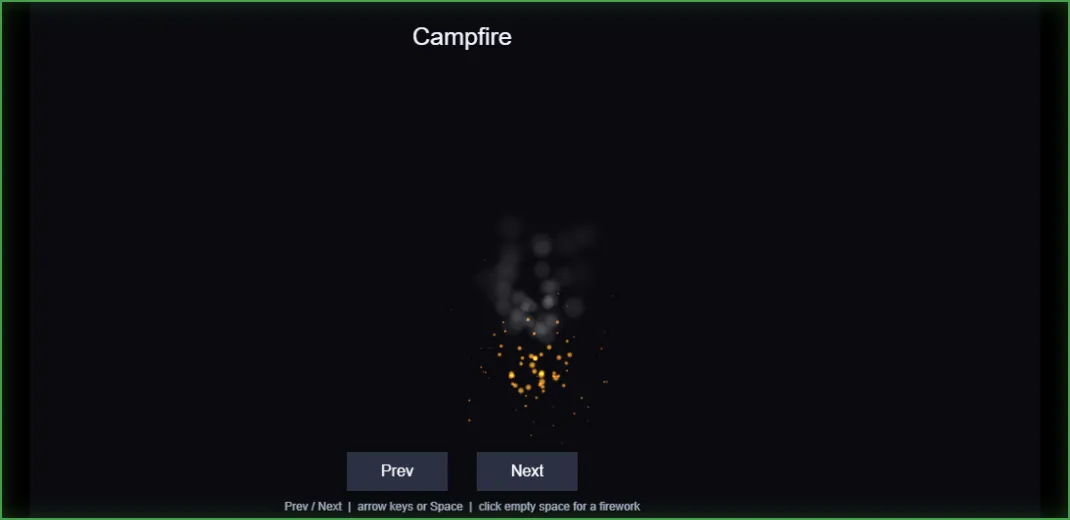
The Particle demo example: a campfire made of two emitters, smoke and sparks.
The particle system ships in the main bundle. In the editor and the web runtime
the plugin is installed automatically. In a custom App, add it once:
import { particlePlugin } from 'esengine';
app.addPlugin(particlePlugin);
Quick start
Section titled “Quick start”Attach a ParticleEmitter to an entity and it starts emitting (playOnStart is
on by default). This makes a looping fountain of embers that fade from yellow to
transparent red and arc under gravity:
import {  defineSystem, Commands, Transform, ParticleEmitter, EmitterShape,} from 'esengine';
const spawnEmbers = defineSystem([Commands()], (cmds) => {  cmds.spawn()    .insert(Transform, { position: { x: 0, y: -200, z: 0 } })    .insert(ParticleEmitter, {      rate: 120,      lifetimeMin: 1.2, lifetimeMax: 2.0,      shape: EmitterShape.Cone, shapeAngle: 20,      speedMin: 300, speedMax: 520,      startSizeMin: 12, startSizeMax: 20,      endSizeMin: 0,  endSizeMax: 0,      startColor: { r: 1, g: 0.9, b: 0.3, a: 1 },      endColor:   { r: 1, g: 0.2, b: 0.1, a: 0 },      gravity: { x: 0, y: -400 },    });});
ParticleEmitter reference
Section titled “ParticleEmitter reference”Every field is optional — omit one and it takes the default below. Sizes, distances, and speeds are in world units (pixels at the default PPU); angles are in degrees.
Emission
Section titled “Emission”| Property | Type | Default | Description |
|---|---|---|---|
rate |
number | 10 |
Continuous emission, particles per second. 0 = bursts only. |
burstCount |
number | 0 |
Particles released per burst. 0 disables bursts. |
bursts |
{ time, count }[] |
[] |
A schedule of bursts: count particles once the emitter has been emitting for time seconds (counted from the end of startDelay). A looping emitter repeats the schedule every duration. Used beside burstCount, not instead of it. |
burstInterval |
number | 1 |
Seconds between bursts. |
duration |
number | 5 |
Seconds the emitter runs before stopping (see looping). |
simulationSpeed |
number | 1 |
How fast this emitter’s own time runs: 2 plays it twice as fast, 0 holds it. Emission, lifetimes and motion all follow it. |
startDelay |
number | 0 |
Seconds the emitter plays before it emits anything; duration counts from the end of the delay. |
looping |
boolean | true |
Restart after duration instead of stopping. |
playOnStart |
boolean | true |
Begin emitting as soon as the entity exists. |
maxParticles |
number | 1000 |
Pool size — the hard cap on live particles. |
gpuSimulation |
boolean | false |
Simulate on the GPU. See GPU simulation. |
Lifetime
Section titled “Lifetime”| Property | Type | Default | Description |
|---|---|---|---|
lifetimeMin |
number | 5 |
Shortest particle lifetime, seconds. |
lifetimeMax |
number | 5 |
Longest particle lifetime, seconds. |
Where particles spawn and their initial direction. See Emitter shapes.
| Property | Type | Default | Description |
|---|---|---|---|
shape |
EmitterShape |
Cone |
Point / Circle / Box / Cone / Sphere / Hemisphere. |
shapeRadius |
number | 100 |
Radius for Circle / Cone / Sphere / Hemisphere. |
shapeSize |
Vec3 | {100, 100, 0} |
Box extents for Box (a z of 0 is the flat rectangle a 2D emitter spawns from). |
shapeAngle |
number | 25 |
Cone half-angle (°) for Cone. |
Velocity & forces
Section titled “Velocity & forces”| Property | Type | Default | Description |
|---|---|---|---|
speedMin |
number | 500 |
Slowest initial speed. |
speedMax |
number | 500 |
Fastest initial speed. |
angleSpreadMin |
number | 0 |
Start of the emission-direction arc (°), in the emitter’s local XY plane. Read by Point and Box only. |
angleSpreadMax |
number | 360 |
End of the emission-direction arc (°). Read by Point and Box only. |
gravity |
Vec3 | {0, 0, 0} |
Constant acceleration applied to every particle. |
damping |
number | 0 |
Velocity drag per second (0 = none). |
addedVelocityMin / addedVelocityMax |
Vec3 | {0,0,0} |
A velocity each particle carries on top of its own, chosen between the two ends when it is born. Gravity, damping, noise and the speed limit do not act on it. CPU simulation. |
speedLimit |
number | 0 |
The fastest a particle may move under its own velocity (0 = no limit). A faster one is pulled back toward the limit. CPU simulation. |
limitDampen |
number | 1 |
How much of the excess over the limit is removed per 1/60 s: 1 clamps at once, a small value brakes gently. |
Noise & turbulence
Section titled “Noise & turbulence”| Property | Type | Default | Description |
|---|---|---|---|
noiseStrength |
number | 0 |
Peak flow speed (px/s) the turbulence pushes particles at. 0 = module off. |
noiseFrequency |
number | 0.01 |
Spatial scale of the field — larger = tighter, busier swirls. |
noiseScrollSpeed |
number | 0 |
How fast the field drifts over time (0 = a static field). |
noiseOctaves |
number | 1 |
Fractal detail layers (1..8). 1 = smooth flow; more = finer turbulence. |
See Noise & turbulence below.
Size over life
Section titled “Size over life”| Property | Type | Default | Description |
|---|---|---|---|
startSizeMin |
number | 100 |
Smallest size at spawn. |
startSizeMax |
number | 100 |
Largest size at spawn. |
endSizeMin |
number | 100 |
Smallest size at death. |
endSizeMax |
number | 100 |
Largest size at death. |
sizeEasing |
ParticleEasing |
Linear |
Interpolation from start to end size. |
sizeCurve |
Curve |
none | Full size-over-life curve; overrides start/end (see below). |
Color over life
Section titled “Color over life”| Property | Type | Default | Description |
|---|---|---|---|
startColor |
Color | {1,1,1,1} |
Color at spawn (RGBA, 0..1). |
endColor |
Color | {1,1,1,0} |
Color at death — default fades alpha to 0. |
colorEasing |
ParticleEasing |
Linear |
Interpolation from start to end color. |
colorGradient |
Gradient |
none | Full color-over-life gradient; overrides start/end. |
Rotation
Section titled “Rotation”| Property | Type | Default | Description |
|---|---|---|---|
rotationMin |
number | 0 |
Smallest spawn rotation (°). |
rotationMax |
number | 0 |
Largest spawn rotation (°). |
angularVelocityMin |
number | 0 |
Slowest spin (°/s). |
angularVelocityMax |
number | 0 |
Fastest spin (°/s). |
Texture & sprite sheet
Section titled “Texture & sprite sheet”| Property | Type | Default | Description |
|---|---|---|---|
texture |
asset | none | Particle texture. Untextured particles are soft quads. |
spriteColumns |
number | 1 |
Sprite-sheet columns (1 = whole texture). |
spriteRows |
number | 1 |
Sprite-sheet rows. |
spriteFPS |
number | 10 |
Frames per second when animating the sheet. |
spriteLoop |
boolean | true |
Loop the sheet vs. hold the last frame. |
Rendering & state
Section titled “Rendering & state”| Property | Type | Default | Description |
|---|---|---|---|
blendMode |
BlendMode |
Additive |
How particles composite. See Blend modes. |
layer |
number | 0 |
Sorting layer for draw order. Under a Canvas, 0 paints by its place in the tree; see Particles in a UI. |
material |
asset | none | Optional custom material/shader. |
simulationSpace |
SimulationSpace |
World |
World or Local (see below). |
renderMode |
ParticleRenderMode |
Billboard |
Billboard faces the view; Stretched lays the quad along the particle’s velocity (see Stretched particles). |
velocityScale |
number | 0 |
Stretched: length added per unit of speed. |
lengthScale |
number | 1 |
Stretched: the quad’s own length is its size times this. |
intensity |
number | 1 |
Multiplies the particle’s colour (not its alpha) as it is drawn. In linear colour space the picture is HDR, so a value past 1 makes a spark bright enough to bloom. A timeline can drive it. The CPU simulation’s per-particle trail is drawn without it. |
enabled |
boolean | true |
Disable to freeze and hide without removing the component. |
Sub-emitter
Section titled “Sub-emitter”| Property | Type | Default | Description |
|---|---|---|---|
subEmitter |
entity | none | Child emitter entity fired when a particle triggers. 0/unset = off. |
subEmitterTrigger |
SubEmitterTrigger |
Death |
Fire on each particle’s Death or Birth, or when it hits something (Collision, see Scene collisions). |
subEmitterChance |
number | 1 |
Probability (0..1) a triggering particle fires the child. |
subEmitterInheritVelocity |
number | 0 |
Fraction of the parent particle’s velocity passed to the sub-burst. |
See Sub-emitters below.
| Property | Type | Default | Description |
|---|---|---|---|
trailEnabled |
boolean | false |
Drag a tapering ribbon behind each particle. Off = no history recorded. |
trailWidth |
number | 8 |
Ribbon width at the head; tapers to a point at the tail. |
trailPoints |
number | 6 |
History length in points (2..12) — longer = smoother, costlier streaks. |
trailMinDistance |
number | 6 |
Min world distance a particle must move before a new trail point is recorded. |
See Per-particle trails below.
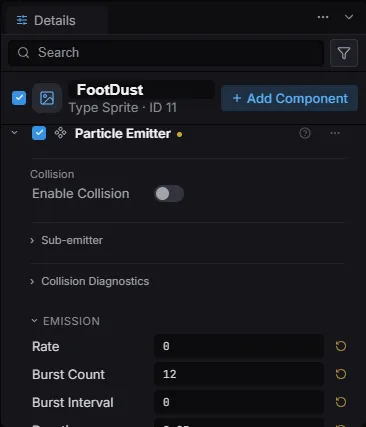
The Particle Emitter Details, with the Collision group at the top (off here) above the emission fields.
Collision
Section titled “Collision”Shown once collisionEnabled is on. See Floor collision and Scene collisions.
| Property | Type | Default | Description |
|---|---|---|---|
collisionEnabled |
boolean | false |
Turn collision on. |
collisionMode |
ParticleCollisionMode |
Floor |
Floor (a horizontal plane), Physics2D or Physics3D (cast through the physics world, CPU only), Depth (what the camera sees, GPU only) or Sdf (every ParticleCollider). See GPU collision. |
collisionFloor |
number | 0 |
World height of the floor plane. |
collisionBounce |
number | 0.5 |
0 = stop dead, 1 = fully elastic. |
collisionFriction |
number | 0.1 |
Horizontal speed shed per bounce, 0..1. |
collisionLifetimeLoss |
number | 0 |
Fraction of life burned per bounce, 0..1. |
collisionMask |
bitmask | all (65535) |
Physics layers the scene modes hit; zero selects none. |
collisionQueryBudget |
number | 128 |
Most queries this emitter makes per update, 0..4096. |
collisionMaxDistance |
number | 0 |
Distance from the nearest active camera beyond which collision is skipped; 0 = no distance culling. |
collisionFallback |
ParticleCollisionFallback |
Floor |
Floor or Skip, when physics is unavailable, the budget is spent or a particle is too far away. |
collisionEvents |
boolean | false |
Emit ParticleCollisionEvents. |
collisionEventBudget |
number | 32 |
Most events this emitter raises per update, 0..1024. |
collisionThickness |
number | 30 |
Depth mode: how far behind a visible surface a particle still counts as having hit it. Past this it has gone round the back. |
Emitter shapes
Section titled “Emitter shapes”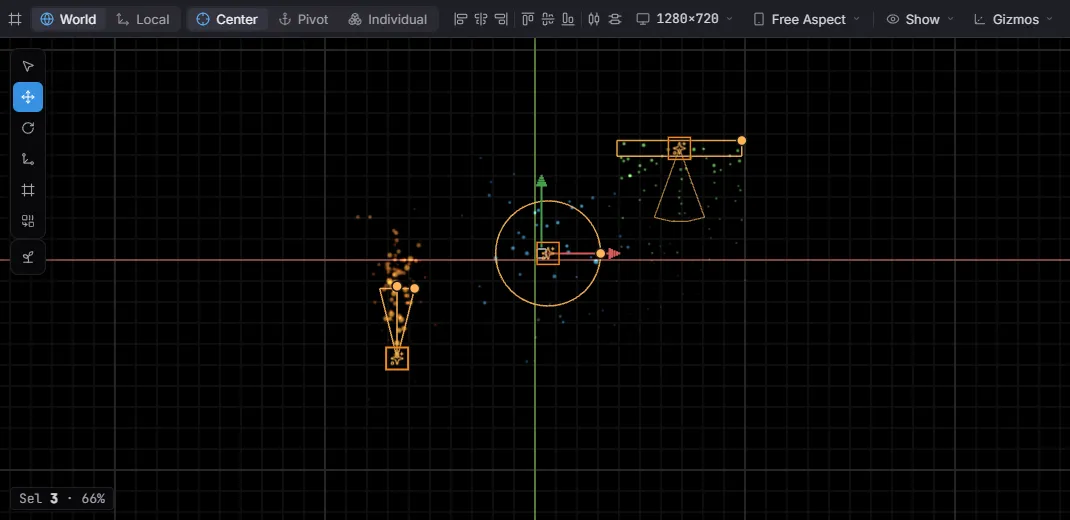
Emitter shape gizmos in the viewport — a cone, a circle, and a rectangle, each drawn where its particles spawn (turn on Preview FX to see them run in edit mode).
EmitterShape sets the spawn region and initial direction:
| Shape | Uses | Behavior |
|---|---|---|
Point |
— | All particles spawn at the entity origin. |
Circle |
shapeRadius |
Spawn inside a disc in the emitter’s own plane; direction radiates outward. |
Box |
shapeSize |
Spawn inside a box (a flat rectangle when shapeSize.z is 0). |
Cone |
shapeRadius, shapeAngle |
Spawn in a cone — a directed spray (fountains, thrusters). |
Sphere |
shapeRadius |
Spawn inside a ball; direction radiates outward. |
Hemisphere |
shapeRadius |
Spawn inside a half ball about local +Y; direction radiates outward. |
Directed shapes point along the emitter’s local +Y, so an unrotated emitter sprays up
and rotating the entity aims it, in 3D as well. Point and Box have no direction of
their own: the angleSpreadMin…Max arc (in the emitter’s local XY plane) says which way
they launch, so a Point that only emits upward uses 0…180. Circle, Cone, Sphere
and Hemisphere carry their direction with them and ignore the arc.
Color & size over life
Section titled “Color & size over life”For most effects, startColor → endColor and startSize → endSize with an
easing curve are enough — these are plain fields, so they work from code and in
the editor. ParticleEasing values are Linear, EaseIn, EaseOut, and
EaseInOut.
For precise control, author a gradient (color) or curve (size multiplier)
in the ParticleEmitter inspector — a list of stops/keys over normalized life t
in 0..1. The engine bakes them into a lookup table the simulation samples by
particle age. The authored data looks like this:
// colorGradient: hot white -> orange -> smoke, fading out.{ stops: [ { t: 0.0, color: { r: 1, g: 1, b: 0.8, a: 1 } }, { t: 0.4, color: { r: 1, g: 0.5, b: 0.1, a: 1 } }, { t: 1.0, color: { r: 0.2, g: 0.2, b: 0.2, a: 0 } }, ],}// sizeCurve: swell in, then shrink away (multiplies the particle's start size).{ keys: [{ t: 0, v: 0.2 }, { t: 0.3, v: 1 }, { t: 1, v: 0 }] }To change the ramp procedurally at runtime, upload a pre-baked lookup table
through the resource — an N×4 RGBA Float32Array for color, an N-scalar array
for size. Pass null to clear it and fall back to start/end + easing:
import { defineSystem, Res, Particle } from 'esengine';
const recolor = defineSystem([Res(Particle)], (particles) => {  const lut = new Float32Array([ /* r,g,b,a, r,g,b,a, … */ ]);  particles.setColorLut(entity, lut);   // or particles.setColorLut(entity, null)});
Sprite-sheet animation
Section titled “Sprite-sheet animation”Point texture at a sprite sheet and set spriteColumns / spriteRows to animate
each particle across the frames at spriteFPS. A 4×4 explosion sheet, played once
over each particle’s life:
.insert(ParticleEmitter, { texture: 'assets/effects/explosion.png', spriteColumns: 4, spriteRows: 4, spriteFPS: 24, spriteLoop: false,});Noise & turbulence
Section titled “Noise & turbulence”Straight-line particles look mechanical. The noise module layers a curl-noise flow field on top of velocity and gravity, so particles wander along smooth, swirling currents — smoke that curls, embers that flutter, magic that drifts.
The field is divergence-free (it’s the curl of a noise potential), which means
particles never bunch into clumps or thin out into gaps the way a raw random jitter
would — the motion stays even and organic. It’s pure CPU math, identical on every
platform (WeChat included), and completely free when noiseStrength is 0.
.insert(ParticleEmitter, { // …emission, lifetime, color… noiseStrength: 120, // how hard the current pushes (px/s) noiseFrequency: 0.01, // smaller = broad, lazy swirls; larger = tight eddies noiseScrollSpeed: 0.5, // let the field drift so the flow keeps evolving noiseOctaves: 2, // 1 = smooth; more = finer, busier turbulence});Tuning tips:
noiseStrengthis the headline dial — start around a fraction of your particles’speedand push up until the wander reads.noiseFrequencysets the swirl size. Rising smoke likes small values (~0.005); sparky, chaotic bursts like larger ones (~0.03).noiseScrollSpeed> 0 keeps a slow, static-looking plume alive; leave it0for a fixed field that particles simply flow through.noiseOctavestrades cost for detail —1–2covers most effects.
Sub-emitters
Section titled “Sub-emitters”A sub-emitter lets one emitter spawn another emitter’s burst at a particle’s position — the classic firework shell that rises and explodes, a rocket trailing smoke puffs, a spark that splits into embers. No per-frame code: you wire a reference and the sim fires the burst on the chosen event.
The child is an ordinary ParticleEmitter entity used as a template — set
rate: 0 and playOnStart: false so it never emits on its own; it only fires when
the parent triggers it. Its burstCount sets how many particles each sub-burst
spawns. Point the parent’s subEmitter at that child entity:
import { EmitterShape, SubEmitterTrigger } from 'esengine';
// The burst template — a normal emitter that only fires when triggered.const shell = cmds.spawn()  .insert(Transform, {})  .insert(ParticleEmitter, {    shape: EmitterShape.Point,                     // no direction of its own: sparks fly all round    rate: 0, playOnStart: false, burstCount: 44,   // 44 sparks per burst    lifetimeMin: 0.6, lifetimeMax: 1.1, speedMin: 160, speedMax: 340,    startColor: { r: 1, g: 0.85, b: 0.35, a: 1 }, endColor: { r: 1, g: 0.3, b: 0.1, a: 0 },    gravity: { x: 0, y: -150 },  }).id();
// The rocket — on each particle's death, fire the shell burst at that spot.cmds.spawn() .insert(Transform, { position: { x: 0, y: -230, z: 0 } }) .insert(ParticleEmitter, { shape: EmitterShape.Point, rate: 2.5, lifetimeMin: 1.4, lifetimeMax: 1.8, speedMin: 560, speedMax: 660, angleSpreadMin: 84, angleSpreadMax: 96, subEmitter: shell, subEmitterTrigger: SubEmitterTrigger.Death, // or Birth subEmitterInheritVelocity: 0.15, // carry a little of the rocket's motion });subEmitterTrigger—Deathfires as each parent particle expires (shell explosions, debris);Birthfires as each is born (a continuous shower of sub-bursts along a stream).subEmitterChance— set below1so only some particles fire the child, thinning out a dense effect.subEmitterInheritVelocity— pass a fraction of the parent particle’s velocity into the burst so the sparks fly with the rocket, not just outward.
In the editor, subEmitter is an entity picker — drop in any emitter entity from
the scene; the reference is remapped automatically when the scene loads.
Per-particle trails
Section titled “Per-particle trails”Turn on trailEnabled and every particle drags a tapering ribbon along its recent
path — comet sparks, tracer rounds, swirling magic streaks. This is distinct from
the standalone TrailRenderer, which trails a single entity; here
each of the (up to thousands of) particles gets its own streak.
.insert(ParticleEmitter, { rate: 40, speedMin: 220, speedMax: 420, lifetimeMin: 0.7, lifetimeMax: 1.2, startColor: { r: 0.6, g: 0.9, b: 1, a: 1 }, endColor: { r: 0.2, g: 0.4, b: 1, a: 0 }, trailEnabled: true, trailWidth: 10, // ribbon width at the particle, tapering to a point behind trailPoints: 8, // how many path points to keep (2..12) trailMinDistance: 5, // record a point every 5 world units of movement});The ribbon takes the particle’s current colour at the head and fades to
transparent along its length, so trails inherit your colour-over-life automatically.
It’s built on the CPU and streamed through the same triangle-strip batch path as
TrailRenderer — no special GPU path — so it sorts and blends like every other 2D
renderable.
Trails are opt-in because they cost more than plain particles: a short position
history per particle (bounded by trailPoints) plus ribbon geometry each frame. Keep
trailPoints modest (6–8 is plenty) and lower maxParticles for heavy trailed
effects.
Force fields
Section titled “Force fields”Where the Noise module is a per-emitter turbulence baked into
one emitter, a force field is an external influence you place in the scene: it’s
its own entity with a ParticleForceField component, and it acts on the world-space
particles of every emitter within range. Wind gusts, black holes, whirlpools,
pockets of still air — drop one in and the whole scene’s particles respond.
import { ParticleForceField, ForceFieldType } from 'esengine';
cmds.spawn()  .insert(Transform, { position: { x: 0, y: 0, z: 0 } })  .insert(ParticleForceField, {    type: ForceFieldType.Vortex,    strength: 450,   // acceleration (px/s²); negative flips a Point field to a repeller    radius: 320,     // 0 = affects the whole scene; > 0 = only particles within range    falloff: true,   // fade the force to 0 at the radius edge  });
The component’s other defaults: type Directional, strength 200, radius 0, direction {1, 0, 0}, falloff on, enabled on.
| Type | Effect |
|---|---|
Directional |
A constant push along direction — wind, updrafts, a current. |
Point |
Pull toward the field (strength > 0) or push away (strength < 0) — gravity wells, explosions. |
Vortex |
Swirl tangentially around the field — whirlpools, tornadoes, galaxies. |
Drag |
Damp velocity inside the zone — a pocket of still air or water that slows particles. |
Fields are pure-CPU: the sim gathers the active ones each frame and folds them into the
same velocity integration as gravity, so there is no new subsystem. A Directional
field uses its direction; Point/Vortex/Drag derive their direction from the
field→particle vector and ignore it.
Two caveats: fields act on world-space particles only (a Local emitter’s particles
move with their emitter and ignore fields), and strength: 0 or enabled: false skips
a field entirely.
Floor collision
Section titled “Floor collision”Turn on collisionEnabled and particles bounce off a horizontal floor plane at
world height collisionFloor — rain splashing on the ground, sparks skittering across
a surface, snow settling. It’s self-contained CPU collision with no physics dependency.
.insert(ParticleEmitter, { rate: 60, speedMin: 200, speedMax: 400, shape: EmitterShape.Cone, shapeAngle: 50, gravity: { x: 0, y: -500 }, collisionEnabled: true, collisionFloor: -200, // world Y the particles land on collisionBounce: 0.5, // 0 = stop dead, 1 = fully elastic collisionFriction: 0.2, // horizontal speed shed per bounce collisionLifetimeLoss: 0.1, // fraction of life burned per bounce (fade as they settle)});When a world-space particle falls below collisionFloor, it’s snapped back to the
plane and its vertical velocity is reflected and scaled by collisionBounce;
collisionFriction bleeds off horizontal speed and collisionLifetimeLoss ages it so
splashes fade out instead of skittering forever.
Simulation space
Section titled “Simulation space”| Value | Particles follow the emitter? | Use for |
|---|---|---|
World (default) |
No — they stay where they were born | Trails, exhaust, sparks left behind a moving object |
Local |
Yes — they move with the entity’s transform | Auras, shields, effects rigidly attached to a mover |
Stretched particles
Section titled “Stretched particles”With renderMode: Stretched each particle’s quad turns so its Y axis runs along the particle’s velocity, and its length is
size × lengthScale + speed × velocityScale while its width stays the particle’s own. Use a texture drawn pointing up: a spark,
a raindrop, a streak. A particle that is not moving keeps the rotation it was born with. Stretching is done where the CPU
simulation draws; an emitter simulated on the GPU draws as Billboard.
Particle materials
Section titled “Particle materials”Give an emitter a material and its fragment stage owns the particle’s shading. Beside v_color (already multiplied by
intensity) and v_texCoord, the particle variant hands the fragment one more input:
| Input | When | What |
|---|---|---|
v_particle |
#ifdef PARTICLE |
x normalized age (0 at birth, 1 at death), y a 0..1 random number the particle keeps for life, z its lifetime in seconds, w the emitter’s intensity. |
v_worldXYZ, v_worldNormal |
the shader declares #pragma feature PARTICLE_WORLD, under #ifdef MESH_NORMALS |
The particle’s world position, and a normal facing the camera. |
Two built-in templates use them:
- Particle (
builtin:particle): texture × colour, plus two things.u_softnessis a distance in world units over which a particle fades as it nears the opaque scene behind it, so smoke and mist no longer cut a hard line into the ground or a wall;u_erosion(0..1) wears the texture away with age, the low-alpha parts first, andu_erosionEdgeis how soft that edge is. - Distortion (
builtin:distortion): draws the picture already behind it, bent — heat haze, a shockwave, a lens. The texture’s alpha (times the particle’s or mesh’s colour alpha) says where and how much;u_strengthis the offset as a fraction of the screen,u_radialchooses between a noise wobble (0) and a push outward from the quad’s centre (1), andu_dispersionsplits red from blue. It works on aMeshRenderertoo.
Both the depth fade and the distortion read what the frame has already drawn, which needs the picture to go through the post-processing chain (linear colour space, an output transform, or any effect). Without one a particle draws unfaded and a distortion draws nothing.
Blend modes
Section titled “Blend modes”BlendMode controls how particles composite over the scene:
| Mode | Effect |
|---|---|
Normal |
Standard alpha blending. |
Additive (default) |
Colors add — glows, fire, magic, light. |
Multiply |
Darkens — smoke, shadow. |
Screen |
Brightens, softer than additive. |
PremultipliedAlpha |
For textures with premultiplied alpha. |
PmaAdditive |
Additive with a premultiplied-alpha source. |
Lighten |
Takes the brighter of particle and scene pixel. |
Darken |
Takes the darker of the two. |
Controlling playback — Res(Particle)
Section titled “Controlling playback — Res(Particle)”Read the Particle resource in a system (or app.getResource(Particle) outside
ECS) to drive an emitter imperatively:
import { defineSystem, Res, Particle } from 'esengine';
const control = defineSystem([Res(Particle)], (particles) => { particles.play(entity); // start / resume emitting particles.stop(entity); // stop emitting (live particles finish) particles.reset(entity); // clear all live particles immediately const n = particles.getAliveCount(entity); // live particle count});| Method | Description |
|---|---|
play(entity) |
Start or resume emission. |
stop(entity) |
Stop emitting; existing particles live out their lifetime. |
reset(entity) |
Kill all live particles and reset the emitter. |
getAliveCount(entity) |
Number of currently live particles. |
setColorLut(entity, lut | null) |
Upload a baked color LUT (see above), or clear. |
setSizeLut(entity, lut | null) |
Upload a baked size LUT, or clear. |
setSpeedLut(entity, lut | null) |
Upload a baked speed-over-life multiplier; it scales how fast a particle travels along its trajectory, and does not replace gravity or noise. |
setBursts(entity, bursts | null) |
Set the burst schedule ({ time, count }[]) from code, or clear. |
setCollisionBudget({ queries?, events? }) |
Change the shared per-App collision caps. |
Scene collisions
Section titled “Scene collisions”Enable collision and choose ParticleCollisionMode.Floor, Physics2D or
Physics3D. Scene modes cast each particle’s movement segment through the
existing physics plugin, including fast motion across thin walls. These are
point queries, not rigid particle volumes or depth-buffer collision. Particle
positions, hit points and event velocities use project world units; physics
adapters perform their existing unit conversion.
collisionQueryBudget caps queries per emitter per update. The shared App cap
defaults to 4,096 queries and 1,024 notifications; change it through
app.getResource(Particle).setCollisionBudget({ queries: 2048, events: 256 }).
Partial budgets rotate between emitters and live particles. collisionMaxDistance
measures distance from the nearest active camera; zero or no active camera
disables distance culling. Offscreen particles still collide within the budget.
Choose ParticleCollisionFallback.Floor or Skip for unavailable physics,
exhausted budgets and distance culling. An ordinary query miss never invokes
fallback. collisionMask filters physics layers; zero selects none.
Set collisionEvents: true and read EventReader(ParticleCollisionEvent) in a
system on the next frame. Each payload contains emitter, pool slot, hit body,
mode, world point, normal and incoming velocity. Floor hits use INVALID_ENTITY
as their body. The subEmitterTrigger: SubEmitterTrigger.Collision option reuses
the child’s burst settings; local-space children are supported. Self triggers
are rejected and inherited chains stop at depth eight.
collisionEventBudget and the App event cap bound collision notifications,
diagnostic contacts and collision sub-bursts. collisionStats exposes the latest
queries, hits, skipped work, unavailable queries, fallbacks and dropped events.
The Details panel shows these counters and transient hit normals. Normal display
is not saved to the scene. The sample particle-demo/assets/scenes/scene-collisions.esscene
demonstrates 2D and 3D walls, impact bursts and project-owned event counters.
GPU simulation
Section titled “GPU simulation”Turn on gpuSimulation and the particles live on the GPU: a compute kernel advances every one of them each frame, and the
draw reads what it wrote. The CPU only decides how many are born, so an emitter of a hundred thousand or a million particles
costs a dispatch, not a loop. maxParticles is then the size of the ring the GPU keeps (up to 2,000,000); a new particle takes
the next slot, and a slot whose particle has died is drawn as nothing.
world.insert(entity, ParticleEmitter, { gpuSimulation: true, maxParticles: 500_000, rate: 200_000, lifetimeMin: 2, lifetimeMax: 3, shape: EmitterShape.Cone, shapeAngle: 40, speedMin: 200, speedMax: 400, gravity: { x: 0, y: -300, z: 0 }, noiseStrength: 40, noiseFrequency: 0.01, collisionEnabled: true, collisionFloor: 0, collisionBounce: 0.4,});It runs the same emitter, with the same shapes, curl noise, force fields (the first eight), gravity, damping, color / size / speed over life, sprite sheets, sub-emitters and trails. Each emitter draws from a fixed seed of its own, so a scene replays the same particles. What it does not do:
- No scene-query collision (
Physics2D/Physics3D). A kernel cannot ask the physics world, so these fall back ascollisionFallbacksays. UseDepthorSdfinstead. - Not sorted. An
Additiveor cut-out look is exact; a deep pile ofNormal-blended particles draws in slot order. - Not in a UI tree. An emitter under a
Canvasdraws through the screen overlay, which the kernel does not feed; leave it on the CPU. Particle.aliveCountis an upper bound. The GPU keeps the truth and nothing is read back.
It needs a device with compute — WebGPU. On WebGL2 and in mini-game runtimes the same emitter runs on the CPU, capped at 20,000 particles, so a scene built for a million still plays, thinner. Design the look to survive the cap if a platform without WebGPU matters to you.
GPU collision
Section titled “GPU collision”Two collision modes are made for a kernel, since neither asks anything per particle that a million particles cannot afford.
Depth collides with what the camera sees. The frame’s depth is copied after the scene is drawn, and next frame the kernel
reprojects each particle into it with the view that saw it. A particle just behind a surface has hit that surface; one further behind than
collisionThickness has gone round the back, and passes.
world.insert(entity, ParticleEmitter, { gpuSimulation: true, collisionEnabled: true, collisionMode: ParticleCollisionMode.Depth, collisionThickness: 50, collisionBounce: 0.3,});It needs no setup and costs one copy a frame, whatever the scene holds, and it has the limits of the picture it reads. Only what the camera
sees and what writes depth counts: nothing off screen stops a particle, a surface turned away from the camera does not exist, a 2D scene of sprites
writes none, and a particle behind the front of a box meets the front rather than the top. It is on a frame’s delay. The one camera that drew first
is the one that counts. For a scene that must hold whatever the camera does, use Sdf.
Sdf collides with shapes you place. A ParticleCollider is a sphere, box or capsule that draws nothing and needs no physics. The emitter bounces off the first 64
in the scene that share a bit of collisionMask with its mask. inverted keeps particles in instead of out: a jar, a dome round a spell.
const ball = world.spawn();world.insert(ball, Transform, { position: { x: 0, y: 100, z: 0 } });world.insert(ball, ParticleCollider, { shape: ParticleColliderShape.Sphere, radius: 120 });| Property | Type | Default | Description |
|---|---|---|---|
shape |
ParticleColliderShape |
Sphere |
Sphere, Box or Capsule. A box and a capsule turn with the entity; a capsule’s axis is its up. |
radius |
number | 50 |
A sphere’s radius, and a capsule’s round its axis. Scaled by the entity’s largest scale. |
halfHeight |
number | 50 |
How far a capsule’s axis runs each way from its centre. |
halfExtents |
Vec3 | 50, 50, 50 |
A box’s half size. |
inverted |
boolean | false |
Keeps particles in rather than out. |
mask |
bitmask | all (65535) |
Which emitters it stops: one that shares a bit in its collisionMask. |
Every particle asks every collider its mask lets through, so a million particles against many colliders is a real cost; keep them few. Sdf also runs on the CPU, so the look survives a device with no compute. Depth does not: on WebGL2 it does what collisionFallback says.
A particle has no size to either mode: it is a point, stopped where its centre meets the surface.
GPU events, sub-emitters and trails
Section titled “GPU events, sub-emitters and trails”A kernel appends what happens to a buffer: each birth, death or collision the emitter’s subEmitterTrigger asks for, or each collision when collisionEvents is on. That buffer is what the other two read.
A sub-emitter runs with no trip to the CPU. Give a GPU emitter a subEmitter that is also gpuSimulation, and its kernel lights slots straight from the parent’s events, burstCount each, at the event’s place, keeping subEmitterInheritVelocity of its speed. A parent runs before its child in the frame, so a spark is born where its drop died. At most 4,096 events an emitter a frame are kept; more are dropped. A child on the CPU is not fed by a GPU parent.
The game hears collisions a frame or two late. With collisionEvents on, ParticleCollisionEvent, collisionStats and the rest read as they do for any other collision, in the same units, once the GPU hands them back. collisionEventBudget is how many are read back a time, and hits counts the rest. Reading back is the one thing here that costs a trip to the CPU, so leave it off unless the game needs to know.
Trails use the same trailEnabled, trailWidth, trailPoints and trailMinDistance. Each particle’s path is kept in a buffer of its own and drawn as quads along it, narrowing and fading from the head. They cost memory for every slot whether alive or not: maxParticles x trailPoints x 60 bytes, so 100,000 particles with 12 points is 72 MB. Each piece turns to face the camera that first drew it that frame, so a second camera sees them slightly edge on.
Particles in a UI
Section titled “Particles in a UI”An emitter under a Canvas paints by its place in the tree, like the controls round it: listed after a panel or inside it, it is over the panel; listed before, it is under it. A Sprite under a Canvas with no UINode does the same. A layer other than 0 opts out and sorts as a layer does, against the controls’ 1000 and up: layer: 5000 holds it over the whole UI.
An emitter that is not under a Canvas belongs to the scene, and a screen Canvas is drawn after the scene: its particles are always under that UI, whatever their layer. To put an effect over a HUD, make it a child of the Canvas. gpuSimulation emitters do not draw under a screen Canvas.
Performance & best practices
Section titled “Performance & best practices”- Budget
maxParticles. It’s a fixed pool; size it to the worst case, not higher. Many small emitters beat one huge one for culling. Past a few thousand particles, use GPU simulation. - Prefer
Additivefor light (fire, sparks, magic) — it hides overdraw and needs no sorting. ReserveNormal/Multiplyfor opaque smoke/dust. - Atlas particle textures and share one
materialso emitters batch. - Spread min/max for natural variety; equal min/max reads as mechanical.
- Reuse emitters via
reset+playinstead of spawning/despawning. - In game code particles advance in play mode; in the editor the Preview FX toggle keeps them live while you author.
Imported particle units
Section titled “Imported particle units”ParticleModelUnits preserves an imported emitter’s size ranges, speed ranges
and gravity in model units. With this component beside ParticleEmitter, the
particle plugin multiplies those values by the largest absolute axis of the
composed world scale, including parent scale. Emitter position still follows
Transform. This is a scalar conversion for world-space particles, not an
anisotropic particle simulation.
Edit the values on ParticleModelUnits when changing these imported properties:
the plugin derives the corresponding ParticleEmitter fields from them.
See also
Section titled “See also”- Materials & Shaders — custom particle materials.
- Post-processing — bloom over additive particles.
- Assets — loading particle textures and atlases.