
Localization
Register a translation catalog per locale, switch the active locale, and look up
strings with t() — all through the Localization resource. It’s deliberately
Intl-free so behavior is identical on the web and WeChat.
Localization is opt-in — install its plugin once before any system reads
Res(Localization):
import { App, localizationPlugin, LocalizationPlugin } from 'esengine';
app.addPlugin(localizationPlugin);// …or preload catalogs + set the initial/fallback locale up front:app.addPlugin(new LocalizationPlugin({  locale: 'en',  fallback: 'en',  catalogs: { en: { play: 'Play' }, 'zh-CN': { play: '开始' } },}));
Catalogs & translation
Section titled “Catalogs & translation”import { defineSystem, Res, Localization } from 'esengine';
const setupI18n = defineSystem([Res(Localization)], (i18n) => { i18n.addCatalog('en', { play: 'Play', score: 'Score: {n}' }); i18n.addCatalog('zh-CN', { play: '开始', score: '得分:{n}' });
i18n.setLocale('zh-CN'); const label = i18n.t('score', { n: 42 }); // "得分:42"});addCatalog(locale, entries)merges keys into a locale — call it again to add more (later calls override).t(key, params?)interpolates{placeholder}values. Missing keys fall back to the fallback locale, then to the key itself (a visible, greppable fallback).
Plurals
Section titled “Plurals”A catalog entry can carry plural forms — the CLDR set zero / one / two / few
/ many / other; t selects one from a count param (and a zero form always
wins when count === 0). The default selector is English-style (one/other); for
Slavic/Arabic/etc. rules register a per-locale selector with
setPluralSelector(locale, (count) => category), returning one of those six
categories.
i18n.addCatalog('en', { apples: { one: '{count} apple', other: '{count} apples' } });i18n.t('apples', { count: 3 }); // "3 apples"Localization reference
Section titled “Localization reference”| Method | Description |
|---|---|
addCatalog(locale, entries) |
Merge translation keys into a locale. |
t(key, params?) |
Look up + interpolate a string. |
setLocale(locale) |
Set the active locale. |
setFallbackLocale(locale) |
Set the locale used when a key is missing. |
setPluralSelector(locale, selector) |
Custom plural rule for a locale. |
setPseudoLocalization(options | null) |
Opt-in length-stress preview (expansion, accents); null restores ordinary translation. |
availableLocales() |
List registered locales. |
has(key) |
Whether a key exists in the active/fallback locale. |
String tables (.eslocale)
Section titled “String tables (.eslocale)”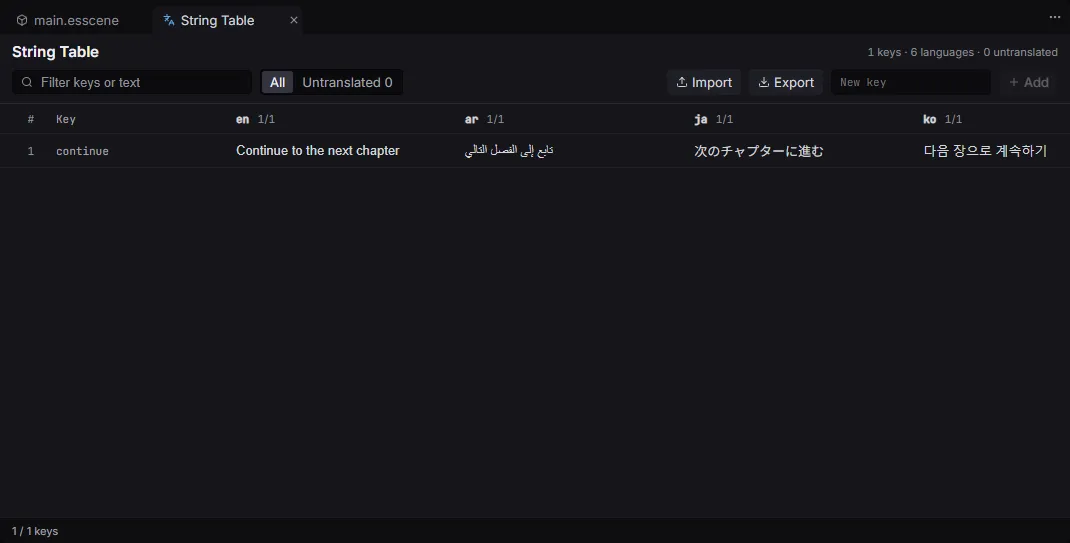
A .eslocale table in the inspector: each key’s value for this locale, with the other locale shown beneath as a translation hint.
Translations can ship as data instead of code: a .eslocale asset carries ONE
locale’s catalog, so a game loads only the languages it needs.
// assets/i18n/zh-CN.eslocale{ "version": 1, "locale": "zh-CN", "entries": { "ui.title": "UI 控件", "apples": { "other": "{count} 个苹果" } }}Create one in the editor (Content Browser → right-click → New Locale Table) or
by hand. Selecting a table turns the Details panel into its editor: key/text
rows (with plural forms), a dimmed reference translation from the project’s other
tables, and a missing-key list you backfill with one click — every edit saves
immediately. Load explicitly with Assets.loadLocaleTable(path) (requires the
localization plugin — it fails loud otherwise), preload via
new LocalizationPlugin({ tables: ['assets/i18n/zh-CN.eslocale'] }), or let the
Text binding below load everything automatically. The
export cook always ships .eslocale files — they load by key, so reachability
can’t see them and force-includes them instead.
Double-click a .eslocale to open the String Table editor, which shows every language of
the project side by side: one row per key, one column per table, untranslated cells marked,
a filter, and add and remove for keys (each edit is written to that language’s file at once).
It can Import an Excel (.xlsx), CSV or XLIFF (.xlf) file and merge it into the tables by key,
and Export every language as one Excel or CSV sheet or as XLIFF 1.2, listing the problems it found
first; a plural entry is edited in the inspector.
To check how a longer language will fit, i18n.setPseudoLocalization({ expansion: 0.35, accents: true })
(@experimental) stretches and accents every translated string while keeping placeholders, rich-text tags
and newlines intact; setPseudoLocalization(null) goes back to the real text.
Bind UI Text to keys
Section titled “Bind UI Text to keys”Set Text.i18nKey (the I18n Key dropdown in the editor’s Details panel, listing
every key across the project’s tables with a translated preview) and content
becomes derived: it re-resolves every frame, so setLocale — or a table landing
late — re-flows every bound label with no code. Scene-driven projects get the whole
loop for free: a scene that binds any key auto-installs the plugin at load, loads
every shipped table, and starts in the player’s system language when a matching
table ships (a game that installs the plugin itself, or calls setLocale, is never
overridden).
Keep dynamic labels (Score: 42) code-driven — bound content is derived, so a
label your code rewrites must not also carry a key; call t('score', { n }) in the
system that owns it instead.
Best practices
Section titled “Best practices”- Key everything through
t()ori18nKey— never hard-code user-facing strings, even placeholders. - Interpolate, don’t concatenate (
'Score: {n}'), so word order can differ per language. - Set a fallback locale so a missing translation degrades to another language rather than a raw key.
- One
.eslocaleper language, all in one folder (assets/i18n/), keyed identically — a missing key falls back visibly to the key string.