
Generated Worlds
A world scattered at random points reads as noise: trees, flowers and rocks with no shape between them. esengine/worldgen lays a
world out the way a designer would — continuous biomes, groups an artist composed, clearings and roads kept open, big things before
small — and does it as the world is explored, the same on every machine and in whatever order its pieces are asked for.
The work is split three ways. The engine samples the fields, weighs the biomes, places groups layer by layer, keeps zones clear, gives every placement a stable id and streams it all in chunks. The game writes the rules: which biomes there are, what stands in them, what is reserved for a home or a road. The artists make the recipes: a grove, a rock group, a strip of reeds along a shore.
The WorldGen component
Section titled “The WorldGen component”| Field | What it does |
|---|---|
rules |
The rules the world is laid out by: a .esworld file, or the id of rules the game registered with registerWorldRules. |
version |
The version of the rules the world was made with. A saved world keeps it; rules that no longer have it fail the world (its status says why) rather than laying out another one. |
world, seed |
The world (a planet, a level) as the game names it, and its seed. Another seed lays out another world by the same rules. |
paintGround |
Whether the biomes paint the terrain (default on). |
surface, seaLevel |
Plane (the default) lays the world out over a Terrain; Planet means the entity is also a Planet and the world is laid out over its six faces. seaLevel (shown for Planet) is the height of the sea above the planet’s radius: ground lower than it is under water. |
What the rules place is published as the entity’s children, round the streaming sources (or the camera): see procedural chunks.
Rules are data: biomes, the recipes that stand in them and the layers they are placed in. Keep them in a .esworld file (in the
editor, New → New World Rules, or open one from the content browser) and name it in the WorldGen’s rules. The editor lists the
file’s biomes, recipes and layers, edits each with a form (meshes and materials picked like any asset), and says under them whether
the engine would take the rules as they stand. Saving the file lays the open world out by it again, in the editor and in a running
game. The file is the JSON of what registerWorldRules takes, checked as it is read: a file that names a recipe or layer it does not
have, or leaves out what a world needs, fails the WorldGen with where it went wrong.
Rules can also be registered from code, which is how a game adds fields of its own (functions are not data):
import { registerWorldRules } from 'esengine/worldgen';
registerWorldRules({    id: 'mygame:wilds',    versions: [1],    biomes: [        { id: 'forest', conditions: [{ field: 'moisture', min: 0.52, blend: 0.08 }, { field: 'up', min: 0.82, blend: 0.05 }],          transition: 120, paint: [0.55, 0.45, 0, 0], paintStrength: 0.5,          recipes: [{ recipe: 'grove', layer: 'groups', density: 0.75 }] },        // …    ],    recipes: [        { id: 'grove', version: 1, tags: ['tree'],          anchor: { id: 'elder', mesh: 'assets/models/pine.esmesh', material: 'assets/materials/pine.esmaterial', scale: [1.4, 1.8], footprint: 10, canopy: 35 },          members: [              { id: 'pine', mesh: 'assets/models/pine.esmesh', count: [3, 6], ring: [45, 110], scale: [0.9, 1.3], footprint: 8 },              { id: 'sapling', mesh: 'assets/models/pine.esmesh', count: [2, 5], ring: [110, 170], scale: [0.35, 0.6], footprint: 4, chance: 0.8 },          ] },    ],    layers: [        { id: 'groups', spacing: 260, drawDistance: 4200, chunkSize: 512 },        { id: 'detail', spacing: 90, drawDistance: 2400 },    ],});
Fields
Section titled “Fields”Every decision is made from fields: numbers read at any world position. height, up (how much the ground faces up) and slope
come from the terrain’s surface, paint.<layer> (how much of the ground is that terrain layer, named by its file: paint.grass for grass.esterrainlayer, or paint.grass, paint.dirt, paint.snow and paint.rock without layer files), waterDepth and shoreDistance (how far a dry place is from the water’s edge, negative on the water) from the water; moisture, temperature and rock are seeded noise, slow across the
world (their scales are the rules’ noise). A game adds fields of its own with fields: { name: (x, z, at) => number }, reading the
built-in ones from at. A zone can set any field over its area.
Biomes
Section titled “Biomes”A biome is a weight over the fields: each condition a band of one field (min, max) whose edges fade over blend, multiplied
together. Where several biomes hold their weights are mixed — a candidate takes a biome by the weights at its place, so two forests
meet in a mixed band instead of a line — and transition makes the edge wander by that many world units of noise. paint (grass,
dirt, snow, rock) pulls the terrain’s own paint toward the biome’s by its weight and paintStrength. A biome lists its recipes, each
with the layer it is placed in and the share of that layer’s candidates it takes.
A rule is worked out for every candidate in every biome, so the fields are read when a condition asks for them and no sooner: a field no biome reads is never computed. A rules file names more noise fields of its own in noise ({ "turf": { "scale": 1400, "octaves": 2 } }), which any condition may then read by that name.
A candidate takes one biome, by weight, and then the recipe that biome has in the layer being laid out: so a biome has to list its recipes in every layer it should stand in, and how thick a layer is where the biome holds is that recipe’s density. A biome that lists nothing for a layer leaves the candidates that chose it empty. The weights mix biomes where they overlap; they do not thin a biome out, which is the recipes’ density and the layer’s spacing.
Recipes
Section titled “Recipes”A recipe is a group: an anchor and members placed round it. Each member says its mesh and material (asset paths, or handles
already loaded), how many (count), how far from the anchor and at what angles (ring, arc), its scale, the ground it takes
(footprint: a trunk) apart from how far it spreads overhead (canopy: a crown), whether it stands upright or leans with the
ground (attach, which a member that names a plant follows too: a stone sits on a slope as the slope lies), how steep (minUp) and how deep in water (waterDepth) it may stand, the chance it is placed at all, and its far
version (far: the rectangle of its texture two crossed cards show, or a tent of them for a conifer, drawn past its layer’s lodDistance). A
member that cannot stand (no ground, too steep, under water, kept out by a zone, on something placed before it) is left out; the
group stands.
version is part of every placement’s id: bump it when a recipe places something else.
Plants
Section titled “Plants”A member names a mesh and a material, or a plant: an entry in the rules’ plants, for what a mesh and a material cannot say. A plant is its parts (a trunk and a crown are two, each with its mesh, a cheaper lod1Mesh, material, texture, tint, whether it is opaque and, for a card that stands for a crown, how soft its normals are: turned toward up by that share, so it is lit as a rounded crown and not as the flat board it is, and whether it castShadows: false for the ground cover too small to be worth a shadow-map draw), the lodDistance past which the cheaper meshes stand in and the drawDistance past which it is not drawn, a far version (a tree’s crossed cards, baked to an atlas of their own) drawn from drawDistance out to farDistance, and optionally:
| Field | What it is |
|---|---|
tints, tintScale |
The colourings the art gives it (linear multipliers on its colour), and how many world units a stand is across: a place takes one of them by slow noise, so a wood has warm and cool stands and no speckle. |
farKeep |
The share of its plants the far version draws (above 0 to 1; default 1): the others are left out and the ones kept grown to make up their cover. A plant with no cards of its own may use its cheaper mesh as its far and thin it this way. The far versions are laid out in cells as wide as the shortest distance any of them is shown over allows (up to eight chunks), so ground cover seen from far off is a few draws a cell and not a few a chunk. |
sink |
How far it is sunk into the ground, in world units (a stone’s buried underside). |
unit |
World units to a unit of its mesh: 100 for plants modelled in metres in a world of centimetres. A recipe’s scale is then a size relative to the model. |
Plants are grown a cell at a time by the same machinery as a placed foliage: a chunk stands at once and fills in over the frames after it, each mesh a few milliseconds of the frame’s budget. The far versions are a layer of their own, laid out as far as the furthest of them goes and shown from past what their kinds draw as themselves, so a layer’s drawDistance is what its plants draw as themselves and not how far the world is seen. A world on a terrain of an area ends where the terrain does.
Layers
Section titled “Layers”Layers are passes, in order: big things first. Each takes one candidate a cell of a grid spacing apart, jittered, with a priority
drawn for it. Of two candidates whose groups would overlap, the higher priority stands; every candidate keeps clear of the footprints
of the layers before it, so a fern does not grow through a trunk and a stone does not sit inside a boulder. A layer is published in
chunks of chunkSize out to drawDistance. occupies: false makes a layer that later ones may overlap (ground cover). farSpacing (default 1) plans the far versions of a layer’s plants that much further apart: ground cover whose far versions keep a quarter of the plants is planned at 2, so a quarter of the candidates are worked out and none is made only to be thrown away.
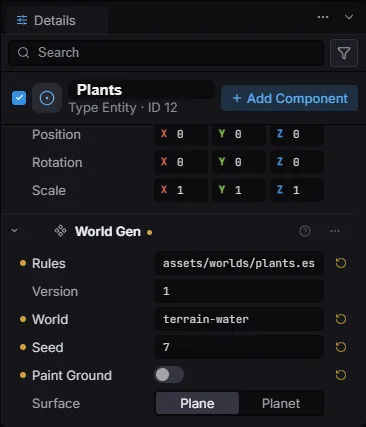
The World Gen component of the Terrain & Water example: the rules asset, the seed and the surface.
A zone (the WorldZone component) plans an area by hand: a home, a road, a landing site, a building’s footprint, a view kept open. It follows its entity’s position and its turn about the vertical.
| Field | What it does |
|---|---|
kind |
What it is for, in the game’s own words (default reserve). |
shape, radius, sizeX, sizeZ |
A circle (default; radius 10), or a box (sizeX × sizeZ, 20 × 20) turned with the entity about the vertical. The editor draws its outline. |
falloff |
Over how many world units past the outline it fades out (default 4): what it excludes thins there instead of stopping on a line. |
priority |
Where zones overlap, the higher holds the biome. |
excludes |
The tags of what it keeps out, separated by commas: a layer, a recipe, a recipe’s or member’s tags, decor, interactive; * is everything (the default); empty keeps nothing out. |
biome |
A biome it holds over its area. |
flatten |
Levels the terrain under it to the ground’s height at its centre, blending back over falloff: a plot to build on. In code, flatten is a world height or 'ground'. |
A game adds zones as it plans and as the player builds:
const gens = app.getResource(WorldGenRes);gens.zones().set({ id: 'house 1', kind: 'building', shape: { type: 'rect', x, z, halfX: 40, halfZ: 30, yaw }, falloff: 12, priority: 20, excludes: ['*'] });Only the chunks the zone reaches are made again, each keeping its old version until the new one replaces it.
Authored zones use the scene name and document entity id for their identity, so reloading the same scene with the same seed preserves the falloff pattern. The plugin enables scene-origin recording before scenes load. Entities created by game code have a runtime identity; use gens.zones(world).set() with a stable id when their zones must survive a reload.
Generators of the same named world share zones and receive changes independently. Authored projections are removed when their entities disappear or the world’s last generator leaves. Game-added zones and PlacementDiffs remain available for later generators, while terrain flattening and biome paint are released with their last active consumer. To observe changes without replacing another consumer, call zones.subscribe(listener) or diffs.subscribe(listener) and call the returned function when finished.
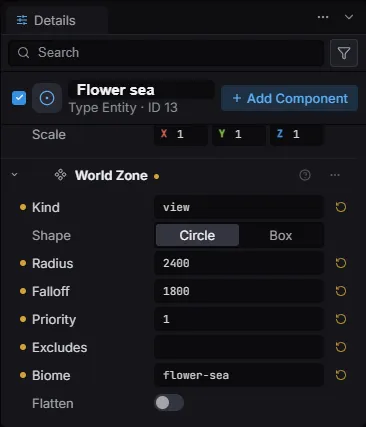
A World Zone: a circle that tells the generator which biome to grow inside it.
Building bases and roads
Section titled “Building bases and roads”An upright recipe member can set grounding: { size: [width, depth], samples: 5, mode: 'highest', maxRelief: 2 }.
The base dimensions are model units; yaw and scale are applied before sampling the corners, edges and interior. The grid side may be
3, 5, 7 or 9. Every sample must have ground and satisfy minUp and waterDepth; maxRelief rejects excessive height variation in
world units. The base chooses highest (default), lowest, mean or center, then adds offset in scaled model units.
Placement.grounding reports the range, support depth and burial depth. This is finite-grid support checking, not a terrain flattening
operation: use a foundation deep enough for the accepted relief, or a flattening WorldZone for an authored site.
The reservation always contains the whole fitted base. scaleFootprint: true also treats footprint and canopy as model-unit radii;
omitting it preserves the existing world-unit behavior. The planner settles overlaps after choosing deterministic scale and base height.
stats / explain report relief alongside slope, water, zone and overlap rejection. The World Rules editor exposes these settings.
import { setRoad } from 'esengine/worldgen';setRoad(worlds.zones('valley'), { id: 'camp-trail', points: [[0, 0], [40, -20], [80, -10]], width: 6, clearance: 2, falloff: 3, excludes: ['tree', 'grass', 'building'],});roadZones returns serializable rectangle and circle zones with continuous bends and round end caps. setRoad replaces just one
road’s reservations, removing obsolete segments, and removeRoad releases them. These reserve space; mesh construction and road
grading are separate. A 2D world uses the same helpers with its y coordinate in the second point slot. Place the building layer before
forest layers so trees respect its footprints, and reserve authored building floors and entrances with WorldZones for Foliage.
Interactive placements and changes
Section titled “Interactive placements and changes”A member with interactive ('ore', 'tree') is an entity of its own, carrying a PlacedObject with its placement id and kind;
everything else is decoration, drawn merged, a mesh a chunk for each kind. gens.objectOf(id) finds the entity of a placement.
Ids are made of the layer, the grid cell, the recipe and the member, with their versions (groups@1:12,-3/grove@1/pine.2) — never a
position in a list — so they do not change with the order chunks are made in, or when a layer or a recipe is added later.
What a player changes is kept apart from the generated world and laid over it before anything is shown:
gens.diffs().remove(id); // felled, mined: gone for goodgens.diffs().change(id, { yaw: 1.2 }); // moved, turned, scaledsave(gens.diffs().toJSON()); // what a save storesgens.diffs().load(saved); // and reads backA felled tree stays felled when its chunk is let go and made again, and after a save is read back. What the player builds is the game’s own: the zone it reserves keeps generation out of its ground.
Asking the plan
Section titled “Asking the plan”gens.plan() answers for anywhere, loaded or not, the same as what is published — what a server, a minimap or a placement check reads:
placementsIn(x0, z0, x1, z1, layers?)— every placement whose group stands in the square.biomeAt(x, z),biomeWeights(x, z)— the biome there, and every biome’s weight.explain(x, z)— everything that decided what stands there: the fields, the biomes, the zones, and each layer’s candidate in that cell with why it was rejected (noBiome,density,noGround,slope,water,zone,occupied,conflict).stats(layer, x0, z0, x1, z1)— how many candidates stood, and why the rest did not.
Shipping
Section titled “Shipping”A .esworld file is followed like a material: the meshes and materials it names ship with the scene that names it. Rules registered
from code name theirs where a scene does not reference them, so a package would leave them out; declare the folders they live in
always included, in .esengine/asset-groups.json:
{ "version": "1.0", "groups": { "recipes": { "folder": "assets/models", "mode": "local", "alwaysInclude": true } } }A 2D world
Section titled “A 2D world”The same rules lay out a 2D world: no terrain, the plan read flat over x and y, published in chunks round the camera. Nothing is drawn by the engine; what a
placement looks like (a sprite, a prefab) and how the ground is painted (a tile layer, a shader) are yours, said in publish.
import { registerWorldRules, createWorld2D } from 'esengine/worldgen';
registerWorldRules(rules);                        // biomes, recipes and layers, as aboveconst world = createWorld2D(app, 'island', {    rules: rules.id, seed: 11, chunkSize: 512, cellSize: 32,    publish(chunk) {        // chunk.placements: what stands here (id, recipe, member, biome, x, y, scale, interactive, footprint...)        // chunk.biomeGrid: the biome of each cell of the ground, indexes chunk.biomes        const spawned = spawnTilesAndSprites(chunk);        return () => despawn(spawned);            // taking the chunk away    },});
world.diffs.remove(tree.id); // felled: only that chunk is made again, and it stays felled- Chunks follow the camera (or the streaming sources), nearest first within the frame’s budget, and are released past
unloadRadius; it isProceduralChunkson the'xy'plane, so a world of any size holds a bounded number of them. - The same whatever is asked first. A chunk is a function of the seed, the rules and its place, so a neighbour made earlier or later agrees, a server and a client agree, and a placement’s id is stable across loads. A group (an anchor and its members) belongs to the chunk its anchor stands in.
- What players changed is a
PlacementDiffs, laid over the plan before a chunk is shown;diffs.toJSON()anddiffs.load()are the save. - Zones are planned by hand: a
ZoneDefwhosezis world y keeps an area clear or holds it to a biome (a camp the player built). - A recipe’s
ringis in world units andarcin degrees from +x toward +y.mesh,material,attachandminUpare 3D things and are not read.
Limits
Section titled “Limits”- Decoration is merged a chunk at a time, not GPU-instanced. The renderer’s instance records are written each frame, which for a field of thousands of plants would upload megabytes a frame; merged static meshes upload nothing, and the chunks bound their memory.
- A game’s own fields are code. A rules file uses the built-in fields and the ones zones set; a field computed by the game is registered with the rules from code.
See the Generated World example (examples/worldgen).