
Physics
Estella’s physics runs in the C++/WebAssembly core, powered by Box2D v3. You attach
a RigidBody2D and a collider to an entity, then move it with forces, query the world
with raycasts, react to collisions, and connect bodies with joints. Physics steps at
a fixed timestep, decoupled from the frame rate, for stable simulation.
Physics is an optional side-module. In the editor and web runtime it loads
automatically when a scene uses physics components. In a custom app, add the plugin
yourself (gravity defaults to { x: 0, y: -9.81 }):
import { Physics2DPlugin } from 'esengine/physics';
app.addPlugin(new Physics2DPlugin('physics.js', { gravity: { x: 0, y: -9.81 } }));
The second argument is a Physics2DPluginConfig; every field is optional:
| Field | Default | Description |
|---|---|---|
gravity |
{ x: 0, y: -9.81 } |
World gravity, m/s². |
fixedTimestep |
1/30 |
Physics step in seconds. The plugin also sets the app’s fixed step to it, so FixedUpdate systems run at the same 30 Hz. |
subStepCount |
4 |
Solver substeps per step. |
contactHertz / contactDampingRatio / contactSpeed |
30 / 10 / 3 |
Contact softness and the maximum push-out speed (m/s). |
collisionLayerMasks |
none | Per-layer collision masks (index = layer 0–15) that replace each collider’s own maskBits; the editor fills it from the collision matrix. |
enableSleep |
true |
Let resting bodies sleep. |
enableContinuous |
true |
Continuous collision for fast bodies. |
restitutionThreshold |
Box2D default | Minimum impact speed (m/s) that produces a bounce; 0 or less keeps the default. |
maxLinearSpeed |
Box2D default | Clamp on body speed; 0 or less keeps the default. |
Box2D simulates in meters; the rest of the engine works in world pixels.
The conversion factor is the live pixels-per-unit (PPU) — Canvas.pixelsPerUnit,
100 pixels per meter by default. Every part of the physics API sits on a fixed
side of that boundary:
| Surface | Units |
|---|---|
Collider component dimensions — halfExtents, radius, offset, … |
Meters. |
Solver-facing methods — applyForce / applyImpulse, setLinearVelocity / getLinearVelocity, setGravity, … |
Meters (m/s, m/s²). |
Spatial queries — raycast, shapeCast*, overlapCircle / overlapAABB, moveCharacter |
World pixels, scaled by the live PPU. |
CharacterController2D.velocity, MotorJoint2D.linearVelocity |
World pixels per second. |
Joint components’ anchorA / anchorB, length, minLength / maxLength, lowerTranslation / upperTranslation; the pixel-taking joint methods (setDistanceJointLength, setDistanceJointLimits, setPrismaticJointLimits, setWheelJointLimits, …) and their getters |
World pixels. Angles (lowerAngle, motorSpeed of a hinge) are radians. |
Contact event positions and speeds — contactX/Y, pointX/Y, approachSpeed |
World pixels, pixels per second. |
createRevoluteJoint’s anchorA / anchorB |
Meters — passed to the solver as is, unlike the joint component’s pixel anchors. |
physics.getPixelsPerUnit() returns the live PPU (pushed from the Canvas each
frame), so conversions never hard-code 100:
const ppu = physics.getPixelsPerUnit(); // world pixels per meterconst speedPx = physics.getLinearVelocity(e).x * ppu; // m/s → px/sphysics.applyImpulse(e, { x: 0, y: jumpPx / ppu }); // px/s → m/sMixing the two spaces — passing pixels to applyForce, or meters to raycast —
is the most common physics bug. When in doubt: components and solver = meters;
queries and the character controller = pixels.
Bodies & colliders
Section titled “Bodies & colliders”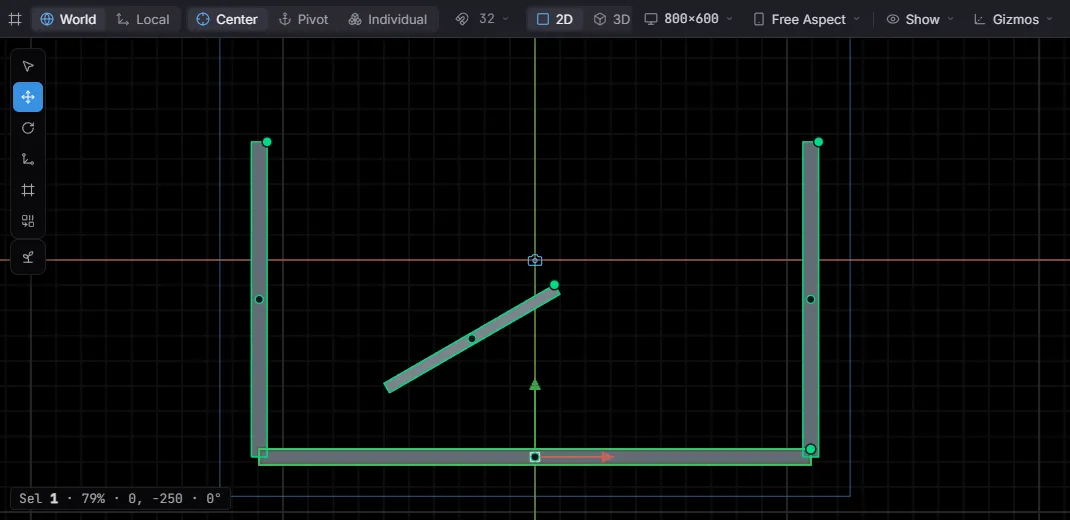
Collider gizmos in the viewport: the selected Ground’s box outline (amber) plus the walls and ramp. Toggle them with the viewport’s Physics show-flag.
Attach a RigidBody2D plus one collider shape. Collider dimensions are in meters,
not pixels — divide pixel sizes by your pixels-per-unit (see Units).
Spawn from a system that takes Commands():
import {  defineSystem, Commands, Transform,  RigidBody2D, BodyType, CircleCollider2D,} from 'esengine';
const PPU = 100;   // = Canvas.pixelsPerUnit; read the live value via physics.getPixelsPerUnit()
const spawnBall = defineSystem([Commands()], (cmds) => {  cmds.spawn()    .insert(Transform, { position: { x: 0, y: 250, z: 0 } })    .insert(RigidBody2D, { bodyType: BodyType.Dynamic, gravityScale: 1 })    .insert(CircleCollider2D, { radius: 24 / PPU, density: 1, friction: 0.3, restitution: 0.4 });});
RigidBody2D
Section titled “RigidBody2D”| Property | Type | Default | Description |
|---|---|---|---|
bodyType |
BodyType |
Dynamic |
Static (immovable), Kinematic (moved by code), Dynamic (simulated). |
gravityScale |
number | 1 |
Multiplier on world gravity (0 = float). |
linearDamping |
number | 0 |
Linear velocity drag. |
angularDamping |
number | 0 |
Angular velocity drag. |
fixedRotation |
boolean | false |
Lock rotation (typical for characters). |
bullet |
boolean | false |
Continuous collision for fast, thin bodies (anti-tunneling). |
enabled |
boolean | true |
Disable to remove from the simulation. |
Colliders
Section titled “Colliders”Colliders share these fields; each adds its own shape parameters (the table below lists the exceptions). Dimensions are in meters.
| Shared property | Type | Default | Description |
|---|---|---|---|
offset |
Vec2 | {0, 0} |
Local offset from the entity origin. |
density |
number | 1 |
Mass per area (drives the body’s mass). |
friction |
number | 0.3 |
Surface friction, 0..1+. |
restitution |
number | 0 |
Bounciness, 0..1. |
isSensor |
boolean | false |
Detect overlaps without a physical response (triggers). |
categoryBits |
number | 0x0001 |
Which collision layer this collider is on. |
maskBits |
number | 0xFFFF |
Which layers it collides with. |
enabled |
boolean | true |
Disable the shape. The body keeps its velocity, joints and other colliders; this one stops existing — nothing collides with it, and no query, raycast or character cast finds it. |
| Component | Shape parameters |
|---|---|
BoxCollider2D |
halfExtents ({0.5, 0.5}). Its corners are always rounded by 0.05 m; there is no field to change that (a radius written to the component is not stored). |
CircleCollider2D |
radius (0.5). |
CapsuleCollider2D |
radius (0.25), halfHeight (0.5). |
SegmentCollider2D |
point1 ({-0.5, 0}), point2 ({0.5, 0}) — a one-sided edge; no offset. |
PolygonCollider2D |
vertices: Vec2[] (any shape, concave allowed; default a unit square), radius (rounded, 0); no offset. |
ChainCollider2D |
points: Vec2[] (at least 4), isLoop (true) — a static edge chain; friction defaults to 0.6, and it has no offset, density or isSensor. |
Concave polygons, and how many vertices you may draw
Section titled “Concave polygons, and how many vertices you may draw”PolygonCollider2D.vertices takes as many points as you like, in any shape,
concave included. Box2D itself builds only CONVEX polygons of at most 8 vertices,
so a ring that is neither is split into convex pieces and each piece becomes its
own shape on the same body. The cap belongs to a piece, not to what you draw.
Pieces behave as one collider: mass sums over them the way it does over any two colliders on a body, and a contact with any piece is a contact with the entity. The cost is real, though — each piece is a shape in the broadphase — so a 400-point outline is 400 points’ worth of work, not one polygon’s.
Two things a divided polygon cannot do:
radius(rounded corners) rounds the OUTER boundary, and a cut between two pieces is not boundary. It applies only when the ring stays in one piece.- A ring that crosses itself has no partition at all. It falls back to the convex hull, and the editor draws the authored ring beside it as a dashed amber outline so the difference is visible without playing the scene. A solid outline is what collides; a dashed one is what you drew.
A ChainCollider2D is still the better answer for long static edge geometry —
terrain, cave walls — where nothing needs the inside to be solid. A chain is a run
of edges: no density, no isSensor, and its points are not rebuilt while the
game runs, but it costs one shape however long it is.
Editing vertices in the viewport
Section titled “Editing vertices in the viewport”Select the entity and the collider’s points become handles. Drag one to move it, click a point to delete it, and click the hollow handle on an edge to insert a vertex there and drag it into place — one gesture, one undo step. The floors below which the solver builds nothing (3 points for a polygon, 4 for a chain) are refused in the editor too, and say which limit they hit.
Collision filtering
Section titled “Collision filtering”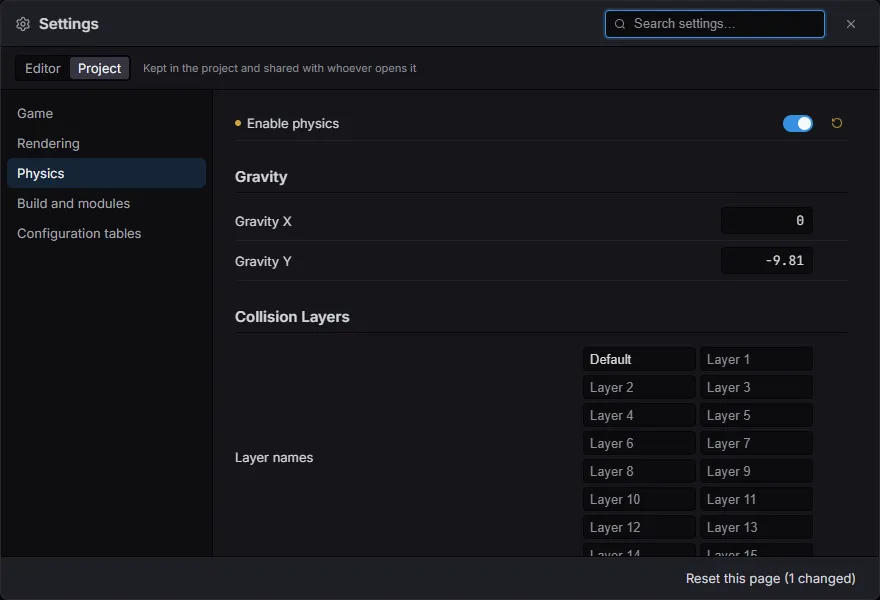
Settings → Project → Physics: name your 16 collision layers, then toggle which pairs collide in the matrix (alongside the solver tuning below).
categoryBits (what layer a body is on) and maskBits (what it collides with) are
16-bit filters. Two bodies collide only if each one’s category is in the other’s mask:
const LAYER_PLAYER = 0x0001;const LAYER_ENEMY  = 0x0002;const LAYER_GROUND = 0x0008;
.insert(CircleCollider2D, {  radius: 16 / PPU,  categoryBits: LAYER_PLAYER,  maskBits: LAYER_ENEMY | LAYER_GROUND,   // ignores other players});
The layer filter is the single control for what interacts — collisions, hit events, and sensor detection all use it. Colliders don’t need to opt in to be seen by a sensor: any collider whose layers pass the sensor’s filter is detected. To keep something out of a sensor, exclude it by layer (not a per-collider flag); to keep sensor work cheap in a busy world, put sensors and their targets on dedicated layers so the mask narrows what each sensor considers.
Moving bodies — forces & velocity
Section titled “Moving bodies — forces & velocity”Read the Physics2D resource — a Physics2DAPI instance — to drive bodies. These
methods talk to the solver directly, so they are all in meters (m/s, m/s² —
see Units). Every method takes the world entity:
import { defineSystem, Query, Res, RigidBody2D } from 'esengine';import { Physics2D } from 'esengine/physics';
const move = defineSystem([Query(RigidBody2D), Res(Physics2D)], (q, physics) => { for (const [entity] of q) { physics.applyForce(entity, { x: 0, y: 20 }); // continuous force physics.applyImpulse(entity, { x: 0, y: 5 }); // instant kick (jump) physics.setLinearVelocity(entity, { x: 3, y: 0 }); }});| Method | Description |
|---|---|
applyForce(e, v) / applyImpulse(e, v) |
Continuous force / instantaneous impulse. |
applyTorque(e, t) / applyAngularImpulse(e, i) |
Rotational force / impulse. |
setLinearVelocity(e, v) / getLinearVelocity(e) |
Set / read linear velocity. |
setAngularVelocity(e, w) / getAngularVelocity(e) |
Set / read angular velocity. |
setGravity(v) / getGravity() |
World gravity. |
getMass(e) / getInertia(e) / getCenterOfMass(e) / getMassData(e) |
Mass properties. |
setAwake(e, awake) / isAwake(e) |
Sleeping-body control. |
getMassData(e) bundles the mass properties into one MassData:
MassData field |
Type | Description |
|---|---|---|
mass |
number | Body mass (from collider density × area). |
inertia |
number | Rotational inertia about the center of mass. |
centerOfMass |
Vec2 |
Center of mass in the body’s local frame, in pixels (× PPU). |
Spatial queries
Section titled “Spatial queries”Queries take pixel-space arguments and auto-scale by the live PPU. Each accepts
an optional maskBits to filter by layer:
// Raycast — every hit along the ray, nearest first.const hits = physics.raycast(origin, direction, 200);for (const hit of hits) {  // hit.entity, hit.point, hit.normal}
const nearby = physics.overlapCircle(center, 64); // Entity[]const inBox = physics.overlapAABB(min, max); // Entity[]const swept = physics.shapeCastCircle(center, 16, { x: 100, y: 0 }); // ShapeCastHit[]| Method | Returns | Description |
|---|---|---|
raycast(origin, dir, dist, maskBits?) |
RaycastHit[] |
All hits along a ray, nearest first. dir is a direction, dist is in pixels. |
overlapCircle(center, radius, maskBits?) |
Entity[] |
Colliders overlapping a circle. |
overlapAABB(min, max, maskBits?) |
Entity[] |
Colliders overlapping a box. |
shapeCastCircle(center, radius, translation, maskBits?) / shapeCastBox(center, halfExtents, angle, translation, maskBits?) / shapeCastCapsule(center1, center2, radius, translation, maskBits?) |
ShapeCastHit[] |
Sweep a shape along translation and get everything it would hit. |
Casts return RaycastHits (ShapeCastHit is the same shape):
RaycastHit field |
Type | Description |
|---|---|---|
entity |
Entity |
The entity owning the collider that was hit. |
point |
Vec2 |
Hit point, world pixels. |
normal |
Vec2 |
Surface normal at the hit point (unit vector). |
fraction |
number | Fraction of the cast distance at the hit, 0..1 — results sort by it, nearest first. |
Placing on a grid
Section titled “Placing on a grid”A build mode asks three things while a finger drags something over the ground, and esengine/gameplay answers them as plain functions (no component, no system): where does the thing sit
snapped to the grid, and may it stand there. What follows the finger (a ghost sprite), how it is tinted, and what a confirmed placement does are yours.
import { snapFootprint, checkPlacement, type PlacementGrid } from 'esengine/gameplay';
const grid: PlacementGrid = { cellWidth: 32, cellHeight: 32 };      // originX / originY if cell (0, 0) is not at the world originconst spot = snapFootprint(grid, fingerX, fingerY, 3, 1);           // a 3 by 1 wall, centred on its middle cellghost.position.x = spot.x; ghost.position.y = spot.y;               // the ghost sits on whole cells
const check = checkPlacement(grid, spot, {    physics,                                  // the Physics2D resource: any collider in the footprint is in the way    mask: SOLID_LAYERS,    solidAt: (x, y) => isTileSolid(layer, ...), // a solid tile under it blocks (see the tilemap guide)    blocked: (col, row) => buildings.has(col, row), // your own table of what is taken    ignore: new Set([ghostEntity]),});ghostSprite.color = check.clear ? GREEN : RED;     // check.blockers and check.blockedCells say what is in the way
snapToGrid snaps a point to a cell middle or a cell corner; gridCellAt and gridCellCentre convert between cells and the world. An odd footprint centres on a cell and an even one on a corner,
each way on its own. Every probe is optional: one you do not pass blocks nothing. solidAt is sampled on a lattice over each cell (every solidStep, a quarter of a cell by default), so a solid tile
narrower than that can slip between the points; the physics query is asked once with the footprint shrunk a hair, so a wall that only touches its edge is not in the way.
Collision & sensor events
Section titled “Collision & sensor events”The Physics2DEvents resource carries this frame’s contacts. Set isSensor: true on a
collider to get enter/exit events without a physical response (trigger zones):
import { defineSystem, Res } from 'esengine';import { Physics2DEvents } from 'esengine/physics';
const onHit = defineSystem([Res(Physics2DEvents)], (events) => {  for (const c of events.collisionEnters) { /* c.entityA, c.entityB, c.normalX/Y, c.contactX/Y */ }  for (const x of events.collisionExits)  { /* x.entityA, x.entityB */ }  for (const h of events.collisionHits)   { /* h.approachSpeed, h.pointX/Y, h.normalX/Y */ }  for (const s of events.sensorEnters)    { /* s.sensorEntity, s.visitorEntity */ }  for (const s of events.sensorExits)     { /* … */ }});
The events carry world pixels (contactX/Y, pointX/Y) and pixels per second
(approachSpeed). The resource is published once per rendered frame and holds every
contact from all fixed steps in that frame. The same events are also re-sent per entity
as collision_enter, collision_exit, collision_hit, trigger_enter and
trigger_exit (the Physics2DEventType constants) — both participants receive one
carrying the other entity as other, which is what lets an authored event binding react
to a trigger zone without code.
| Event list | Fired when |
|---|---|
collisionEnters / collisionExits |
Two solid colliders begin / stop touching. |
collisionHits |
A high-speed impact (carries approachSpeed). |
sensorEnters / sensorExits |
A body enters / leaves a sensor collider. |
Joints
Section titled “Joints”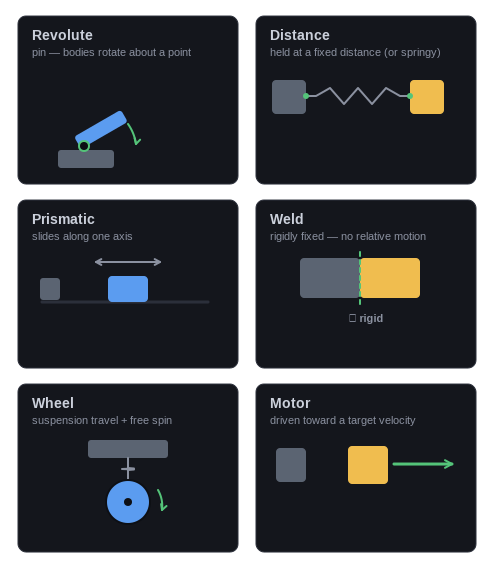
What each joint constrains: a Revolute hinge (rotate about a pin), a Distance spring/rod, a Prismatic slider (one axis), a rigid Weld, a Wheel (suspension + free spin), and a Motor (driven toward a target velocity).
Connect two bodies. Add a joint component (HingeJoint2D, DistanceJoint2D,
SliderJoint2D, FixedJoint2D, WheelJoint2D, MotorJoint2D), or create one imperatively
and drive its motor / limits:
// A hinge with a motor (a powered wheel or swinging door).physics.createRevoluteJoint(bodyA, bodyB, anchorA, anchorB, {  enableMotor: true, motorSpeed: 6, maxMotorTorque: 200,  enableLimit: true, lowerAngle: -1.0, upperAngle: 1.0,});
physics.setRevoluteMotorSpeed(bodyA, 10);physics.setRevoluteLimits(bodyA, -0.5, 0.5);const angle = physics.getRevoluteAngle(bodyA);physics.destroyJoint(bodyA);
Each joint type has a parallel set of control methods:
| Joint | Control methods |
|---|---|
| Revolute (hinge) | setRevoluteMotorSpeed, setRevoluteMaxMotorTorque, enableRevoluteMotor, enableRevoluteLimit, setRevoluteLimits, getRevoluteAngle, getRevoluteMotorTorque. |
| Distance (spring) | setDistanceJointLength, getDistanceJoint*Length, enableDistanceJointSpring/Limit/Motor, setDistanceJointLimits, setDistanceJointMotorSpeed, … |
| Prismatic (slider) | getPrismaticJointTranslation/Speed, enablePrismaticJointSpring/Limit/Motor, setPrismaticJointLimits/MotorSpeed/MaxMotorForce, … |
| Wheel | enableWheelJointSpring/Limit/Motor, setWheelJointLimits/MotorSpeed/MaxMotorTorque, getWheelJointMotorTorque. |
| Motor | setMotorJointLinearVelocity, setMotorJointAngularVelocity, setMotorJointMaxVelocityForce, setMotorJointMaxVelocityTorque. |
Destroy any joint with destroyJoint(bodyA).
The motor joint drives body B toward a target velocity (or spring-held offset) relative to body A — a conveyor, a driven platform, or anything that should move under its own power:
// A conveyor: drive the crate toward +x at a fixed speed.world.insert(crate, MotorJoint2D, { connectedEntity: anchor, linearVelocity: { x: 200, y: 0 }, // world px/s maxVelocityForce: 500, // newtons available to reach it});physics.setMotorJointLinearVelocity(crate, { x: -200, y: 0 }); // reverse at runtimeIn the editor
Section titled “In the editor”Scene-authored joints draw a gizmo in the viewport: a dashed link between the two
anchors, with the anchor dots draggable — dragging writes anchorA / anchorB
in the owning body’s local frame. Prismatic and wheel joints also show their slide
axis; drag its tip to re-aim the axis. Motor joints show an arrow along their target
linear velocity. The whole family (colliders, one-way arrows, joints) is toggled by
the Physics entry in the viewport’s Show Flags.
One-way platforms
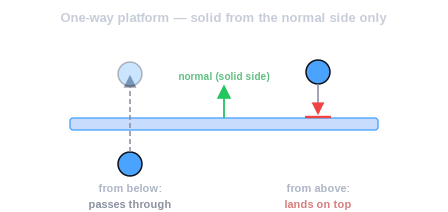
Section titled “One-way platforms”Add OneWayPlatform2D to a static (or kinematic) collider to make it one-sided — a
body lands on it from one direction and passes through from the others. This is the
classic jump-up-through-a-ledge behaviour, built on Box2D’s pre-solve callback (zero
cost when no one-way platforms exist):
import { OneWayPlatform2D } from 'esengine/physics';
const platform = world.spawn('ledge');world.insert(platform, Transform, { position: { x: 0, y: 0 } });world.insert(platform, RigidBody2D, { bodyType: BodyType.Static });world.insert(platform, BoxCollider2D, { halfExtents: { x: 2, y: 0.2 } });world.insert(platform, OneWayPlatform2D, { normal: { x: 0, y: 1 } }); // solid top: land from above, pass from below
normal is the solid-side direction in world space; { x: 0, y: 1 } (the default)
means “solid top”. Set localSpace: true (default false) to rotate the normal with the
body instead, including its parent’s rotation. Set enabled: false to turn the platform back into a normal solid.
In the editor, a one-way platform’s collider gizmo grows an arrow along the solid-side
normal, so which way it carries is visible at a glance.
Mouse / drag joint
Section titled “Mouse / drag joint”To let the player drag a body with the pointer, use the drag-joint API. Box2D v3 has no dedicated mouse joint, so this is its canonical replacement — a spring that pulls the body toward a moving target. Create it on pointer-down (grabbing the body at the cursor), move the target on pointer-move, and destroy it on pointer-up:
// pointer down — grab the body at the world-space cursor:physics.createMouseJoint(entity, cursorWorld); // maxForce auto-sizes to the body// pointer move:physics.setMouseTarget(cursorWorld);// pointer up:physics.destroyMouseJoint();Only one drag is live at a time. Pass { hertz, dampingRatio, maxForce } to tune the
spring’s stiffness (hertz, default 7.5), damping (dampingRatio, default 1) and grip
(maxForce, default auto-sized from the body’s weight). cursorWorld is in world pixels.
Character controller
Section titled “Character controller”For a player that walks along surfaces instead of tumbling like a dynamic body, add
a CharacterController2D. Set its velocity from gameplay each step; the controller
advances it one step with Box2D’s native kinematic mover (b2World_CollideMover
b2SolvePlanes) — it collides the body into contact planes and solves a depenetrating slide, so a character resting on the ground slides and jumps cleanly instead of sticking to it. It writes the resolved pose back and reports what it touched:
import { defineSystem, Query, Mut, Res, Time, Schedule, CharacterController2D } from 'esengine';
const drive = defineSystem([Query(Mut(CharacterController2D)), Res(Time)], (q, time) => {  for (const [entity, cc] of q) {    cc.velocity = { x: moveX * 240, y: cc.velocity.y - 900 * time.fixedDelta };  // gravity    if (cc.isOnFloor && jumpPressed) cc.velocity.y = 480;  }});app.addSystemToSchedule(Schedule.FixedUpdate, drive);   // moveX / jumpPressed: your input
Give the entity a collider (the mover shape is derived from it — a box becomes a
capsule inscribed along its longer axis) and, if other bodies should collide with
the character, a Kinematic RigidBody2D. The mover excludes the character’s own
body automatically, so its maskBits need not avoid its own collision layer. Drive
velocity from a fixed-timestep system so motion is frame-rate independent; read the
isOnFloor edge for jumps (delivered correctly to FixedUpdate — see
Input).
| Property | Type | Default | Description |
|---|---|---|---|
velocity |
Vec2 | {0, 0} |
Desired velocity in world pixels/second (set each step). |
up |
Vec2 | {0, 1} |
Up direction for floor/ceiling classification. |
floorMaxAngle |
number | 0.785 |
Max walkable slope from up, radians (45°). |
skinWidth |
number | 1 |
Gap kept off surfaces (pixels) so the body doesn’t stick or jitter. |
maxSlides |
number | 4 |
Max depenetration slide iterations per move (clamped to ≥1). |
snapLength |
number | 0 |
Down-probe length (pixels) that glues the body to descending stairs/slopes; 0 disables it. Skipped while rising, so a jump still leaves the ground. |
slideOnCeiling |
boolean | true |
When false, a ceiling hit cancels the upward velocity instead of sliding along it. |
maskBits |
number | 0xFFFF |
Layers that block the character. |
stepHeight |
number | 0 |
The highest ledge it walks up without jumping (pixels). 0 leaves only what its rounded foot rides over. |
stopOnSlope |
boolean | true |
Stand still on a walkable slope, and walk along it rather than into it. |
constantSlopeSpeed |
boolean | false |
Keep the asked speed along the slope. Off, the speed across the ground is what stays, so a climb takes as long as the same distance on the flat. |
blockSteepSlopes |
boolean | true |
A slope past floorMaxAngle is a wall: walking into it does not climb it, and it slides down. |
followPlatform |
boolean | true |
Ride what it stands on, sideways as well as up and down. |
dynamicBodies |
enum | Block |
What a dynamic body does to it: Block stops it, Push stops it and is pushed with up to pushForce, Ignore lets it through. |
pushForce |
number | 40 |
The force of a push, newtons. |
dropThrough |
boolean | false |
Pass through one-way platforms while on. |
isOnFloor / isOnWall / isOnCeiling |
boolean | — | Output: what was touched this move. |
floorNormal |
Vec2 | — | Output: normal of the last floor touched. |
floorEntity |
Entity | — | Output: what it stands on, 0 for nothing. |
floorVelocity |
Vec2 | — | Output: how fast that is carrying it, pixels/second. |
realVelocity |
Vec2 | — | Output: actual displacement / dt after collisions. |
A trigger never stops a character: a sensor has nothing to say about where it may go.
Platformer controller
Section titled “Platformer controller”CharacterController2D moves what it is told to. For a side-on game add a
PlatformerController2D beside it, and no system of your own: it reads the keyboard, runs,
jumps and falls, with the forgiveness a platformer is judged on. A jump pressed
jumpBuffer seconds before landing still happens, and so does one pressed coyoteTime
seconds after running off a ledge.
import { Transform, CapsuleCollider2D, CharacterController2D, CharacterDynamicBodies, PlatformerController2D } from 'esengine';
const player = world.spawn();world.insert(player, Transform, { position: { x: 0, y: 100, z: 0 } });world.insert(player, CapsuleCollider2D, { radius: 0.1, halfHeight: 0.15 });world.insert(player, CharacterController2D, { stepHeight: 12, snapLength: 8, dynamicBodies: CharacterDynamicBodies.Push });world.insert(player, PlatformerController2D, { moveSpeed: 260, jumpSpeed: 620 });
It moves with A/D or the arrows, jumps with Space, W or Up, and drops through a one-way
platform with Down or S and jump. Set readKeyboard: false to drive it from a game, a
touch screen or an AI instead: write moveInput and jumpHeld, and set jumpPressed or
dropPressed for the next fixed step to consume. A press is latched per rendered frame,
so a tap between two fixed steps is not lost.
| Property | Type | Default | Description |
|---|---|---|---|
moveSpeed |
number | 260 |
Top running speed, pixels/second. |
groundAcceleration / airAcceleration |
number | 2400 / 1500 |
How fast it reaches that speed. |
groundDeceleration / airDeceleration |
number | 3000 / 900 |
How fast it sheds it when the input centres. |
gravity |
number | 1600 |
Downward acceleration, pixels/second². |
fallGravityScale |
number | 1.25 |
Gravity multiplier while falling. Above 1 lands faster than it rose. |
maxFallSpeed |
number | 1000 |
The fastest it falls. |
jumpSpeed |
number | 620 |
Upward speed a jump starts with; 0 disables jumping. |
jumpCut |
number | 0.5 |
How much of a rising speed survives letting go of jump. 1 makes every jump full height. |
coyoteTime |
number | 0.1 |
Seconds after leaving the ground that a jump still counts as from the ground. |
jumpBuffer |
number | 0.12 |
Seconds a jump pressed too early is remembered, to happen on landing. |
airJumps |
number | 0 |
Extra jumps before landing again. |
dropTime |
number | 0.2 |
Seconds a drop through a one-way platform lasts. |
keepPlatformVelocity |
boolean | true |
A jump keeps the velocity of the platform it left. |
readKeyboard |
boolean | true |
Read the keyboard itself. |
Debug draw
Section titled “Debug draw”The physics plugin installs a Physics2DDebugDraw resource — an in-game overlay
that strokes collider outlines, velocity vectors, and contact points through the
Draw API. It ships disabled; flip enabled from any
system to see exactly what the solver sees:
import { defineSystem, Res, Input } from 'esengine';import { Physics2DDebugDraw } from 'esengine/physics';
const toggleDebug = defineSystem([Res(Input), Res(Physics2DDebugDraw)], (input, dbg) => {  if (input.isKeyPressed('F1')) dbg.enabled = !dbg.enabled;});
Physics2DDebugDrawConfig field |
Default | Draws |
|---|---|---|
enabled |
false |
Master switch for the whole overlay. |
showColliders |
true |
Collider outlines, color-coded by body: blue = static, green = dynamic, cyan = kinematic; sensors are yellow. |
showVelocity |
false |
A red arrow per dynamic body along its linear velocity. |
showContacts |
false |
A red dot at each contact that began this frame. |
The overlay draws in world pixels at each body’s live transform (scaled by the
live PPU), so what you see is exactly where the queries agree the collider is.
setupPhysics2DDebugDraw(app, Physics2D, Physics2DEvents) is the wiring Physics2DPlugin
runs for you — it inserts the resource and registers the draw callback; call it (or
the underlying per-frame drawPhysics2DDebug(app, Physics2D, Physics2DEvents)) only from
a custom host that bypasses the plugin.
Best practices
Section titled “Best practices”- Fixed timestep: apply continuous forces from a
FixedUpdatesystem, and readPhysics2DEventsevery frame — the resource is published once per frame and holds the contacts from every fixed step in it. bullet: trueon fast, thin bodies (bullets, thin platforms) to avoid tunneling.fixedRotation: truefor characters so they don’t topple.- Colliders and the solver in meters, queries and the character controller in
pixels — mixing the two is the most common bug; convert with
physics.getPixelsPerUnit()(see Units). - Sensors for triggers:
isSensor: truegives enter/exit events with no physical push. - Filter with layers (
categoryBits/maskBits) instead of checking entity types in event handlers.
See also
Section titled “See also”- Scenes — physics components serialize with the scene.
- Math Helpers — vector math for velocities and directions.