
State machines
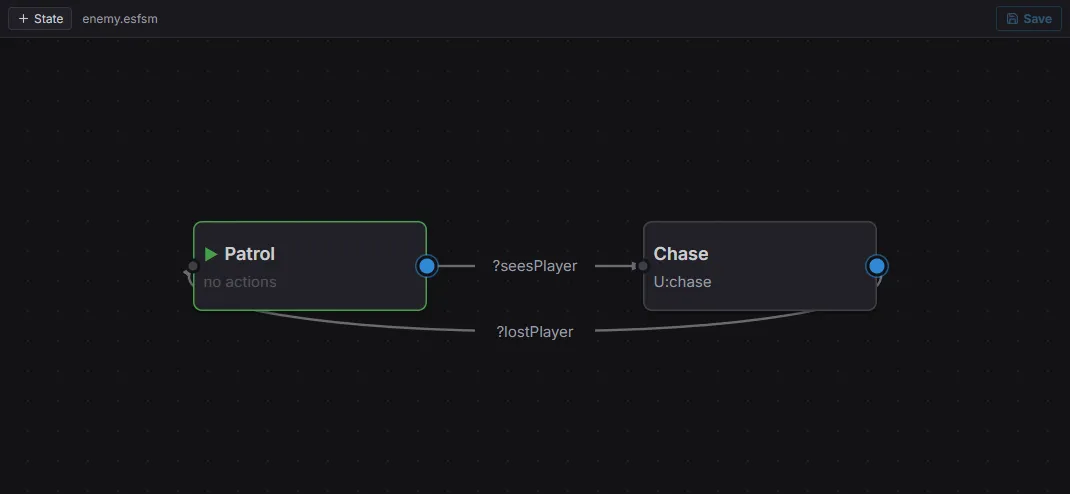
The state-machine editor: states (Patrol / Chase) linked by guarded transitions (?seesPlayer, ?lostPlayer).
A state machine is a set of states connected by guarded transitions. Exactly
one state is active; each tick, its outgoing transitions are checked in order and the
first enabled one is taken. Attach a StateMachineAgent and point it at a graph:
import { StateMachineAgent } from 'esengine/ai';
cmds.spawn()  .insert(NavAgent, {})  .insert(Perceiver, { range: 240 })  .insert(Perception, {})  .insert(StateMachineAgent, { fsm: 'assets/ai/enemy.esfsm' });   // an editor-authored asset
StateMachineAgent field |
Description |
|---|---|
fsm |
Key of the machine to run: a registerFsm name or an .esfsm asset path. |
current |
Active state name, written each tick (read-only; visible in the inspector). |
The recommended path is to author the graph in the editor as an .esfsm asset
(see Authoring in the editor). The states reference your
registered action/condition names by string. You can also build a machine in code:
import { registerFsm } from 'esengine/ai';
registerFsm('guard', {  initial: 'Patrol',  states: [    {      name: 'Patrol',      onUpdate: 'patrol',      transitions: [{ to: 'Chase', condition: 'seesPlayer' }],    },    {      name: 'Chase',      onEnter: 'startChase',      onUpdate: 'chase',      transitions: [{ to: 'Patrol', condition: 'lostPlayer' }],    },  ],});
Each state carries up to three named hooks — onEnter, onUpdate, onExit — and a
list of transitions. A transition is enabled when all of its specified
mechanisms hold; a transition with none is unconditional:
| Transition field | Description |
|---|---|
to |
Destination state name. |
trigger |
A one-shot event name that must be fired (consumed when taken). |
condition |
A registered condition that must return true. |
guard |
One or more blackboard comparisons, AND-combined. |
Guards compare a blackboard key with ==, !=, <, <=, >, >=, truthy, or
falsy — e.g. { key: 'health', op: '<', value: 20 }.