
DragonBones Animation
Estella animates DragonBones armatures:
bones, meshes, slots and animations, posed by the same renderer that draws
everything else. It’s driven by the DragonBonesAnimation component and
controlled at runtime through the DragonBones resource (from the
esengine/dragonbones subpath).
It runs everywhere the engine does — the editor viewport, Play, web, playable ads, mini-games, and compiled into the iOS and Android hosts.
Importing a project
Section titled “Importing a project”A DragonBones export is three files, and Estella imports all three as one asset type:
| File | What it is |
|---|---|
<name>_ske.json or <name>.dbbin |
The skeleton — bones, slots, animations. |
<name>_tex.json |
The atlas — where each piece sits on the image. |
<name>_tex.png |
The image itself. |
Drop the folder into the project. The two _ske / _tex halves are told apart
by their name suffix, not their extension — both are .json, so extension
alone cannot say which is which.
The PNG is the one file nothing in your scene points at: it is named inside the
atlas, in its imagePath field. Estella follows that reference when it packages a
build, so the image ships with the atlas instead of being culled as unreachable.
You do not need to reference it anywhere.
The DragonBonesAnimation component
Section titled “The DragonBonesAnimation component”Add it with Create → DragonBones, or add the component to an existing entity.
It lives in the main esengine package.
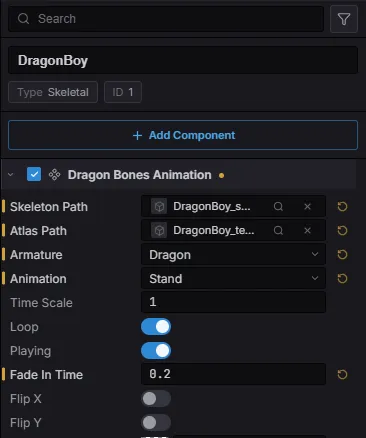
| Property | Type | Default | Description |
|---|---|---|---|
skeletonPath |
asset | '' |
Skeleton file (_ske.json / .dbbin). |
atlasPath |
asset | '' |
Atlas file (_tex.json). |
armature |
string | '' |
Which armature in the file (empty = the first). |
animation |
string | '' |
Animation to play on spawn. |
loop |
boolean | true |
Loop the initial animation. |
playing |
boolean | true |
Whether playback advances. |
fadeInTime |
number | 0 |
Crossfade seconds, used on the first play too. |
timeScale |
number | 1 |
Per-entity playback speed. |
skeletonScale |
number | 1 |
Uniform skeleton scale. |
flipX / flipY |
boolean | false |
Mirror horizontally / vertically. |
color |
Color | {1,1,1,1} |
Tint (RGBA, 0..1). |
layer |
number | 0 |
Sorting layer for draw order. |
material |
asset | none | Optional custom material. |
enabled |
boolean | true |
Disable to freeze and hide. |
Skeleton and atlas are asset slots: pick from the popover, drag a file in from
the Content Browser, or use the slot’s locate / clear actions. The scene serializes
them as portable @uuid: references, so moving or renaming the files never breaks
the link.
The armature poses in the viewport while you edit — changing the animation, the scale or a flip shows immediately, without pressing Play.
Choosing an armature
Section titled “Choosing an armature”A DragonBones file is a project, not a skeleton: one file often holds several
armatures. Choosing one is a real step, so armature is its own field.
Once the entity points at a skeleton, Armature and Animation become dropdowns filled by reading that file — you pick from what is actually in it rather than typing a name and finding out at runtime. The animation list follows the chosen armature, because two armatures in one file do not share an animation list.
Leaving armature empty uses the first armature the file holds. Most files ship
one, and requiring a value you cannot know without opening the file would make the
common case harder than it is.
Play & crossfade animations
Section titled “Play & crossfade animations”This is where DragonBones differs from Spine most, and the API says so rather than pretending otherwise. Spine keeps a mix table on the skeleton — “going from idle to run takes 0.2s”. DragonBones blends at the moment an animation starts, so the fade is an argument to starting it:
import { defineSystem, Query, Res, DragonBonesAnimation } from 'esengine';import { DragonBones } from 'esengine/dragonbones';
const control = defineSystem(  [Query(DragonBonesAnimation), Res(DragonBones)],  (q, dragonBones) => {    // Null until the runtime lands — it is fetched on first use.    if (!dragonBones) return;
for (const [entity] of q) { dragonBones.fadeIn(entity, 'walk', 0.25, true); // crossfade over 0.25s dragonBones.setTimeScale(entity, 1.5); // 1.5x speed } },);| Method | Description |
|---|---|
play(entity, name, loop?) |
Start an animation immediately, no blend. |
fadeIn(entity, name, seconds, loop?) |
Crossfade into an animation. |
stop(entity, name?) |
Stop one animation, or all of them when omitted. |
setTimeScale(entity, scale) |
Per-entity playback speed. |
setColor(entity, r, g, b, a) |
Tint the whole armature (0..1), multiplied onto slot colours. |
setEnabled(entity, on) |
Remove from the frame entirely (freeze and hide). |
setEntityProps(entity, props) |
Set { skeletonScale?, flipX?, flipY?, layer?, playing?, timeScale?, color? } at once. |
playing: false freezes the pose but keeps drawing it; setEnabled(false) takes
the armature out of the frame. They are different things and both are useful.
setEnabled and the component’s own enabled field drive the same switch: writing
the field (in the inspector, or via world.set) wins at the moment it is written,
and setEnabled holds between such writes. The editor’s Outliner eye rides the
same channel, which is why hiding a skeletal entity hides it in the viewport
without touching the enabled you authored.
Query an armature
Section titled “Query an armature”const anims = dragonBones.getAnimations(entity); // string[]const bounds = dragonBones.getBounds(entity); // { x, y, width, height } | nullgetBounds is derived from the armature’s posed geometry, not from the bounds
the authoring tool recorded — so it follows the character as it moves rather than
describing where it was drawn.
Sharing one skeleton
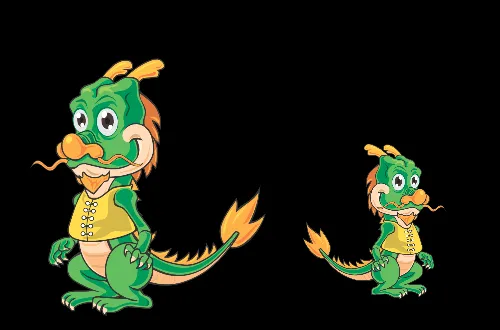
Section titled “Sharing one skeleton”Entities pointing at the same skeleton + atlas pair share one parsed skeleton and one atlas. Ten copies of a character parse the file once and hold one texture between them; the last one removed unloads it.
Nothing is required to opt in — it follows from the pair the components reference. Per-entity properties stay per entity, so a shared skeleton can still be scaled, flipped and tinted independently:
What ships in a build
Section titled “What ships in a build”The DragonBones runtime is pay-for-use. A project without an armature in it never fetches, inlines or copies the module:
| Target | How the runtime gets there |
|---|---|
| Web / desktop | dragonbones.wasm beside the engine, fetched on first use. |
| Playable ad | Inlined into the single HTML file — only if a scene uses it. |
| Mini-game | Copied into the package — only if a scene uses it. |
| iOS / Android | Compiled into the app binary. |
The editor decides by scanning the scenes it is packaging, so there is no setting to remember and no way to ship a game whose armatures have no runtime.
Best practices
Section titled “Best practices”- Give transitions a fade.
fadeInwith 0.15–0.3s reads far better thanplay, which snaps. SetfadeInTimeon the component so the first play blends too. - Share the pair across entities — a crowd of one character costs one parse and one atlas.
- Pick the armature in the editor, from the dropdown, rather than typing it: a name that does not exist in the file draws nothing.
- Prefer
playing: falseto disabling when you want a character to hold a pose on screen.
See also
Section titled “See also”- Spine Animation — the other skeletal runtime, and how it differs.
- Animation — sprite flipbooks and the Animator state machine.
- Assets — how skeleton and atlas assets are imported and referenced.
- Build & Export — what a package contains per target.