
Materials & Shaders
A material is a shader plus parameters. Renderers that support materials —
Sprite, SpineAnimation, ParticleEmitter, MeshRenderer, and UIVisual — expose a
material handle field; set it to draw with your own shader instead of the default.
How it works
Section titled “How it works”You author an .esshader that declares its tunable parameters with #pragma param.
The engine reflects those into a std140 uniform block, so the CPU can set them by
name and they reach the GPU safely. A Material binds a compiled shader to a set of
parameter values; assigning its handle to a renderer’s material field draws that
renderer with it.
Built-in shader templates
Section titled “Built-in shader templates”You rarely start from a blank file. The Content Browser’s New Material submenu
creates a material from a built-in template — the same list ships in code as
BUILTIN_SHADER_TEMPLATES:
| Template | builtin: id |
What it does |
|---|---|---|
| Unlit | sprite-unlit |
Texture × vertex color × u_tint. The plain default. |
| Lit | sprite-lit |
Lit by the scene’s 2D lights; u_tint + optional u_normalMap. |
| Sway | sprite-sway |
Leans in the wind with the foot fixed and the tip free — grass, reeds, hanging cloth. u_swayStrength is the lean as a share of the sprite’s width; the weather’s wind scales it. Lit, with an optional normal map. A SwayPusher on a character makes the plants lean away from it as it walks through (the eight nearest the camera; u_swayPushStrength is how far they lean). |
| Hit Flash | sprite-hit-flash |
Blends toward u_flashColor by u_flash — drive it from code for damage blinks. |
| Outline | sprite-outline |
Colored silhouette outline (u_outlineColor, u_outlineWidth in texels). |
| Dissolve | sprite-dissolve |
Noise burn-away with a glowing edge (u_progress 0→1). |
| Pixelate | sprite-pixelate |
Quantizes UVs to a u_pixels grid. |
| UV Scroll | sprite-uv-scroll |
Scrolls the texture by u_scrollSpeed × time. |
| Model | model |
What a glTF material says beyond base color: u_normalMap, u_emissive(Map), u_occlusionMap + u_occlusionStrength, u_alphaCutoff, u_metallic / u_roughness (+ u_metallicRoughnessMap), and the shading layers — clear coat, sheen, anisotropy, translucency, thin film, index of refraction, transmission. Written by model import. |
| Toon | toon |
Lit in steps: each lamp’s light is cut into u_bands flat bands (u_bandSoftness softens the step), u_shadeColor is the colour of what no lamp reaches, a flat highlight of u_specColor above u_specThreshold (u_specSize is how glossy), and a rim (u_rimColor, u_rimWidth, u_rimStrength). A lamp’s shadow is part of its step. Uses the sixteen lamps of the frame, and carries the lamp loop as Model does. |
| Matcap | matcap |
What a picture of a lit sphere (u_matcap) shows, looked up by which way the surface faces the camera. No lamp is asked and no shadow is read: one texture read, which is why it suits a phone. u_baseBlend multiplies the base colour in. |
| Particle | particle |
For a ParticleEmitter: a particle fades as it nears the scene behind it (u_softness, world units) and its texture wears away with age (u_erosion, u_erosionEdge). See Particle materials. |
| Distortion | distortion |
Bends the picture already behind it: heat haze, a shockwave, a lens. The texture’s alpha says where and how much (u_strength, u_radial, u_dispersion). Works on particles and meshes. |
| Terrain | terrain |
Four texture layers (grass, dirt, snow, rock) weighted by the Terrain component and tiled by world position. |
| Foliage | foliage |
Plants that sway in the wind: a vertex bend by weights painted in the vertex colour, two-sided and translucent, with an optional cutout texture. See Foliage. |
| Skin | skin |
Soft diffuse by colour, a warm terminator, light through thin places, two shine lobes and a fuzz — without blurring the picture. See Skin and hair. |
| Hair | hair |
Strand lighting: Kajiya-Kay diffuse, two shifted highlights along a flow map, and light through the strands. See Skin and hair. |
| Eye | eye |
An eye from a depth map and an iris normal map: refraction through the cornea, an iris with fibres, limbal ring and pupil, a wrapped sclera and lid shadow. See Skin and hair. |
| Water | water |
A horizontal body of water: travelling waves and ripples, the scene behind it bent and tinted by how deep the water is, reflections, and foam. See Water. |
The Terrain, Foliage, Water, Hair, Skin and Eye templates belong to modules (esengine/terrain, esengine/foliage, esengine/water, esengine/character-shaders) and are listed once the project installs the module.
A new material references its template by id — it stores shader: "builtin:sprite-unlit"
and writes no shader file to disk. The engine compiles the built-in from in-code source
(the runtime loader, the cook step, and the editor all resolve builtin:<id> the same way),
so a fresh material draws immediately with nothing extra to manage. A real .esshader only
lands on disk when you convert the material to a unique shader (below) or create a
shader yourself.
The Water shader (builtin:water) draws a body of water: refraction by measured depth, reflection and foam. WaterBody components say where an
ocean, a lake or a river is, and a WaterZone bakes them into one surface drawn with it, lifts the geometry with waves and answers for the surface from code.
All of it is in Water.
Wet ground
Section titled “Wet ground”A Model material can lay a wet map over the ground, so a yard is damp in places and has standing water in others rather than one roughness
all over. Give it u_wetMask, a small texture read in the world’s X and Z (red is standing water, 0 dry to 1 a puddle; green is dampness),
the world corner it starts at (u_wetOrigin) and how big it is (u_wetSize, 0 leaves wetness off), and raise u_wetness above 0:
| Where the map says | The surface |
|---|---|
| damp (green, or red) | darkens by u_wetDarken (water in the pores takes the light a dry surface scatters) and grows smoother, toward u_wetRoughness |
| a puddle (red) | goes flat (the normal map is let go of) and nearly a mirror, roughness 0.05 |
| outside the map | stays dry |
The picture is laid over the ground the way a map is read from the map’s own corner: its left column is at the origin’s X and its top row is the far (largest Z) edge, so a map painted as a plan with +Z up lines up with the world.
Put a Planar Reflection on the same mesh (see Lighting) and the puddles show the scene. The map is data, not a picture: import it without sRGB (the
shader’s texel(data) says so). With u_wetness at 0, which is the default, a surface pays one comparison.
Skin and hair
Section titled “Skin and hair”Two shaders for the parts of a character a metal/rough pair does not describe. Both take the base colour from the mesh’s own texture, as
the Model shader does, and take u_normalMap and an u_ormMap (occlusion in red, roughness in green) as data textures: import them
with sRGB off, or the normal map is bent by the colour curve and the surface comes out blotched.
Skin (builtin:skin) does not blur the picture. Light that goes into skin and comes out a little way off softens the lit side of a
curve, and it does that here per colour: the diffuse light is taken from a softer normal than the surface’s own, softest for red
(u_blurRed, u_blurGreen, mip levels of the normal map), so the pores and the highlight stay sharp. The terminator is warmed (u_sssColor, u_sssWrap),
a thin or strongly curved place lets light through (u_translucency, u_thinness: an ear, a nostril, a finger), the shine is two
lobes (u_specular, u_lobe2, u_lobe2Roughness) and a faint fuzz lights the rim (u_fuzz). Turn u_subsurface on to also mark it for the
Subsurface Scattering effect, which spreads what is left on a larger scale at the cost of
blurring the picture. u_preIntegrate takes the wrap past the terminator per colour (red furthest) and widens it where the surface turns sharply, so a nose or an ear glows at its edge while a flat cheek stays crisp; u_curvature is how fast a turn counts as sharp, per world unit. u_detailMap is a second, fine normal map tiled over the surface (u_detailTile) for pores and creases that a baked map has no texels for: it is laid on the sharp normal the shine reads, by u_detailStrength (0 leaves it out), and not on the soft diffuse normals. Import it with sRGB off and wrap repeat. It shades each pixel with three lighting passes, so it is for the skin of a character in view, not for a crowd.
Hair (builtin:hair) lights a strand as a strand. u_flowMap says which way the strands run (red and green are a direction across the
texture), the diffuse light is Kajiya-Kay (a strand is lit by how far the light is from along it), and the shine is two narrow
highlights along the strand, shifted against each other by u_shiftMap (u_shiftAmount, u_shiftTile): a white one near the surface and a coloured
one under it (u_secondaryTint). u_roughness sets how tight the lines are, and u_lobeGain how much of the highlight a lamp draws apart from the reflection of the environment (u_specular). u_clumpCount draws a card’s strands as that many locks across its width, each lighter or darker than the next (u_clumpTone), with its own break in the highlight (u_clumpShift) and a shadowed seam (u_clumpGap); 0 leaves the card as authored. Light comes through the strands from behind (u_translucency),
u_sharpen keeps the fine strands a card is covered in from washing out at a slant, and u_rootDark darkens the roots by the occlusion map.
u_anisotropy above zero swaps the two strand highlights for the Principled shader’s: GGX stretched along the strand by that anisotropy (Blender’s), with u_specular as the specular factor, which is what a card exported from Blender with an anisotropy is imported with. u_strandDiffuse is how much of the diffuse is that strand diffuse against a surface’s N dot L (0 is the Principled shader’s, which goes dark where a card turns from the light). u_hairShadow is how much light a layer of strands takes, per world unit along the light: above zero the frame fits a shadow cascade to the hair alone, the first in the sun’s list, so cards a few millimetres apart are told apart, and the light left after a depth of hair falls off with that depth, as a deep shadow map reads it. u_alphaCutoff cuts a card out by its texture’s alpha, feathered by alpha-to-coverage under MSAA, and the card then casts its own shape into shadow maps. u_tipSoftness adds the soft outer band: where the alpha falls from the cutoff down by that much, a second blended pass draws the strand’s tip fading out, sorted with the other blended draws, so tips do not stair-step under coverage (0 leaves it out). The card’s own shape goes into shadow maps too, not the rectangle it is drawn on. A hair model is usually cards or ribbons, not strands; this shader gives the shading of a strand to what the geometry gives it.
Eye (builtin:eye) builds an eye from two maps and a few numbers. u_depthMap is white over the iris and the dome of the cornea, and u_irisNormalMap holds that dome’s normals (import both with sRGB off). The view ray is bent into the cornea (u_ior) and carried down to the iris (u_irisDepth), so the iris moves behind the surface as the eye turns. The iris itself is drawn from u_irisColor to u_irisColor2 with fibres, a dark limbal ring (u_limbal) and a pupil (u_pupilSize), against the white (u_scleraColor), which is lit with light that wraps past the terminator (u_scleraWrap). The cornea is a near-mirror (u_corneaRoughness, u_specular), so every light and the sky show as a catchlight. The lids shade the eye: u_lidMap is an authored occlusion map (white where the eye is open), and u_lidShadow darkens, and fades the cornea’s reflections, where the surface faces up (from u_lidStart, a dot with the world’s up, to straight up), which is the upper lid on an upright head. A painted eye texture on the mesh multiplies the result.
Both read the same lighting core as every Lit shader, so shadows, image-based light and the other effects apply.
Shading layers
Section titled “Shading layers”The Model shader is a metal/rough surface with layers on top. Each is off at its default, a layer at zero costs the surface nothing, and a material that says none of them is the plain surface it always was.
| Layer | Parameters | What it does |
|---|---|---|
| Clear coat | u_clearcoat, u_clearcoatRoughness |
A smooth lacquer over the surface: a second, sharper highlight, the base underneath darkened by what the coat reflects, and an environment reflection of its own. The coat is lit by the surface’s own normal, so a bump map roughens what is under it and not the lacquer. Car paint, varnished wood, wet stone. |
| Sheen | u_sheenColor, u_sheenRoughness |
The soft light that cloth throws back at grazing angles (a Charlie lobe), taken out of the base so that it does not add energy. Velvet, satin, felt. |
| Anisotropy | u_anisotropy (-1..1), u_anisotropyRotation |
A highlight stretched across the grooves instead of round: brushed metal, hair-like fibres, CDs. The grooves run along the UV frame turned by the rotation; the environment reflection is bent the same way. |
| Translucency | u_translucency, u_translucencyColor, u_thickness |
Light that scatters into a thin surface: the lit side wraps past the terminator, and a lamp behind shows through, tinted, less the thicker it is. Leaves, paper, wax, a lampshade, skin at the ears. |
| Subsurface | u_subsurface |
Marks the surface as one light spreads through: with the Subsurface Scattering effect in the volume, its lit colour is blurred along the surface, red furthest. Skin, wax, marble. |
| Thin film | u_iridescence, u_iridescenceIor, u_iridescenceThickness (nm) |
The reflection changes hue with the angle: soap, oil, beetle shell, coated glass. |
| Index of refraction | u_ior, u_specular |
How strongly a non-metal reflects head-on (1.5 is glass and most plastics; a gemstone is 2.4), and a master scale on the reflection. |
| Transmission | u_transmission, u_attenuationColor, u_thickness, u_refractionStrength |
Glass and water: the surface shows what is behind it, bent by the glass (thicker bends more), tinted, and softened by its roughness; it reflects more at grazing angles. |
Everything here is written by model import from the glTF extensions of the same names (KHR_materials_clearcoat, _sheen, _anisotropy, _ior, _specular, _iridescence, _transmission, _volume, _diffuse_transmission) — see Models.
In the editor a Model material shows each layer as a section of its own with a switch in the header: off sets the layer’s
strength to 0 (its colour todefault(white | black | flatnormal | ripples) fallback when unset (ripples is the engine’s tiling map of wind ripples: two fields of normals, in rg and in ba).for sheen), on gives it a strength where it looks like itself, and the section’s fields tune
it. Reflectance, the index of refraction and the specular scale, has no switch.
Limits. These are cheap, real-time models, and say where they stop:
- Transmission refracts the opaque scene only. A material that holds
u_transmissionabove zero is drawn after the rest of the scene, from a copy of the picture taken just before: the ray is bent through the surface’s thickness and the copy is read where it lands. So glass does not refract other glass, and a thin shell bends the picture by a fixed amount rather than as a lens that flips it. It needs a scene the engine can copy, which means a post-process chain is running (any effect, an output transform, or a render scale below 1); without one the surface falls back to alpha-blended coverage and shows the background undistorted. - Translucency is a shading term, not a blur. It wraps light past the terminator and lets a lamp behind show through, but the light that enters at a point leaves at that point. The spreading itself is the Subsurface Scattering effect’s, and it blurs the whole lit colour of the marked surface, so a sharp highlight on it is softened too.
- A layer’s textures are not read. Each layer is a constant for the whole material (the Model shader has no texture unit left for more); a glTF extension’s maps are reported at import and its factors are kept.
- Sheen and thin film are fits. Sheen’s energy loss and the film’s interference are analytic approximations in place of the lookup tables a production renderer bakes.
- Not provided: a Marschner-style strand model, a separate normal map for the coat, layered materials beyond one coat.
In your own shader
Section titled “In your own shader”A Lit shader reaches the same lighting. applyLightingSurface(albedo, N, worldPos, V, metallic, roughness, specular, ao, ext) is applyLightingPBR with the layers; start ext from surfaceExtNone(N) and set what you use:
| Field | Holds |
|---|---|
ext.coat |
x strength, y perceptual roughness; ext.coatN.xyz the coat’s normal |
ext.sheen |
rgb colour (black is off), a perceptual roughness |
ext.aniso |
xyz tangent (unit, across N), w strength -1..1 (0 is off) |
ext.scatter |
rgb colour the scattered light takes, a wrap 0..1; ext.trans.x how much passes through, ext.trans.y thickness 0..1 |
ext.film |
x strength, y film index, z thickness in nanometres |
ext.misc.x |
reflectance at normal incidence of a non-metal (0.04 for an index of 1.5) |
Choosing & sharing shaders in the editor
Section titled “Choosing & sharing shaders in the editor”Select a material in the Content Browser and the Details panel opens its inspector with a
Shader section at the top, above the parameters. The Shader dropdown lists every
built-in template (as Built-in · Unlit, Built-in · Lit, …) alongside every .esshader
in your project — pick one to rebind the material.
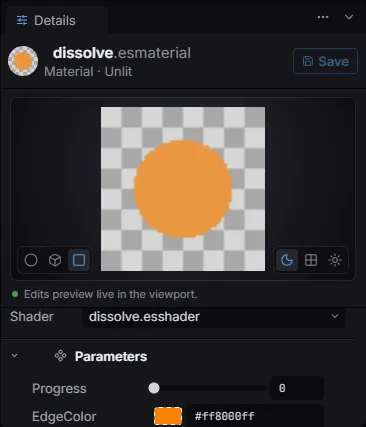
The material inspector: the Shader section with its picker (here dissolve.esshader), above the Parameters reflected from that shader’s #pragma params.
Switching re-runs shader reflection: the parameter list below rebuilds from the new shader’s
#pragma params, so the inspector always matches the bound shader. Because the old shader’s
parameters no longer apply, switching clears the material’s parameter values — re-tune
them for the new effect.
A material instance (instanceOf another material) shows a box before each parameter, as a Material Instance does in
Unreal: ticked, the instance sets that parameter; clear, it takes its parent’s value, shown greyed and closed to edits.
Ticking keeps the parameter at the value it showed until you change it, even where that is the parent’s.
- Share one shader across materials. An
.esshaderis a first-class asset (badge SHD). Point several materials at the same.esshaderfile and they share one compiled shader — edit the source once and every material that references it updates. That is why the picker lists your project shaders next to the built-ins. - Convert to Unique Shader. While a material still references a
builtin:template, the section shows a Convert to Unique Shader button. It copies the built-in’s source into an editable<material>.esshaderbeside the material and re-points the material at it — your parameter values carry over. Reach for it the moment you want to hand-edit a built-in effect. - New Shader. To author a shader from scratch, use the Content Browser’s New Shader
entry (a submenu — pick a built-in template to start from). It writes a standalone
.esshaderyou can then select from any material’s Shader dropdown.
The .esshader format
Section titled “The .esshader format”One file holds every stage plus its metadata, separated by pragmas:
| Pragma | Meaning |
|---|---|
#pragma shader "Name" |
Display name. |
#pragma version 300 es |
GLSL version line for every stage. |
#pragma domain <D> |
Unlit (default), Lit, PostProcess, UI. Lit injects the lighting uniforms + helpers. The older spellings Unlit2D / Lit2D still load as these. |
#pragma param … |
A reflected material parameter (table below). A name the engine already declares for the shader’s domain (u_time, u_viewport, u_projection everywhere; the light block’s u_ambient, u_lights, u_shadowMatrix … in a Lit shader) is refused when the shader loads, on every platform: WebGL keeps every block member in one namespace, so the second declaration would not compile there. |
#pragma switch NAME [default(on)] |
Material-facing static permutation toggle (a #define). |
#pragma feature NAME |
Engine-chosen compile-time variant keyword. |
#pragma lighting direct |
A Lit shader lit by the sixteen lights of the block and hard-edged shadows only. It compiles without the tiled lights past those sixteen, the 2D light masks, and soft and hair shadows, which every pixel pays for on a phone whether a scene uses them or not. A light with a size (a sun’s sourceAngle) casts a hard shadow here. The Water shader declares it, and the low and medium quality levels compile every lit mesh this way (see Lighting on a phone). |
#pragma coverage PARAM |
While the float param PARAM is above zero, the shader’s output alpha is coverage — a cutout’s alpha sharpened to about a pixel around the cutoff (cutoutCoverage(alpha, cutoff, fwidth(alpha))). An opaque draw into a multisampled target then turns it into multisample coverage, so the cutout’s edge is antialiased instead of stair-stepped; without multisampling it is the hard cut. The cut is at the cutoff at every distance, as glTF’s MASK is: a cutout seen small keeps its area because the cook rescales its mips’ alpha to the coverage the full image has at the cutoff. The built-in Model shader declares u_alphaCutoff. |
#pragma hairshadow PARAM |
While the float param PARAM is above zero, meshes drawn with the material are hair for shadows: the sun’s cascades gain one fitted to them alone, and a shader that sets g_hairShadow before it lights reads the shadow as a density along the light instead of a hard compare. The value is the density. The built-in Hair shader declares u_hairShadow. |
#pragma gbuffer |
A PostProcess shader reads the scene’s surface record (see the G-buffer) at u_gbuffer. Declaring it is what makes the frame draw one; a chain whose shaders do not never pays for it. |
#pragma vertex / #pragma fragment … #pragma end |
Stage bodies. The vertex block is optional for 2D domains — the engine injects the canonical stage. |
#include "path" |
Textual include (resolved by the host). |
Write the GLSL; the WGSL is derived. The editor’s viewport draws through WebGPU,
and a web build may too, so every shader also needs a WGSL version. You do not write
it: the editor derives it from your GLSL as the shader is read, and every export
derives it as the shader is packaged (a generated twin that no longer matches the
GLSL is derived again). A shader with its own hand-written #pragma fragment wgsl
block keeps it untouched. If a GLSL construct cannot be translated, the build warns
and that shader runs on the WebGL2 path only.
Fragment-only authoring
Section titled “Fragment-only authoring”2D sprites bake their world transform into the batch vertices, so every 2D shader
shares one vertex stage. Omit #pragma vertex and write only the fragment; these
varyings arrive ready to use:
| Varying | Type | Value |
|---|---|---|
v_color |
vec4 |
Per-instance tint (the sprite’s color). |
v_texCoord |
vec2 |
Texture UV. |
v_worldPos |
highp vec2 |
World-space position (Lit domain only). |
On a mesh that carries a second uv set (the MESH_LIGHTMAP variant), the vertex stage also hands the
fragment v_texCoord1 (vec2) — that second uv set exactly as authored, beside the lightmap coordinates
the engine derives from it. A material that is not a bake can read it for a mask or a dissolve map.
The sprite’s texture is u_textures[0] (declare uniform sampler2D u_textures[8];
— units 0–7 belong to the batch; texture params bind above them automatically).
A draw has sixteen texture units on every device the engine targets (WebGL2 and WebGPU promise no more), and the
top one is the engine’s. Texture params take units 8–14 in the order they are declared; past seven, each further
one takes a unit below 8 that this shader never reads: one whose engine texture it does not sample. A Lit
shader reads the shadow map, the reflections, the morph deltas, the bake and both 2D masks there, so it has units
1 and 0 left, nine textures in all; an Unlit one has every unit but the morph deltas’ (4), fourteen in all. A
shader that reads u_textures keeps all of 0–7 for the batch, and a PostProcess one stays at seven. In a WGSL
twin, a t or s followed by a number (t1, s0) is a unit’s name, a local of that name included, so give a
local any other name or that unit stays the engine’s. A param past what is left draws its default and the console
says which one found no unit.
Declaring parameters with #pragma param
Section titled “Declaring parameters with #pragma param”#pragma param u_tint color default(1, 1, 1, 1)#pragma param u_intensity float default(1.0) range(0, 4) ui(slider)#pragma param u_mask texture default(white)
// … your GLSL fragment code, reading u_tint / u_intensity / u_mask …| Param type | GLSL | Value shape | Notes |
|---|---|---|---|
float / int |
float / int |
number |
Scalar knob; range(min,max) + ui(slider) for the inspector. |
vec2 / vec3 / vec4 |
same | [x, y, …] |
Vector knob. |
color |
vec4 |
[r, g, b, a] |
RGBA, 0..1; color picker in the inspector. |
texture |
sampler2D |
texture handle | `default(white |
Params live in an engine-generated std140 block, initialized from their default(…)
values — a material that never sets a param still draws correctly.
group(Name) puts a param in a group, as Unreal groups a material’s parameters: the inspector shows each group as a
section of its own (the built-in Model shader’s are Base, UV, Normal, Emissive, Occlusion, Wetness and Detail), and
params with no group under Parameters. Names read as words there: u_uvTiling is UV Tiling.
A param that is a distance in the world says so with unit(length), and one that is a rate per distance (a fog or water density) with
unit(perLength). Its default and range are then written at the engine’s reference of 100 world units a metre, and follow the project’s
own Units per Metre (Project Settings → Physics → 3D): default(250) unit(length) is 2.5 m of whatever a unit is, 250 in a
centimetre project and 2.5 in a metre one. The inspector shows the project’s numbers, and a value a material states is never scaled.
It is the same rule a component’s lengths and a post-process effect’s follow, so a project says what a unit is once.
#pragma param u_foamWidth float default(120) range(0, 2000) ui(slider) unit(length)#pragma param u_density float default(0.0012) range(0, 0.04) unit(perLength)Injected uniforms & helpers
Section titled “Injected uniforms & helpers”The engine injects these into every compiled .esshader — never declare them yourself:
| Injected | Available | What |
|---|---|---|
u_time |
always | vec4 frame clock: .x elapsed seconds, .y delta seconds. |
u_viewport |
always | vec4 canvas: .xy size in pixels, .zw = 1/size (screen UV = gl_FragCoord.xy * u_viewport.zw). |
| MaterialConstants block | when the shader has params | Your #pragma param values. |
applyLighting2D(albedo, N, worldPos) |
Lit | Applies every scene light (+shadows); returns the lit color. |
applyLighting2DAO(albedo, N, worldPos, ao) |
Lit | The same, with the ambient term scaled by ao (1 = unoccluded). |
sampleNormal(map, uv) |
Lit | Unpacks a tangent-space normal map (RGB → [-1,1], normalized). |
shadowFactor2D(worldPos, target, softness) |
Lit | Occlusion factor toward a point (used by applyLighting2D). |
distanceToEye(worldPos) |
always | Distance from a world position to the camera, the same quantity the scene’s depth copy stores. |
sceneUv(worldPos) |
always | The screen UV a world position lands on, for sampling the two pictures below. |
sceneDistance(texel) |
always | Decodes one sample of u_sceneDepthMap into a distance. sceneDistance(texture(u_sceneDepthMap, sceneUv(P))) - distanceToEye(P) is how far the opaque scene stands behind P. |
A shader that declares a texture param by one of these names is handed this frame’s picture when it draws (the picture has to go through the post-processing chain):
| Param | What it holds | When the draw is made |
|---|---|---|
u_sceneColor |
The opaque scene behind it: water, refracting glass. | After the opaque scene; the other blended draws then land over it by depth. |
u_sceneDepthMap |
The opaque scene’s distance from the camera at each pixel (texel(data)). |
After the opaque scene. |
u_screenColor |
The whole frame as drawn so far, blended draws and particles included: distortion, heat haze. On screen UI, the frame under its layer, with mips for a blur (see UI overview). | After every other draw. |
A #pragma switch selects a static shader permutation baked into the material at
compile time (via the features argument to compileShader).
#if and #elif conditions may use defined, !, &&, || and parentheses, and resolve the same way in a
shader’s WGSL twin as in its GLSL, so a lit material on the engine’s own vertex stage or a lit 2D shader draws on
WebGPU as it does on WebGL2.
Create & apply in code
Section titled “Create & apply in code”Compile the shader once (not per frame), make a material, then point a renderer at it:
import { Material } from 'esengine';
const shader = Material.compileShader(tintShaderSource);const tintMat = Material.create({  shader,  uniforms: { u_tint: [1, 0.6, 0.2, 1], u_intensity: 1.5 },});
import { defineSystem, Query, Mut, Sprite } from 'esengine';
const applyMaterial = defineSystem([Query(Mut(Sprite))], (q) => { for (const [entity, sprite] of q) { sprite.material = tintMat; // the material handle }});Update parameters at runtime
Section titled “Update parameters at runtime”Material.setUniform(tintMat, 'u_intensity', 2.5);const v = Material.getUniform(tintMat, 'u_intensity');Material API reference
Section titled “Material API reference”| Method | Description |
|---|---|
compileShader(esshaderSource, features?) |
Compile an .esshader (reflects #pragma param); returns a shader handle. |
createShader(vertexSrc, fragmentSrc) |
Compile a raw GLSL vertex/fragment pair (no reflected params). |
create({ shader, uniforms }) |
Build a material binding a shader to parameter values. |
setUniform(material, name, value) |
Set a reflected parameter at runtime. |
getUniform(material, name) |
Read a parameter’s current value. |
MaterialOptions
Section titled “MaterialOptions”Material.create(options) takes the full render state, not just shader + uniforms:
| Field | Default | Description |
|---|---|---|
shader |
— | Shader handle from compileShader / createShader (required). |
uniforms |
— | Initial parameter values by name; textures via Material.tex(textureId). |
blendMode |
BlendMode.Normal |
How the material composites (Normal, Additive, Multiply, …). |
depthTest |
false |
Test against the depth buffer. |
depthWrite |
true |
Write to the depth buffer. |
cull |
CullMode.None |
Triangle culling mode. |
depthBias |
0 |
Depth-buffer units toward the eye — decides which of two coplanar surfaces wins (a decal on a wall). |
switches |
{} |
Enabled #pragma switch names — the static permutation this material was compiled for. |
Each state field also has a runtime setter — setBlendMode, setDepthTest,
setDepthWrite, setDepthBias, setCull — and Material.createInstance(source) builds a cheap
variant that inherits everything from a parent material and stores only the diffs
you set on it.
CullMode
Section titled “CullMode”| Value | Meaning |
|---|---|
CullMode.None |
Draw both faces (the 2D default). |
CullMode.Back |
Cull back faces. |
CullMode.Front |
Cull front faces. |
ShaderSources
Section titled “ShaderSources”For the raw createShader path, ShaderSources ships ready-made ES 3.0 GLSL
using the batch vertex layout (vec3 position + vec4 color + vec2 texCoord,
with u_projection / u_model uniforms) — pair a vertex with its fragment:
| Source | Stage | What it does |
|---|---|---|
ShaderSources.SPRITE_VERTEX |
vertex | Passes position, color, and UV through. |
ShaderSources.SPRITE_FRAGMENT |
fragment | texture(u_texture, uv) × v_color. |
ShaderSources.COLOR_VERTEX |
vertex | Position + color only (no UV). |
ShaderSources.COLOR_FRAGMENT |
fragment | Flat vertex color. |
These are not the .esshader templates — no #pragma param reflection; use
them as starting points for Material.createShader(vertex, fragment) meshes.
Building graphs in code
Section titled “Building graphs in code”The editor’s material graph is not a separate pipeline — it’s a visual frontend
that generates a .esshader. compileMaterialGraph(graph) walks the node DAG
from the output and emits the same shader source you’d write by hand (both the
GLSL fragment and its WGSL twin), so a graph material runs on either backend and
its const/texture nodes become ordinary reflected #pragma params. That means you
can author graphs entirely in code — the graph is plain data:
import { compileMaterialGraph, Material, type MaterialGraph } from 'esengine';
const graph: MaterialGraph = {  name: 'TintedSprite',  output: 'out',                     // id of the output node  nodes: [    { id: 'tex',  type: 'textureSample', params: { name: 'u_albedo', default: 'white' } },    { id: 'tint', type: 'constColor',    params: { name: 'u_tint', value: [1, 0.6, 0.2, 1] } },    { id: 'mul',  type: 'multiply',      inputs: { a: 'tex', b: 'tint' } },    { id: 'out',  type: 'output',        inputs: { color: 'mul' } },  ],};
const shader = Material.compileShader(compileMaterialGraph(graph));const mat = Material.create({ shader });Material.setUniform(mat, 'u_tint', [1, 0, 0, 1]);   // graph params are ordinary params
compileMaterialGraph throws on a cycle, a missing node or input, or an output
root that isn’t an output node.
Node types
Section titled “Node types”GraphNodeType covers inputs, params, and math (NODE_SPECS holds each type’s
ports and editable literals — the same schema the editor’s palette reads):
| Node | Output | What |
|---|---|---|
uv / screenUV |
vec2 |
Texture UV / canvas-normalized screen UV (0–1, y-up). |
vertexColor |
vec4 |
The sprite’s per-instance tint. |
time |
float |
Engine frame clock in seconds. |
constFloat / constColor |
float / vec4 |
A reflected material param (params: { name, value }). |
textureSample |
vec4 |
Samples a texture param at a UV (params: { name, default }). |
multiply / add / lerp |
widened / vec4 |
Arithmetic; scalars broadcast against vectors. |
oneMinus / saturate / sin |
input type | 1 − x / clamp 0–1 / sine. |
smoothstep |
input type | smoothstep(edge0, edge1, x) — edges are node literals. |
noise |
float |
Procedural value noise over a UV (scale literal). |
panner |
vec2 |
uv + time × speed — scrolling UVs (speedX / speedY literals). |
Editing operations
Section titled “Editing operations”For tooling (or generating graphs procedurally), the SDK exports pure operations — each returns a new graph, leaving the input untouched:
| Function | Does |
|---|---|
newMaterialGraph() |
A starter graph: one white textureSample wired to output. |
addNode(g, type, x, y) |
Adds a node with sensible default params; returns { graph, id }. |
connect(g, fromId, toId, toSlot) |
Wires an edge; returns g unchanged if it would create a cycle or the slot is unknown. |
disconnect(g, toId, toSlot) |
Clears an input connection. |
moveNode(g, id, x, y) |
Canvas layout only — the compiler ignores positions. |
removeNode(g, id) |
Removes a node and every edge touching it (the output node can’t be removed). |
Custom geometry
Section titled “Custom geometry”Materials aren’t limited to component renderers: the Geometry API
(Geometry.create with a GeometryOptions vertex layout, plus createQuad /
createCircle / createPolygon helpers) builds handle-based meshes you draw
immediately with Draw.drawMeshWithMaterial(geometry, material) — the full
reference lives in Custom Drawing.
Best practices
Section titled “Best practices”- Compile shaders once at startup and reuse the handle — never in a per-frame system.
- Share one material across renderers that use the same shader + params so they batch into fewer draw calls.
- Prefer the editor’s material graph for authoring; it generates the
#pragma paramshader and lets you assign the material visually. The code API here is for procedural materials. - Drive animated effects via
setUniformon a shared material rather than recreating materials.
See also
Section titled “See also”- Post-processing — full-screen effects (a separate pipeline).
- Assets —
loadMaterialand shader handles. - Particles — assign a custom
materialto an emitter.