
Steam
Steam is a channel on the desktop target, not a platform of its own. It defines no runtime, no renderer and no asset format — it defines where a desktop build goes. So there is no “Steam build”: there is a desktop build, and a switch that also writes what SteamPipe needs.
The desktop build is a native app — the engine’s C++ core with an embedded Dawn (Metal on macOS, D3D12 on Windows, Vulkan on Linux) and QuickJS-ng, on SDL3. There is no browser in the process, which is also why the Steam overlay, Steam Input and exclusive fullscreen behave the way players expect them to.
What you need
Section titled “What you need”-
A Steamworks app. An App ID from the partner backend — depots, launch options and achievements live there and no build can write to them.
-
The Steamworks SDK, downloaded from the partner site. Estella ships no copy of it: its redistribution is licensed to Steamworks partners, and the runtime template is one prebuilt binary shared by every game made with the engine.
-
steamcmd, Valve’s uploader. Log in with it once in a terminal so Steam Guard is satisfied and cached — nothing in Estella stores a password.
Setting it up
Section titled “Setting it up”Open File → Build… and pick Steam, listed under Desktop in the target list — Steam is a destination for the desktop build, so it branches that target rather than standing beside it. Everything the channel needs is on that page.
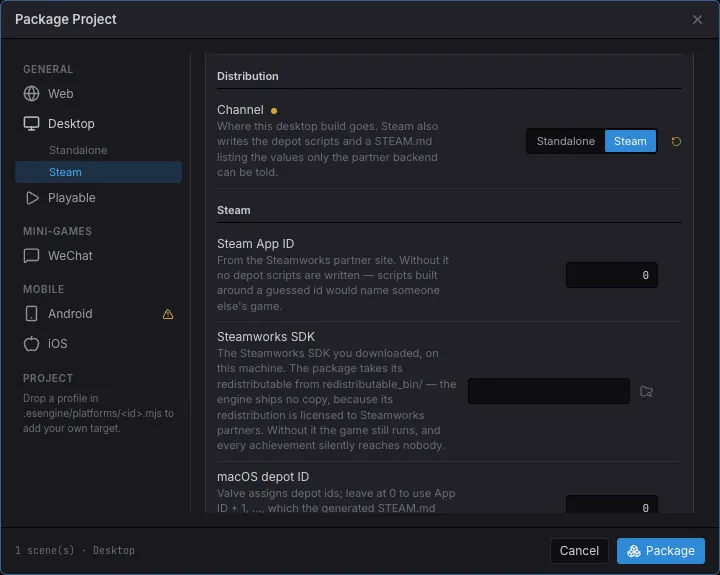
| Setting | What it is |
|---|---|
| Channel | Steam — writes the depot scripts beside the build. Picking Steam in the target list sets this; they are the same value. |
| Steam App ID | From the partner backend. Without it no scripts are written: a script built around a guessed id names someone else’s game. |
| Steamworks SDK | The SDK you downloaded. Its redistributable_bin/<os>/ library ships inside the app. |
| Depot IDs | Leave at 0 to use App ID + 1, … Valve assigns these; the generated checklist tells you to check them. |
The achievement ids are not here: they live in Project Settings → Packaging, because every store keeps that same list under a different name. Declaring them is what lets an unlock of an id no backend has be refused where it happens, instead of being accepted and silently dropped.
Then press Package. Beside the app you get:
dist-desktop/ MyGame.app/ ← macOS, and/or MyGame/ ← Windows: MyGame.exe + Content/ ← Linux: MyGame + Content/ steam/ app_build_<appid>.vdf depot_<id>_<os>.vdf STEAM.md ← this build's own valuesSTEAM.md is the part worth reading. Generic instructions belong in docs like this
one; what cannot be looked up is what this build needs pasted where — the launch
executable per OS, the depot ids it used, the Auto-Cloud paths the game really
writes to, and the achievement ids to create.
Uploading
Section titled “Uploading”steamcmd +login <your-account> +run_app_build "…/steam/app_build_<appid>.vdf" +quitThe script is written with Preview "1", so the first run uploads nothing — it
reports what it would do. Remove it to upload for real. SetLive is deliberately
empty: publishing to a branch is a separate decision, made in the backend, and it
is the one that cannot be undone by uploading again.
Achievements
Section titled “Achievements”Achievements is an engine service like Ads and Leaderboard, so the game’s code
is the same with or without a store:
import { Achievements } from 'esengine';
const achievements = world.getResource(Achievements);achievements.setStat('enemies_defeated', count);await achievements.unlock('FIRST_BLOOD');await achievements.store();      // pushes to Steam; stores batch behind this
It always works. With no store behind it the unlock is recorded locally — the same
data your own achievements screen reads — and available tells you whether a store
will also hear about it, which is what a UI reads to decide between the platform’s
toast and drawing its own.
Two ways an achievement silently does nothing, and what the engine does about each:
- An id the backend does not have. Steam accepts it and does nothing; a player finds out months later. So ids are declared once in Project Settings, and an unlock outside that set is refused where it happens, listing what is declared.
- A build with no Steam library. Point the SDK setting at your download; if it
is missing, the export warns and
STEAM.mdsays so at the top.
Cloud saves
Section titled “Cloud saves”Storage writes where the OS says it should, which is a path Steam Auto-Cloud can
sync with no code in the game. Under Steam Cloud → Auto-Cloud, use the roots
STEAM.md prints — they are read off what the app actually does, not from a table
in a document:
| OS | Root | Subdirectory |
|---|---|---|
| Windows | WinAppDataRoaming |
Estella/<Name> |
| macOS | MacHome |
Library/Application Support/Estella/<Name> |
| Linux | LinuxHome |
.local/share/Estella/<Name> |
Honest boundaries
Section titled “Honest boundaries”- macOS builds are signed ad-hoc, and only on a Mac. Notarize with your own Developer ID before a public release.
steamcmdis not driven from the editor. The checklist gives you the exact command instead; a feature that cannot be verified here is worse than a line you can copy.- Workshop, DLC, microtransactions and Steam Input action sets are not covered. They all hang off the same flat API and the same service surface, but each is its own feature rather than something “Steam support” drags in.