
Audio
Estella’s audio plays one-shot effects and looping music through the Audio
resource, controls individual sounds with a handle, balances the mix with a bus
hierarchy, and positions sounds in the world with spatial audio. It runs on the
Web Audio backend in browsers, a player-per-sound backend on WeChat and the other mini-game hosts, and the host’s
native audio engine (miniaudio) in the iOS and Android apps.
How it works
Section titled “How it works”Audio is a per-App resource, registered by default. Sound files are decoded into
buffers that are cached on first use, then played on a bus (a named volume
group). Each play returns an AudioHandle you can keep to adjust or stop that one
sound. For sounds tied to a place or an object, an AudioSource component plays
declaratively and (when spatial) attenuates by distance from the AudioListener.
Decoded buffers live in a byte-budgeted warm cache (default 32 MB,
RuntimeConfig.audioCacheBudget / build-config audioCacheBudget), the audio
mirror of the texture budget: a buffer released by asset lifetime stays instantly
playable and is revived without a re-fetch + re-decode, while the oldest unused
buffers are dropped past the budget. On OS memory warnings the engine trims the
whole warm cache automatically — sounds that are playing keep playing.
Sound effects & music
Section titled “Sound effects & music”import { defineSystem, Res, Audio } from 'esengine';
const play = defineSystem([Res(Audio)], (audio) => { const sfx = audio.playSFX('assets/hit.wav', { volume: 1, pitch: 1, pan: 0 }); audio.playBGM('assets/theme.ogg', { fadeIn: 0.5, crossFade: 1.0 });});playSFX fires a one-shot and returns a handle; playBGM loops and replaces the
current track, optionally cross-fading. Both auto-preload an uncached clip and play
it once ready.
Music in layers
Section titled “Music in layers”A piece exported as stems (one clip for each instrument, all the same length) plays as layers: every stem begins on the same sample and they loop together, and each has a level of its own.
const music = audio.playLayers( { drums: 'assets/music/theme_drums.wav', bass: 'assets/music/theme_bass.wav', lead: 'assets/music/theme_lead.wav' }, { mix: 'assets/music/theme.wav', levels: { lead: 0 }, fadeIn: 1 },);music.setLayer('lead', 1, 2); // up over two secondsmusic.setLayer('drums', 0, 4); // and the drums awayIt is the background music: it takes the place of what playBGM was playing,
and stopBGM ends it. Layers are only music while they are in step, which
needs decoded clips (loadType: 'decompress') on the web or the native host.
Where each clip is a player of its own (a mini-game, a clip played from its
compressed file) the mix plays instead and music.layered is false; with
no mix the layers are started one after another and may drift.
What packaging does to a clip
Section titled “What packaging does to a clip”A .wav is re-encoded when a game is exported, and a decoder gives an encoded
clip back with a fortieth of a second of silence before its sound and some after
it. The exporter records how long each clip really is and the runtime plays it
from past that silence to its real end, so a loop that was seamless as a .wav
is seamless in the build and an effect is not late. Nothing is asked of you.
Only a clip that is decoded can go round between two samples. A long clip
(over 30 seconds under auto) is played from its compressed file instead, by a
player that is sent back to the start when it ends: a looping piece of music
wants loadType: 'decompress' in its import settings, which costs its decoded
size in memory while it is loaded. The editor’s music tool sets it for pieces up
to two minutes.
An introduction, then the loop
Section titled “An introduction, then the loop”A piece with an introduction is one file: it plays from the top once, and each
time it reaches its end it comes back to loopStart seconds in.
audio.playBGM('assets/theme.ogg', { loopStart: 12.5, fadeIn: 1 });The join is exact to the sample where the clip is decoded (the web’s decoded
clips, and the native host). Where a clip is played from its compressed file (a
long clip streamed on the web, a mini-game) the player is sent back when it
ends, which can be heard as a short breath: decode a piece whose join matters
(loadType: 'decompress').
Sound event definitions (beta)
Section titled “Sound event definitions (beta)”A .esaudioevent is a versioned JSON asset containing clips with audio references
and relative weight values. Load it with assets.load<SoundEventAsset>('sound-event', ref);
the loader validates the document without decoding every candidate. Candidate UUID
references participate in export dependencies, including slots whose weight is zero.
import { parseSoundEvent, SoundEventSelector } from 'esengine';
const event = parseSoundEvent({  version: 1,  mode: 'no-repeat',  clips: [{ clip: 'assets/step-a.wav', weight: 1 }, { clip: 'assets/step-b.wav', weight: 3 }],  volume: [0.8, 1],  playbackRate: [0.9, 1.1],});const selector = new SoundEventSelector(event, 42);const result = selector.next();if (result.selection) {  const { clip, volume, playbackRate } = result.selection;  audio.playSFX(clip, { volume, pitch: playbackRate });}
random uses relative weights; sequence cycles enabled slots in authored order;
no-repeat excludes the previous audio identity when another positive-weight clip
exists. Duplicate identities combine weights in random modes and report their first
slot. Zero-weight slots are disabled in every mode. An empty or entirely disabled
pool returns empty or zero-weight without a selection; one enabled clip may repeat.
The seed controls clip and parameter choices independently of the playback backend. Changing parameter ranges preserves clip order. Playback rate changes pitch and duration. It does not preserve duration while shifting pitch.
The selector only chooses clips and parameters. Use the managed playback resource to apply event settings and own loading/playing lifetimes together.
Managed event playback
Section titled “Managed event playback”import { SoundEvents } from 'esengine';
const events = app.getResource(SoundEvents);const emitter = await events.load('assets/steps.esaudioevent', { owner: entity, seed: 42 });const voice = emitter?.trigger(); // Spatial events can also take a world-space position.if (voice) { await voice.ready; console.log(voice.status, voice.reason, voice.selection);}Keep the emitter for repeated triggers. It owns a definition lease and its own choice stream; a fixed seed reproduces that emitter’s sequence. Emitters for the same canonical asset share event concurrency and cooldown, including across hot reload generations. Event admission runs before clip IO, then the existing Audio pool applies global priority and voice limits. Pending and paused requests hold event slots. Cooldown begins at admission, including later load/global-limit failures; stopping does not reset it. The Audio plugin advances its clock with simulation time.
ready resolves when loading completes or is cancelled. reason distinguishes
event limits, cooldown, empty/disabled pools, global limits, missing positions and
load failures. Errors include the event and selected clip slot. Volume/rate controls,
pause and Stop remain valid during loading. Natural completion, Stop, global
Audio.stopAll(), owner despawn and App cleanup release the selected clip lease.
Dispose ownerless emitters explicitly with emitter.dispose(); owner-bound emitters
also dispose when their registry disconnects. events.getStats() reports admitted,
started, ended, stopped and rejected counts without storing trigger history.
Spatial events reuse AudioSource attenuation and panning; provide an owner with a
world transform or a position to trigger(). Without a listener the origin is used.
Mini-game hosts without stereo panning report that limitation while retaining
software distance attenuation. See Sound event source for component
and graph triggers.
Authoring sound events
Section titled “Authoring sound events”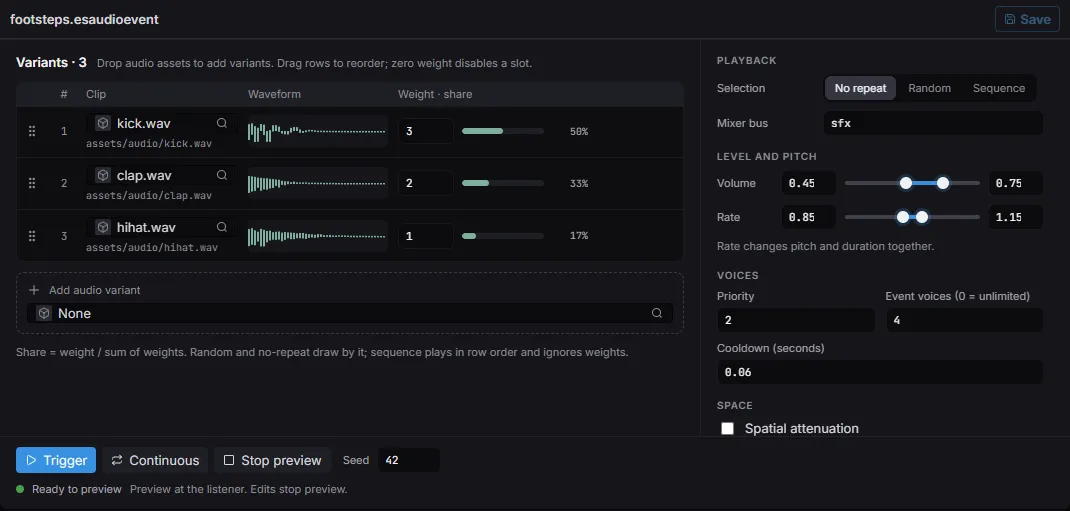
A sound event with three variants. Each row has its waveform and weight (the share is weight over the sum), and Trigger plays it at the listener with the event’s own rules.
Choose New → Create Sound Event in the Content Browser, or select audio assets
and use Create Sound Event in their context menu. Double-click a .esaudioevent
to open its dedicated editor. Dropping audio into an empty event panel creates an
event beside the first clip; dropping into an open event appends variants.
Use the audio picker to add or replace clips. Drag rows or use the arrow buttons
to reorder them; delete removes the slot, retaining its audio file. Weight 0
disables a slot. Selection mode, volume/rate ranges, bus, priority, concurrency,
cooldown and optional spatial settings share the runtime’s validated format.
Edits participate in Undo/Redo, dirty-tab indicators, Save, autosave snapshots
and external-file reload handling. Invalid files leave the current document intact.
Trigger samples another variation; Continuous plays successive variations
after completion while observing event cooldown and voice budgets. The preview
uses the existing audio mixer and global pool, displays the last selected slot,
clip, sampled volume and rate, and follows that voice with the shared waveform.
Spatial preview places the source at the listener; test distance attenuation in
the scene. The preview seed belongs to the editor, not the asset. Stopping or
editing resets its stream; configure SoundEventSource.seed for runtime playback.
Changing the definition, closing the panel, replacing the project or global Stop All cancels preview work. Waveform reuse keeps up to 64 peak arrays (about 200 KiB), without caching PCM in that cache. Disk changes and project replacement invalidate the peaks. Preview software checks do not replace device/output acceptance.
Audio API reference
Section titled “Audio API reference”| Method | Description |
|---|---|
playSFX(url, config?) |
Play a one-shot; returns an AudioHandle. Config: volume, pitch, pan, priority. |
playBGM(url, config?) |
Loop music, replacing the current track. Config: volume, fadeIn, crossFade. |
stopBGM(fadeOut?) |
Stop the music, optionally fading out over fadeOut seconds. |
stopAll() |
Stop every playing sound. |
setMasterVolume(v) |
Set the master bus volume (0..1). |
setMusicVolume(v) |
Set the music bus volume. |
setSFXVolume(v) |
Set the sfx bus volume. |
setUIVolume(v) |
Set the ui bus volume. |
muteBus(name, muted) |
Mute/unmute a bus by name. |
preload(url) |
Decode and cache a clip ahead of time (async). |
preloadAll(urls) |
Preload an array of clips (async). |
getBufferHandle(url) |
The cached buffer for url, or undefined. |
getSpectrum(out) |
Fill a Uint8Array with the master output’s frequency spectrum (0–255 per bin, low→high) for a visualizer. Returns false on backends without analysis (WeChat) — treat that as silence. |
setBufferBudget(bytes) |
Override the warm-cache byte budget (null returns to the RuntimeConfig value; 0 disables the cache). |
getBufferStats() |
Residency counters: bufferCount, bufferBytes, bufferBudget, evictableCount. |
trimBufferCache() |
Free every unused cached buffer now (the engine calls this on OS memory warnings). |
Controlling a playing sound
Section titled “Controlling a playing sound”playSFX returns an AudioHandle — keep it to drive that specific sound:
const shot = audio.playSFX('assets/laser.wav');shot.setVolume(0.6);shot.setPan(-0.5); // -1 left … +1 rightshot.setPlaybackRate(1.2); // pitch / speedshot.setLoop(true);shot.pause(); shot.resume(); shot.stop();shot.onEnd = () => { /* the sound finished */ };| Member | Type | Description |
|---|---|---|
setVolume(v) |
method | Volume, 0..1. |
setPan(p) |
method | Stereo pan, -1 (left) … +1 (right). |
setPlaybackRate(r) |
method | Playback speed / pitch (1 = normal). |
setLoop(l) |
method | Loop the sound. |
pause() / resume() / stop() |
method | Transport control. |
onEnd |
callback | Called once when the sound finishes. |
isPlaying |
readonly | Whether it’s currently playing. |
currentTime |
readonly | Playback position in seconds. |
duration |
readonly | Total length in seconds. |
Declarative playback — AudioSource
Section titled “Declarative playback — AudioSource”Attach an AudioSource to an entity to play without code — ideal for ambience,
looping machines, or a sound anchored to an object. With playOnAwake + enabled
the audio system starts it automatically.
| Property | Type | Default | Description |
|---|---|---|---|
clip |
asset | '' |
Audio asset to play. |
bus |
string | 'sfx' |
Mixer bus to route through. |
volume |
number | 1 |
Volume, 0..1. |
pitch |
number | 1 |
Playback speed / pitch. |
loop |
boolean | false |
Loop the clip. |
loopStart |
number | 0 |
With loop: seconds into the clip that it comes back to at its end, so an introduction plays once. |
fadeIn |
number | 0 |
Seconds to come up to volume when playing is raised. |
fadeOut |
number | 0 |
Seconds to go down to nothing when playing is lowered; the voice stops after. Raising playing again on the way out turns it round. |
playing |
boolean | false |
The play flag: raise to play, lower to stop. The engine lowers it when a non-looping clip ends. |
finished |
boolean | false |
Runtime, read-only: the clip completed; raising playing plays it again. |
playOnAwake |
boolean | false |
Start automatically when the entity is enabled. |
spatial |
boolean | false |
Attenuate by distance from the listener. |
minDistance |
number | 100 |
Distance within which volume is full. |
maxDistance |
number | 1000 |
Distance beyond which the sound is silent. |
attenuationModel |
AttenuationModel |
Inverse |
Falloff curve — Linear / Inverse / Exponential. |
rolloff |
number | 1 |
Falloff steepness multiplier. |
priority |
number | 0 |
Voice priority when the pool is full (higher wins). |
enabled |
boolean | true |
Disable to stop and silence without removing the component. |
Mixer buses
Section titled “Mixer buses”The mixer is hierarchical — master → { music, sfx, ui, voice }. Setting a bus
volume scales everything routed under it:
audio.setMasterVolume(0.8);audio.setMusicVolume(0.6);audio.setSFXVolume(1.0);audio.setUIVolume(0.9);audio.muteBus('music', true);Route a sound to a bus with the AudioSource.bus field, or leave playSFX
defaulting to sfx. Volume setters exist for setMasterVolume (a global slider)
and setMusicVolume / setSFXVolume / setUIVolume. The voice bus routes sounds
and has no named setter: set it with setBusVolume('voice', v) (which reaches any bus by name) or toggle it with
muteBus('voice', …).
Bus effects & ducking
Section titled “Bus effects & ducking”Each bus carries a DSP insert chain, declared as data:
audio.setBusEffects('music', [ { type: 'filter', filter: 'lowpass', frequency: 800, q: 1 }, // muffle (pause menu) { type: 'reverb', seconds: 1.5, wet: 0.3 }, // procedural room tail { type: 'compressor', thresholdDb: -24, ratio: 4 },]);audio.setBusEffects('music', []); // clearSidechain ducking is a rule, not code — duck music while voice lines play:
audio.setBusDucking('music', { trigger: 'voice', amount: 0.3, attack: 0.05, release: 0.4 });audio.setBusDucking('music', null); // removeattack (default 0.05 s) and release (default 0.4 s) are time constants, and threshold (default 0.003, an RMS level from 0 to 1) is how loud the trigger bus must be to count as active. While the trigger bus carries signal, the target’s duck stage ramps to
amount; on silence it releases back to 1. Ducking is a separate gain stage,
so it never fights the user’s volume setting. On backends without a WebAudio
graph (WeChat) both APIs degrade to no-ops, like the volume calls.
The Audio Mixer panel & project config
Section titled “The Audio Mixer panel & project config”The Audio Mixer bottom-dock panel edits all of this visually — one strip
per bus with a volume fader, mute, the effect chain, a duck-by rule, and
custom buses. Edits persist to project.esproject (features.audio) and
apply live in the editor; Play and every export boot the identical mix.
Import settings & cooked audio
Section titled “Import settings & cooked audio”Selecting an audio asset shows a decoded waveform with play/seek plus Import
Settings: Compress (default on) and Bitrate (96, 128 or 192 kbps; default 128) control the cook’s WAV → MP3 transcode
(enable Compress audio in the Package dialog). Already-compressed formats
pass through untouched. MP3 has a small encoder delay — turn Compress off on
clips that must loop seamlessly.
Load Type decides how the clip is held on the Web: Auto streams clips of 30 seconds or longer from their compressed file and decodes shorter ones, Decompress On Load always decodes (instant to start; a three-minute track costs about 69 MB), and Streaming always streams. A streamed clip takes almost no memory and goes through the same bus, volume and fades, but gives up a sample-accurate loop point and a second simultaneous voice of the same clip. The choice ships in the exported game’s audio settings, so Play, an export and a playable ad stream the same clips.
Under the facade
Section titled “Under the facade”Audio is a facade over three exported classes the Web Audio backend assembles —
AudioMixer, AudioBus, and AudioPool. You rarely construct them inside a
game (on the WeChat and native backends they don’t exist at all, which is why the bus APIs
degrade to no-ops there), but they’re public for two real jobs: custom buses
beyond the built-in four, and standalone audio pipelines — an audition
tool, a custom PlatformAudioBackend, tests — built on your own AudioContext.
Custom buses need no class at all — the facade covers them:
audio.ensureBus('ambience'); // create under master (idempotent)audio.ensureBus('footsteps', 'sfx'); // or under an existing busaudio.setBusVolume('ambience', 0.5);// playSFX is always on the 'sfx' bus; playTrack (or an entity's AudioSource.bus) picks one.audio.playTrack('assets/wind.ogg', { bus: 'ambience' });ensureBus(name, parent?) creates the bus if it’s missing (under parent,
defaulting to master) and returns false on backends without a mixer graph;
every by-name facade call (setBusVolume, muteBus, setBusEffects,
setBusDucking) then reaches it.
AudioBus
Section titled “AudioBus”One mixer strip: input → [effect inserts…] → duck → gain(volume) → parent.
Sources and child buses connect to input; node is the output gain — what
volume/mute act on and where parents (or an AnalyserNode for a VU meter) tap.
The duck stage is a separate gain, so sidechain ducking never fights the user’s
volume setting. Constructed with an AudioBusConfig:
AudioBusConfig |
Type | Default | Description |
|---|---|---|---|
name |
string | – | Bus name. |
volume |
number | 1 |
Initial volume, clamped 0..1. |
muted |
boolean | false |
Start muted. |
parent |
string | 'master' |
Parent bus name (consumed by AudioMixer.createBus). |
| Member | Description |
|---|---|
input / node |
Entry GainNode / output GainNode (analyser taps connect from node). |
volume |
0..1; changes are smoothed over ~15 ms so they never click. |
muted |
Ramps the output to 0 and back without losing volume. |
effects / setEffects(defs) |
Read / idempotently replace the DSP insert chain (BusEffectDef[]). |
duckTo(level, timeConstant) |
Ramp the duck stage toward level (the mixer’s ducking drives this). |
connect(dest) / addChild(bus) |
Wire the output into a parent bus or a raw AudioNode. |
AudioMixer
Section titled “AudioMixer”Owns the bus tree. Constructing one builds master → { music, sfx, ui, voice }
wired to context.destination, with volumes from AudioMixerConfig
(masterVolume / musicVolume / sfxVolume / uiVolume / voiceVolume —
music defaults to 0.8, the rest to 1):
import { AudioMixer } from 'esengine';
const mixer = new AudioMixer(new AudioContext(), { musicVolume: 0.6 });const ambience = mixer.createBus({ name: 'ambience' }); // under master| Method | Description |
|---|---|
master / music / sfx / ui / voice |
The built-in buses, as readonly fields. |
getBus(name) / busNames() |
Look up a bus / list every name (creation order, master first). |
createBus(config) |
Create and wire a bus under config.parent (default master). |
setDucking(target, rule | null) / getDucking(target) |
Install or clear a sidechain BusDuckRule (trigger, amount, attack, release, threshold). |
updateDucking() |
Per-frame: measure each trigger’s RMS and ramp its target’s duck stage (the audio system calls this for the engine’s mixer). |
AudioPool
Section titled “AudioPool”The voice pool behind one-shots: pre-built gain → panner node pairs
(PooledAudioNode) that are acquire()d per play and release()d when the
sound ends, growing past the initial 16 on demand; activeCount and capacity
report usage. Reach for it when you build custom playback on your own
AudioContext and want to avoid per-play node churn.
Spatial audio
Section titled “Spatial audio”Set AudioSource.spatial = true and give your listener entity (usually the camera
or player) an enabled AudioListener. The source then attenuates by distance:
import { defineSystem, Commands, Transform, AudioSource, AudioListener,         AttenuationModel } from 'esengine';
const setupSpatial = defineSystem([Commands()], (cmds) => {  // A positioned, looping ambience that fades with distance.  cmds.spawn()    .insert(Transform, { position: { x: 600, y: 0, z: 0 } })    .insert(AudioSource, {      clip: 'assets/campfire.ogg', loop: true, playOnAwake: true,      spatial: true, minDistance: 80, maxDistance: 900,      attenuationModel: AttenuationModel.Inverse,    });
  // The listener (attach to the camera/player).  cmds.entity(cameraEntity).insert(AudioListener, { enabled: true });});
AttenuationModel |
Falloff |
|---|---|
Linear |
Straight line from minDistance to maxDistance. |
Inverse (default) |
Natural inverse-distance rolloff. |
Exponential |
Steeper exponential rolloff. |
AudioListener has a single field, enabled (default true) — keep exactly one
enabled listener in the scene.
Spatial audio is three-dimensional: each frame, the audio system takes the
source’s and the listener’s world positions, computes the distance in all three
axes, and drives the playing handle with volume × attenuation plus a stereo pan
along the listener’s own right (dot(source − listener, right) / maxDistance, clamped
to ±1; an unturned listener’s right is world +X, and a listener that turns hears the
world turn with it). There is no HRTF, doppler, or occlusion. A spatial source playing with no enabled listener warns
once and measures from the world origin.
The curve math is exported as pure functions for tools and tests —
calculateAttenuation(distance, config) with a SpatialAudioConfig
(model, refDistance, maxDistance, rolloff — the system fills it from
AudioSource.minDistance/maxDistance/rolloff), and
calculatePanning(source, listener, right, maxDistance) (the first three are { x, y, z }):
import { calculateAttenuation, calculatePanning, AttenuationModel } from 'esengine';
const gain = calculateAttenuation(250, {  model: AttenuationModel.Inverse, refDistance: 100, maxDistance: 1000, rolloff: 1,});                                                  // 0.4 — refDistance / distanceconst pan = calculatePanning(  { x: 600, y: 0, z: 0 }, { x: 0, y: 0, z: 0 }, { x: 1, y: 0, z: 0 }, 1000,);                                                   // 0.6 — to the right
Sound event source
Section titled “Sound event source”Add SoundEventSource to an entity and pick its .esaudioevent resource. Scene
preloading acquires the definition without decoding all its candidates. The
component’s seed (default 0) fixes its choice stream; playOnAwake plays once
per enabled component lifetime. Changing the event or seed creates a new stream.
import { SoundEventSource, triggerSoundEventSource, stopSoundEventSource } from 'esengine';
app.world.insert(entity, SoundEventSource, { event: 'assets/steps.esaudioevent', seed: 42 });const voice = await triggerSoundEventSource(app.world, entity);if (voice) {  await voice.ready;  console.log(voice.status, voice.reason, voice.selection);}stopSoundEventSource(app.world, entity);
Use soundEvent.trigger / soundEvent.stop in script graphs, FSM hooks or BT
actions to reach the same source. Each trigger is independent, including multiple
triggers in one frame. Graph actions continue immediately while loading proceeds.
They do not wait for clip completion.
Cold definitions queue at most 256 intents per source, in FIFO order. Excess
intents, unavailable/disabled sources, failed definitions and cancelled intents
resolve to null. A returned handle reports clip loading and event/global voice
rejections separately. Event cooldown begins when the loaded definition admits
an intent, so several cold intents may share an admission time.
Stopping cancels this source’s queue and voices; other emitters on the entity
remain owned by their callers. A later trigger restarts this source’s seeded
stream. Disable, removal, event/seed changes, inactive hierarchy, despawn and
registry disconnect invalidate its old lifetime. These checks also run after
asynchronous loads, preventing a late clip from playing before the next frame.
Global Audio.stopAll() cancels pending source intents while preserving prepared
definitions. Local source stop does not replay playOnAwake on the next frame.
Best practices
Section titled “Best practices”- Preload clips you’ll play in performance-critical moments (
preload/preloadAll) so the first play isn’t silent while it decodes. - Start on a gesture — browsers block audio until the first user input.
- Separate buses (
music/sfx/ui/voice) so players can mix them, and drive everything frommaster. - Cap simultaneous sounds with
priorityonAudioSourceso important sounds win when the voice pool is full. The ceiling is 32 voices by default; set your own withfeatures.audio.maxVoicesinproject.esproject(0 = no cap). When the pool is full the sound worth least is dropped for one worth more, ties go to the older voice, and a new sound worth less than everything playing is simply not started. - Use
AudioSource(declarative) for world/object sounds andplaySFXfor fire-and-forget UI/gameplay one-shots.