
The Built-in Agent
The editor ships with an agent of its own. You type a sentence; it reads the scene, calls the same tools the editor’s UI calls, and shows you every one of them as it goes. Nothing about it is a separate copy of the editor: it drives the exact tool catalog an external MCP client drives, so what it can do and what the editor can do are one list.
Give it a model
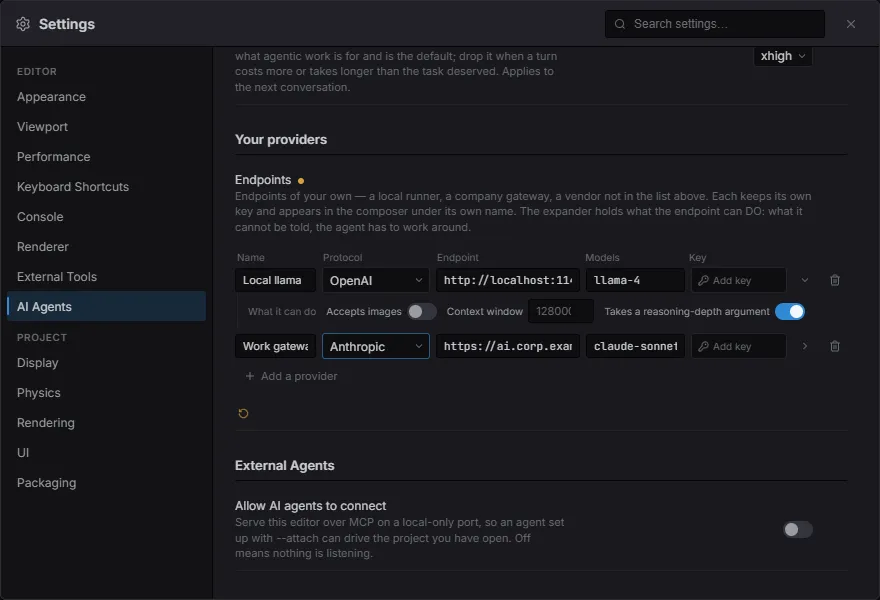
Section titled “Give it a model”The editor ships no key and calls nothing on its own. Open Settings ▸ AI Agents and configure one provider — that is the whole setup.
-
Paste an API key for Anthropic, DeepSeek or OpenAI. Each provider keeps its own, so switching back to one you used last week costs nothing.
-
Some providers also want their model names typed in. That is deliberate: a list shipped in the editor would be right until the vendor’s next release, and a name that no longer exists is not refused — the endpoint quietly serves something smaller instead, for the rest of the session.
-
Or add your own under Your providers — any endpoint at all, as many as you have. Each row is a provider like the shipped ones: a name, which protocol it speaks, its address, its model names, and its own key. Expand a row to say what that endpoint can do.
-
Close Settings. The model picker sits next to the box you type in — it is a per-message choice, not a preference buried in a dialog.
What an endpoint can do
Section titled “What an endpoint can do”The shipped providers already say. For one of your own the editor has no way to find out, and guessing is expensive in both directions — so a row’s expander is where you tell it. What is left unsaid is worked around, not discovered.
- Accepts images — the agent takes screenshots to check its own work. Where a picture cannot be sent it asks for the same frame as a coarse colour grid in text instead, and says so in the transcript. Off by default: claiming sight an endpoint lacks costs a whole turn to a refused request, while withholding it costs detail the agent can mostly do without.
- Context window — how far a conversation may grow before its oldest runs are folded away. Blank assumes a conservative window, which folds a conversation that still had room; too generous fails the turn outright, after the wait.
- Takes a reasoning-depth argument — whether the request may name the depth set above. An endpoint that has never heard of the argument refuses the whole call rather than ignoring it, so turn this off for one that does.
Ask it something
Section titled “Ask it something”Open the command palette (Ctrl/Cmd+Shift+P) and run Agent: Open. Or skip that:
type your question straight into the palette. Anything that reads as a sentence
rather than a command offers Hand to Agent, and Enter sends it.
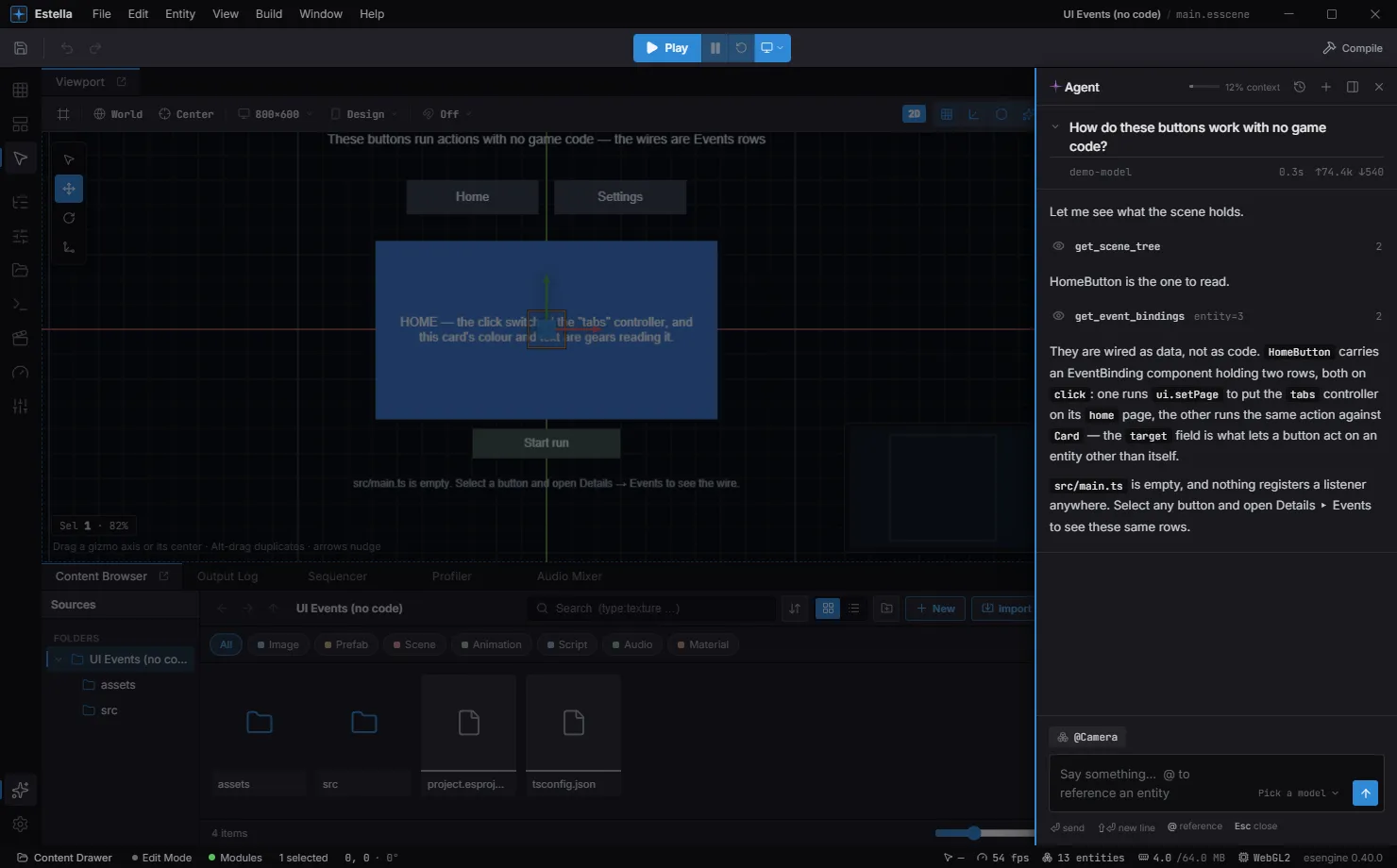
A run reads top to bottom:
- The question, with the model that answered it, how long it took, and the tokens it cost.
- A row per tool call —
get_scene_tree,get_event_bindings— with its arguments and how much came back. This is the part worth reading: it is the difference between an answer about your scene and an answer about scenes in general. - The answer.
In the composer, @ references an entity by name so you do not have to describe
which one you mean. You can drop or paste an image — a mock-up, a screenshot of
the bug — and it is sent along with the question, where the endpoint accepts images.
While it works, the status bar carries a live segment with a Stop button, so a
long run is visible and interruptible with the drawer closed.
What it may do without asking
Section titled “What it may do without asking”The tiers are drawn where Undo stops working, which is what makes them worth knowing:
| Tier | Examples | What happens |
|---|---|---|
| Read | get_scene_tree, get_inspector, capture_viewport |
Runs. Never asks. |
| Undoable | create, delete, set_field, re-parent, paint tiles |
Runs. The whole turn is bracketed by one checkpoint, so a single Undo takes all of it back. |
| Irreversible | writing a file, exporting a build, saving, run_editor_command |
Always asks first. Undo cannot rescue you afterwards. |
So the approval you give is not per edit — it is the Undo button, and it applies to the turn as a whole. When a run finishes having changed something, the transcript leaves a bar behind offering Undo or Keep, and it tells you if you have edited since (because then Undo would take your own work back too).
Before a large edit
Section titled “Before a large edit”One undoable tool still stops to ask, and not for safety: apply_scene_ops authors
a whole subtree in a single call, and a hundred-node edit is worth seeing before it
lands rather than reading back afterwards.
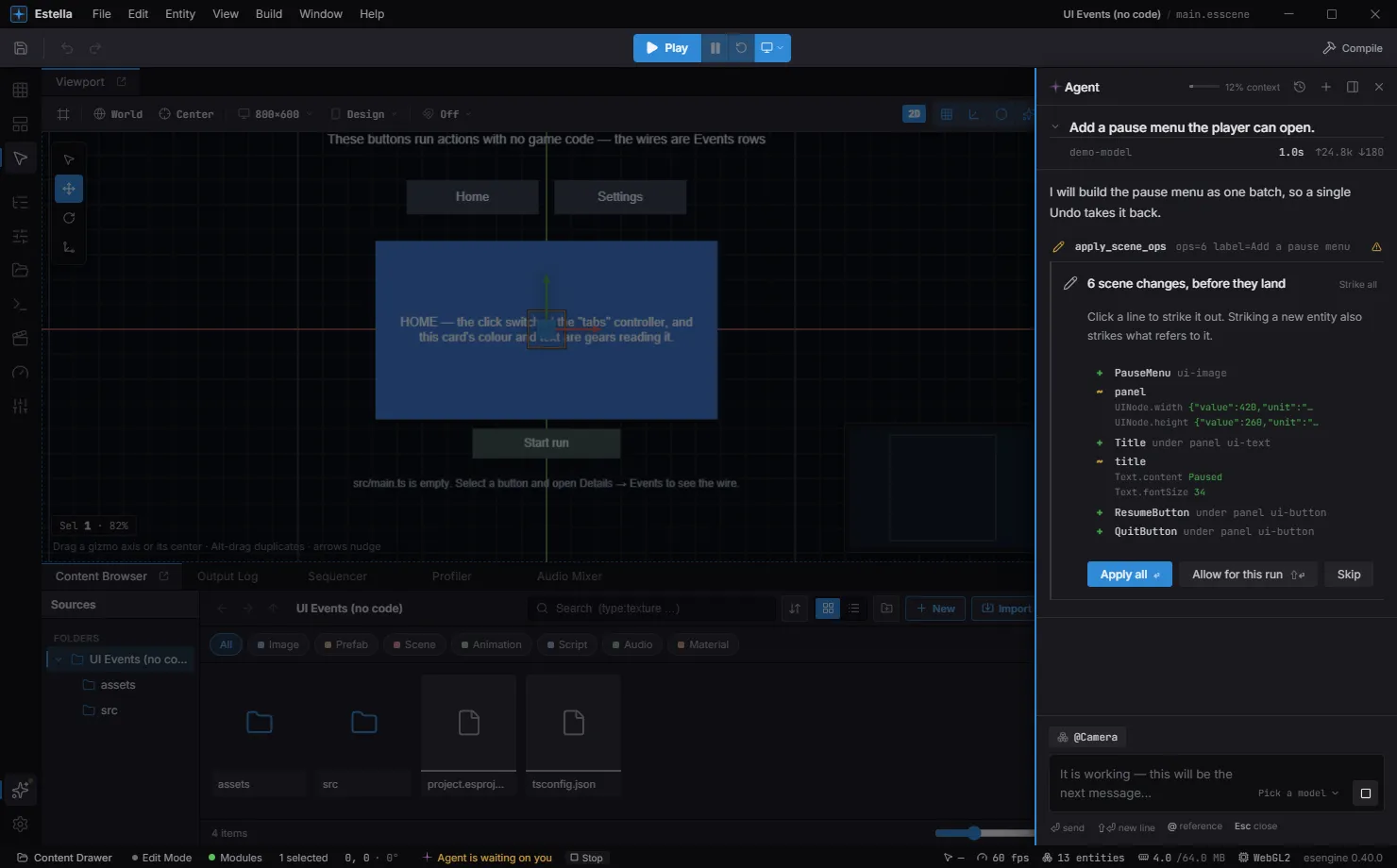
Every line is one change. Click one to strike it out — striking a new entity also strikes whatever refers to it — then Apply the rest. Allow for this run stops the asking until the turn ends, which is what keeps a long build from becoming a hundred prompts; the next run asks again.
Declining is not a dead end: the agent is told it was skipped and works around it.
The conversation is kept with the project
Section titled “The conversation is kept with the project”A finished run is saved alongside the project — the transcript and the model’s memory of it. Earlier conversations lists them; pick one and it carries on where it stopped. The next question in an open conversation still has everything the previous one established.
Two things are worth knowing about a long one:
- The context gauge in the drawer’s header says how full the model’s window is. Past a threshold the earliest runs are folded out of its memory: what you asked is kept word for word, the tool calls and their results are not. The transcript still shows them — the model can no longer read them. When that happens the drawer says so, on the line where it happened.
- A conversation belongs to the model that answered it. Switching models ends it and starts a new one. What it changed in the scene stays.
You can also ask a run again in different words: it discards that run and everything after it, then re-asks. Useful when a turn went the wrong way three messages ago and you would rather not talk it back.
See also
Section titled “See also”- AI Agents (MCP) — the same tool catalog, driven from Claude Code, Cursor, or your own agent instead of from inside the editor.
- Event Binding — what the agent reaches for when you ask for behaviour without code.
- Prefabs — in Prefab Mode the agent edits the prefab, not the scene. Check the document it is working on before asking for a big change.