Physics
Estella’s physics runs in the C++/WebAssembly core, powered by Box2D v3. You attach
a RigidBody and a collider to an entity, then move it with forces, query the world
with raycasts, react to collisions, and connect bodies with joints. Physics steps at
a fixed timestep, decoupled from the frame rate, for stable simulation.
Physics is an optional side-module. In the editor and web runtime it loads
automatically when a scene uses physics components. In a custom app, add the plugin
yourself (gravity defaults to { x: 0, y: -9.81 }):
import { PhysicsPlugin } from 'esengine/physics';
app.addPlugin(new PhysicsPlugin('physics.js', { gravity: { x: 0, y: -9.81 } }));Box2D simulates in meters; the rest of the engine works in world pixels.
The conversion factor is the live pixels-per-unit (PPU) — Canvas.pixelsPerUnit,
100 pixels per meter by default. Every part of the physics API sits on a fixed
side of that boundary:
| Surface | Units |
|---|---|
Collider component dimensions — halfExtents, radius, offset, … |
Meters. |
Solver-facing methods — applyForce / applyImpulse, setLinearVelocity / getLinearVelocity, setGravity, … |
Meters (m/s, m/s²). |
Spatial queries — raycast, shapeCast*, overlapCircle / overlapAABB, moveCharacter |
World pixels, scaled by the live PPU. |
CharacterController.velocity, MotorJoint.linearVelocity |
World pixels per second. |
physics.getPixelsPerUnit() returns the live PPU (pushed from the Canvas each
frame), so conversions never hard-code 100:
const ppu = physics.getPixelsPerUnit(); // world pixels per meterconst speedPx = physics.getLinearVelocity(e).x * ppu; // m/s → px/sphysics.applyImpulse(e, { x: 0, y: jumpPx / ppu }); // px/s → m/sMixing the two spaces — passing pixels to applyForce, or meters to raycast —
is the most common physics bug. When in doubt: components and solver = meters;
queries and the character controller = pixels.
Bodies & colliders
Section titled “Bodies & colliders”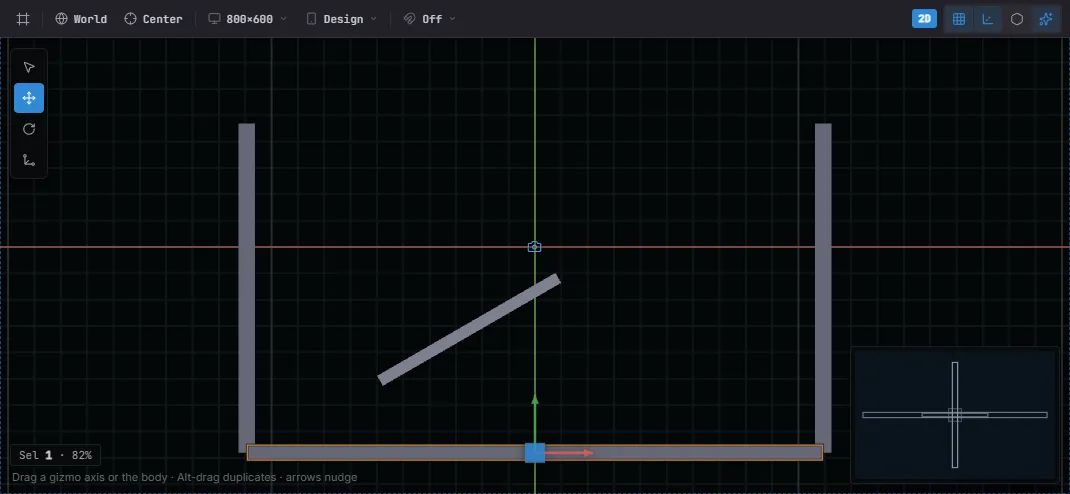
Collider gizmos in the viewport: the selected Ground’s box outline (amber) plus the walls and ramp. Toggle them with the viewport’s Physics show-flag.
Attach a RigidBody plus one collider shape. Collider dimensions are in meters,
not pixels — divide pixel sizes by your pixels-per-unit (see Units).
Spawn from a system that takes Commands():
import {  defineSystem, Commands, Transform,  RigidBody, BodyType, CircleCollider,} from 'esengine';
const PPU = 100;   // = Canvas.pixelsPerUnit; read the live value via physics.getPixelsPerUnit()
const spawnBall = defineSystem([Commands()], (cmds) => {  cmds.spawn()    .insert(Transform, { position: { x: 0, y: 250, z: 0 } })    .insert(RigidBody, { bodyType: BodyType.Dynamic, gravityScale: 1 })    .insert(CircleCollider, { radius: 24 / PPU, density: 1, friction: 0.3, restitution: 0.4 });});
RigidBody
Section titled “RigidBody”| Property | Type | Default | Description |
|---|---|---|---|
bodyType |
BodyType |
Dynamic |
Static (immovable), Kinematic (moved by code), Dynamic (simulated). |
gravityScale |
number | 1 |
Multiplier on world gravity (0 = float). |
linearDamping |
number | 0 |
Linear velocity drag. |
angularDamping |
number | 0 |
Angular velocity drag. |
fixedRotation |
boolean | false |
Lock rotation (typical for characters). |
bullet |
boolean | false |
Continuous collision for fast, thin bodies (anti-tunneling). |
enabled |
boolean | true |
Disable to remove from the simulation. |
Colliders
Section titled “Colliders”All colliders share these fields; each adds its own shape parameters. Dimensions are in meters.
| Shared property | Type | Default | Description |
|---|---|---|---|
offset |
Vec2 | {0, 0} |
Local offset from the entity origin. |
density |
number | 1 |
Mass per area (drives the body’s mass). |
friction |
number | 0.3 |
Surface friction, 0..1+. |
restitution |
number | 0 |
Bounciness, 0..1. |
isSensor |
boolean | false |
Detect overlaps without a physical response (triggers). |
categoryBits |
number | 0x0001 |
Which collision layer this collider is on. |
maskBits |
number | 0xFFFF |
Which layers it collides with. |
enabled |
boolean | true |
Disable the shape. |
| Component | Shape parameters |
|---|---|
BoxCollider |
halfExtents ({0.5, 0.5}), radius (rounded corner, 0.05). |
CircleCollider |
radius (0.5). |
CapsuleCollider |
radius, halfHeight. |
SegmentCollider |
point1, point2 (a one-sided edge). |
PolygonCollider |
vertices: Vec2[], radius (rounded). |
ChainCollider |
points: Vec2[], isLoop (static edge chain; no density/isSensor). |
Collision filtering
Section titled “Collision filtering”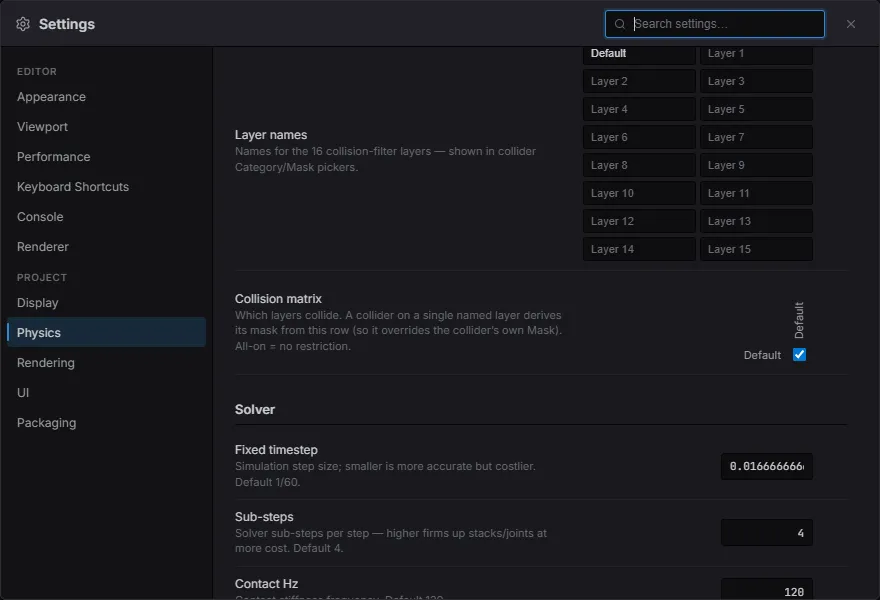
Project Settings → Physics: name your 16 collision layers, then toggle which pairs collide in the matrix (alongside the solver tuning below).
categoryBits (what layer a body is on) and maskBits (what it collides with) are
16-bit filters. Two bodies collide only if each one’s category is in the other’s mask:
const LAYER_PLAYER = 0x0001;const LAYER_ENEMY  = 0x0002;const LAYER_GROUND = 0x0008;
.insert(CircleCollider, {  radius: 16 / PPU,  categoryBits: LAYER_PLAYER,  maskBits: LAYER_ENEMY | LAYER_GROUND,   // ignores other players});
The layer filter is the single control for what interacts — collisions, hit events, and sensor detection all use it. Colliders don’t need to opt in to be seen by a sensor: any collider whose layers pass the sensor’s filter is detected. To keep something out of a sensor, exclude it by layer (not a per-collider flag); to keep sensor work cheap in a busy world, put sensors and their targets on dedicated layers so the mask narrows what each sensor considers.
Moving bodies — forces & velocity
Section titled “Moving bodies — forces & velocity”Read the Physics resource — a PhysicsAPI instance — to drive bodies. These
methods talk to the solver directly, so they are all in meters (m/s, m/s² —
see Units). Every method takes the world entity:
import { defineSystem, Query, Res, RigidBody } from 'esengine';import { Physics } from 'esengine/physics';
const move = defineSystem([Query(RigidBody), Res(Physics)], (q, physics) => { for (const [entity] of q) { physics.applyForce(entity, { x: 0, y: 20 }); // continuous force physics.applyImpulse(entity, { x: 0, y: 5 }); // instant kick (jump) physics.setLinearVelocity(entity, { x: 3, y: 0 }); }});| Method | Description |
|---|---|
applyForce(e, v) / applyImpulse(e, v) |
Continuous force / instantaneous impulse. |
applyTorque(e, t) / applyAngularImpulse(e, i) |
Rotational force / impulse. |
setLinearVelocity(e, v) / getLinearVelocity(e) |
Set / read linear velocity. |
setAngularVelocity(e, w) / getAngularVelocity(e) |
Set / read angular velocity. |
setGravity(v) / getGravity() |
World gravity. |
getMass(e) / getInertia(e) / getCenterOfMass(e) / getMassData(e) |
Mass properties. |
setAwake(e, awake) / isAwake(e) |
Sleeping-body control. |
getMassData(e) bundles the mass properties into one MassData:
MassData field |
Type | Description |
|---|---|---|
mass |
number | Body mass (from collider density × area). |
inertia |
number | Rotational inertia about the center of mass. |
centerOfMass |
Vec2 |
Center of mass in the body’s local frame, in pixels (× PPU). |
Spatial queries
Section titled “Spatial queries”Queries take pixel-space arguments and auto-scale by the live PPU. Each accepts
an optional maskBits to filter by layer:
// Raycast — every hit along the ray, nearest first.const hits = physics.raycast(origin, direction, 200);for (const hit of hits) {  // hit.entity, hit.point, hit.normal}
const nearby = physics.overlapCircle(center, 64); // Entity[]const inBox = physics.overlapAABB(min, max); // Entity[]const swept = physics.shapeCastCircle(/* … */); // sweep a shape| Method | Returns | Description |
|---|---|---|
raycast(origin, dir, dist, maskBits?) |
hit list | All hits along a ray, nearest first. |
overlapCircle(center, radius, maskBits?) |
Entity[] |
Colliders overlapping a circle. |
overlapAABB(min, max, maskBits?) |
Entity[] |
Colliders overlapping a box. |
shapeCastCircle / shapeCastBox / shapeCastCapsule |
hit | Sweep a shape and get what it would hit. |
Casts return RaycastHits (ShapeCastHit is the same shape):
RaycastHit field |
Type | Description |
|---|---|---|
entity |
Entity |
The entity owning the collider that was hit. |
point |
Vec2 |
Hit point, world pixels. |
normal |
Vec2 |
Surface normal at the hit point (unit vector). |
fraction |
number | Fraction of the cast distance at the hit, 0..1 — results sort by it, nearest first. |
Collision & sensor events
Section titled “Collision & sensor events”The PhysicsEvents resource carries this frame’s contacts. Set isSensor: true on a
collider to get enter/exit events without a physical response (trigger zones):
import { defineSystem, Res } from 'esengine';import { PhysicsEvents } from 'esengine/physics';
const onHit = defineSystem([Res(PhysicsEvents)], (events) => { for (const c of events.collisionEnters) { /* c.entityA, c.entityB, c.normalX/Y, c.contactX/Y */ } for (const x of events.collisionExits) { /* x.entityA, x.entityB */ } for (const h of events.collisionHits) { /* h.approachSpeed, h.pointX/Y, h.normalX/Y */ } for (const s of events.sensorEnters) { /* s.sensorEntity, s.visitorEntity */ } for (const s of events.sensorExits) { /* … */ }});| Event list | Fired when |
|---|---|
collisionEnters / collisionExits |
Two solid colliders begin / stop touching. |
collisionHits |
A high-speed impact (carries approachSpeed). |
sensorEnters / sensorExits |
A body enters / leaves a sensor collider. |
Joints
Section titled “Joints”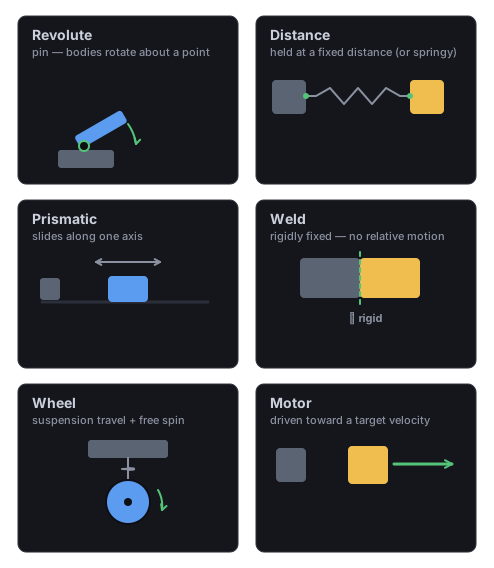
What each joint constrains: a Revolute hinge (rotate about a pin), a Distance spring/rod, a Prismatic slider (one axis), a rigid Weld, a Wheel (suspension + free spin), and a Motor (driven toward a target velocity).
Connect two bodies. Add a joint component (RevoluteJoint, DistanceJoint,
PrismaticJoint, WeldJoint, WheelJoint, MotorJoint), or create one imperatively
and drive its motor / limits:
// A hinge with a motor (a powered wheel or swinging door).physics.createRevoluteJoint(bodyA, bodyB, anchorA, anchorB, {  enableMotor: true, motorSpeed: 6, maxMotorTorque: 200,  enableLimit: true, lowerAngle: -1.0, upperAngle: 1.0,});
physics.setRevoluteMotorSpeed(bodyA, 10);physics.setRevoluteLimits(bodyA, -0.5, 0.5);const angle = physics.getRevoluteAngle(bodyA);physics.destroyJoint(bodyA);
Each joint type has a parallel set of control methods:
| Joint | Control methods |
|---|---|
| Revolute (hinge) | setRevoluteMotorSpeed, setRevoluteMaxMotorTorque, enableRevoluteMotor, enableRevoluteLimit, setRevoluteLimits, getRevoluteAngle, getRevoluteMotorTorque. |
| Distance (spring) | setDistanceJointLength, getDistanceJoint*Length, enableDistanceJointSpring/Limit/Motor, setDistanceJointLimits, setDistanceJointMotorSpeed, … |
| Prismatic (slider) | getPrismaticJointTranslation/Speed, enablePrismaticJointSpring/Limit/Motor, setPrismaticJointLimits/MotorSpeed/MaxMotorForce, … |
| Wheel | enableWheelJointSpring/Limit/Motor, setWheelJointLimits/MotorSpeed/MaxMotorTorque, getWheelJointMotorTorque. |
| Motor | setMotorJointLinearVelocity, setMotorJointAngularVelocity, setMotorJointMaxVelocityForce, setMotorJointMaxVelocityTorque. |
Destroy any joint with destroyJoint(bodyA).
The motor joint drives body B toward a target velocity (or spring-held offset) relative to body A — a conveyor, a driven platform, or anything that should move under its own power:
// A conveyor: drive the crate toward +x at a fixed speed.world.insert(crate, MotorJoint, { connectedEntity: anchor, linearVelocity: { x: 200, y: 0 }, // world px/s maxVelocityForce: 500, // newtons available to reach it});physics.setMotorJointLinearVelocity(crate, { x: -200, y: 0 }); // reverse at runtimeIn the editor
Section titled “In the editor”Scene-authored joints draw a gizmo in the viewport: a dashed link between the two
anchors, with the anchor dots draggable — dragging writes anchorA / anchorB
in the owning body’s local frame. Prismatic and wheel joints also show their slide
axis; drag its tip to re-aim the axis. Motor joints show an arrow along their target
linear velocity. The whole family (colliders, one-way arrows, joints) is toggled by
the Physics entry in the viewport’s Show Flags.
One-way platforms
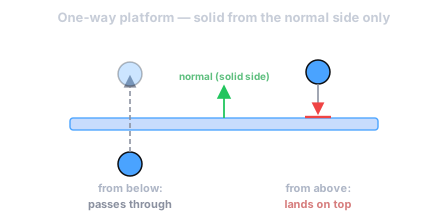
Section titled “One-way platforms”Add OneWayPlatform to a static (or kinematic) collider to make it one-sided — a
body lands on it from one direction and passes through from the others. This is the
classic jump-up-through-a-ledge behaviour, built on Box2D’s pre-solve callback (zero
cost when no one-way platforms exist):
import { OneWayPlatform } from 'esengine/physics';
const platform = world.spawn('ledge');world.insert(platform, Transform, { position: { x: 0, y: 0 } });world.insert(platform, RigidBody, { bodyType: BodyType.Static });world.insert(platform, BoxCollider, { halfExtents: { x: 2, y: 0.2 } });world.insert(platform, OneWayPlatform, { normal: { x: 0, y: 1 } }); // solid top: land from above, pass from below
normal is the solid-side direction in world space; { x: 0, y: 1 } (the default)
means “solid top”. Set enabled: false to turn the platform back into a normal solid.
In the editor, a one-way platform’s collider gizmo grows an arrow along the solid-side
normal, so which way it carries is visible at a glance.
Mouse / drag joint
Section titled “Mouse / drag joint”To let the player drag a body with the pointer, use the drag-joint API. Box2D v3 has no dedicated mouse joint, so this is its canonical replacement — a spring that pulls the body toward a moving target. Create it on pointer-down (grabbing the body at the cursor), move the target on pointer-move, and destroy it on pointer-up:
// pointer down — grab the body at the world-space cursor:physics.createMouseJoint(entity, cursorWorld); // maxForce auto-sizes to the body// pointer move:physics.setMouseTarget(cursorWorld);// pointer up:physics.destroyMouseJoint();Only one drag is live at a time. Pass { hertz, dampingRatio, maxForce } to tune the
spring’s stiffness and grip.
Character controller
Section titled “Character controller”For a player that walks along surfaces instead of tumbling like a dynamic body, add
a CharacterController. Set its velocity from gameplay each step; the controller
advances it one step with Box2D’s native kinematic mover (b2World_CollideMover
b2SolvePlanes) — it collides the body into contact planes and solves a depenetrating slide, so a character resting on the ground slides and jumps cleanly instead of sticking to it. It writes the resolved pose back and reports what it touched:
import { defineSystem, Query, Mut, CharacterController } from 'esengine';
const drive = defineSystem([Query(Mut(CharacterController))], (q) => {  for (const [entity, cc] of q) {    cc.velocity = { x: input.moveX * 240, y: cc.velocity.y - 900 * dt };  // gravity    if (cc.isOnFloor && jumpPressed) cc.velocity.y = 480;  }});
Give the entity a collider (the mover shape is derived from it — a box becomes a
capsule inscribed along its longer axis) and, if other bodies should collide with
the character, a Kinematic RigidBody. The mover excludes the character’s own
body automatically, so its maskBits need not avoid its own collision layer. Drive
velocity from a fixed-timestep system so motion is frame-rate independent; read the
isOnFloor edge for jumps (delivered correctly to FixedUpdate — see
Input).
| Property | Type | Default | Description |
|---|---|---|---|
velocity |
Vec2 | {0, 0} |
Desired velocity in world pixels/second (set each step). |
up |
Vec2 | {0, 1} |
Up direction for floor/ceiling classification. |
floorMaxAngle |
number | 0.785 |
Max walkable slope from up, radians (45°). |
skinWidth |
number | 1 |
Gap kept off surfaces (pixels) so the body doesn’t stick or jitter. |
maxSlides |
number | 4 |
Max depenetration slide iterations per move (clamped to ≥1). |
snapLength |
number | 0 |
Down-probe length (pixels) that glues the body to descending stairs/slopes; 0 disables it. Skipped while rising, so a jump still leaves the ground. |
slideOnCeiling |
boolean | true |
When false, a ceiling hit cancels the upward velocity instead of sliding along it. |
maskBits |
number | 0xFFFF |
Layers that block the character. |
isOnFloor / isOnWall / isOnCeiling |
boolean | — | Output: what was touched this move. |
floorNormal |
Vec2 | — | Output: normal of the last floor touched. |
realVelocity |
Vec2 | — | Output: actual displacement / dt after collisions. |
Debug draw
Section titled “Debug draw”The physics plugin installs a PhysicsDebugDraw resource — an in-game overlay
that strokes collider outlines, velocity vectors, and contact points through the
Draw API. It ships disabled; flip enabled from any
system to see exactly what the solver sees:
import { defineSystem, Res, Input } from 'esengine';import { PhysicsDebugDraw } from 'esengine/physics';
const toggleDebug = defineSystem([Res(Input), Res(PhysicsDebugDraw)], (input, dbg) => {  if (input.isKeyPressed('F1')) dbg.enabled = !dbg.enabled;});
PhysicsDebugDrawConfig field |
Default | Draws |
|---|---|---|
enabled |
false |
Master switch for the whole overlay. |
showColliders |
true |
Collider outlines, color-coded by body: blue = static, green = dynamic, cyan = kinematic; sensors are yellow. |
showVelocity |
false |
A red arrow per dynamic body along its linear velocity. |
showContacts |
false |
A red dot at each contact that began this frame. |
The overlay draws in world pixels at each body’s live transform (scaled by the
live PPU), so what you see is exactly where the queries agree the collider is.
setupPhysicsDebugDraw(app, Physics, PhysicsEvents) is the wiring PhysicsPlugin
runs for you — it inserts the resource and registers the draw callback; call it (or
the underlying per-frame drawPhysicsDebug(app, Physics, PhysicsEvents)) only from
a custom host that bypasses the plugin.
Best practices
Section titled “Best practices”- Fixed timestep: apply continuous forces and read
PhysicsEventsevery frame, since physics substeps independently of the frame delta. bullet: trueon fast, thin bodies (bullets, thin platforms) to avoid tunneling.fixedRotation: truefor characters so they don’t topple.- Colliders and the solver in meters, queries and the character controller in
pixels — mixing the two is the most common bug; convert with
physics.getPixelsPerUnit()(see Units). - Sensors for triggers:
isSensor: truegives enter/exit events with no physical push. - Filter with layers (
categoryBits/maskBits) instead of checking entity types in event handlers.
See also
Section titled “See also”- Scenes — physics components serialize with the scene.
- Math Helpers — vector math for velocities and directions.