Particles
Particles drive effects like fire, smoke, explosions, sparks, rain, and magic.
Estella simulates them on the CPU in the C++/WebAssembly core and renders them
GPU-instanced in a single draw call per emitter, so a scene can run thousands
of particles cheaply. You describe an effect declaratively with one
ParticleEmitter component and control playback through the Particle resource.
How it works
Section titled “How it works”An emitter owns a fixed pool of up to maxParticles. Each frame it spawns new
particles at rate per second (plus optional bursts), and each particle:
- Spawns somewhere inside the emitter shape, with a velocity whose speed and direction are picked randomly between the configured min/max.
- Lives for a random
lifetimeMin…lifetimeMaxseconds, during which its color and size animate from their start value to their end value. - Moves under its own velocity plus
gravityanddamping, optionally spinning (angularVelocity). - Dies and returns to the pool when its lifetime elapses.
Everything is randomized per particle between a …Min and …Max pair — set
them equal for a uniform look, or spread them apart for variety. Over-life
animation uses startColor/endColor + startSize/endSize with an easing
curve by default, or a full gradient/curve for precise control (see below).
The particle system ships in the main bundle. In the editor and the web runtime
the plugin is installed automatically. In a custom App, add it once:
import { particlePlugin } from 'esengine';
app.addPlugin(particlePlugin);
Quick start
Section titled “Quick start”Attach a ParticleEmitter to an entity and it starts emitting (playOnStart is
on by default). This makes a looping fountain of embers that fade from yellow to
transparent red and arc under gravity:
import {  defineSystem, Commands, Transform, ParticleEmitter, EmitterShape,} from 'esengine';
const spawnEmbers = defineSystem([Commands()], (cmds) => {  cmds.spawn()    .insert(Transform, { position: { x: 0, y: -200, z: 0 } })    .insert(ParticleEmitter, {      rate: 120,      lifetimeMin: 1.2, lifetimeMax: 2.0,      shape: EmitterShape.Cone, shapeAngle: 20,      speedMin: 300, speedMax: 520,      startSizeMin: 12, startSizeMax: 20,      endSizeMin: 0,  endSizeMax: 0,      startColor: { r: 1, g: 0.9, b: 0.3, a: 1 },      endColor:   { r: 1, g: 0.2, b: 0.1, a: 0 },      gravity: { x: 0, y: -400 },    });});
ParticleEmitter reference
Section titled “ParticleEmitter reference”Every field is optional — omit one and it takes the default below. Sizes, distances, and speeds are in world units (pixels at the default PPU); angles are in degrees.
Emission
Section titled “Emission”| Property | Type | Default | Description |
|---|---|---|---|
rate |
number | 10 |
Continuous emission, particles per second. 0 = bursts only. |
burstCount |
number | 0 |
Particles released per burst. 0 disables bursts. |
burstInterval |
number | 1 |
Seconds between bursts. |
duration |
number | 5 |
Seconds the emitter runs before stopping (see looping). |
looping |
boolean | true |
Restart after duration instead of stopping. |
playOnStart |
boolean | true |
Begin emitting as soon as the entity exists. |
maxParticles |
number | 1000 |
Pool size — the hard cap on live particles. |
Lifetime
Section titled “Lifetime”| Property | Type | Default | Description |
|---|---|---|---|
lifetimeMin |
number | 5 |
Shortest particle lifetime, seconds. |
lifetimeMax |
number | 5 |
Longest particle lifetime, seconds. |
Where particles spawn and their initial direction. See Emitter shapes.
| Property | Type | Default | Description |
|---|---|---|---|
shape |
EmitterShape |
Cone |
Point / Circle / Rectangle / Cone. |
shapeRadius |
number | 100 |
Radius for Circle / Cone. |
shapeSize |
Vec2 | {100, 100} |
Box extents for Rectangle. |
shapeAngle |
number | 25 |
Cone half-angle (°) for Cone. |
Velocity & forces
Section titled “Velocity & forces”| Property | Type | Default | Description |
|---|---|---|---|
speedMin |
number | 500 |
Slowest initial speed. |
speedMax |
number | 500 |
Fastest initial speed. |
angleSpreadMin |
number | 0 |
Start of the emission-direction arc (°). |
angleSpreadMax |
number | 360 |
End of the emission-direction arc (°). |
gravity |
Vec2 | {0, 0} |
Constant acceleration applied to every particle. |
damping |
number | 0 |
Velocity drag per second (0 = none). |
Noise & turbulence
Section titled “Noise & turbulence”| Property | Type | Default | Description |
|---|---|---|---|
noiseStrength |
number | 0 |
Peak flow speed (px/s) the turbulence pushes particles at. 0 = module off. |
noiseFrequency |
number | 0.01 |
Spatial scale of the field — larger = tighter, busier swirls. |
noiseScrollSpeed |
number | 0 |
How fast the field drifts over time (0 = a static field). |
noiseOctaves |
number | 1 |
Fractal detail layers. 1 = smooth flow; more = finer turbulence. |
See Noise & turbulence below.
Size over life
Section titled “Size over life”| Property | Type | Default | Description |
|---|---|---|---|
startSizeMin |
number | 100 |
Smallest size at spawn. |
startSizeMax |
number | 100 |
Largest size at spawn. |
endSizeMin |
number | 100 |
Smallest size at death. |
endSizeMax |
number | 100 |
Largest size at death. |
sizeEasing |
ParticleEasing |
Linear |
Interpolation from start to end size. |
sizeCurve |
Curve |
none | Full size-over-life curve; overrides start/end (see below). |
Color over life
Section titled “Color over life”| Property | Type | Default | Description |
|---|---|---|---|
startColor |
Color | {1,1,1,1} |
Color at spawn (RGBA, 0..1). |
endColor |
Color | {1,1,1,0} |
Color at death — default fades alpha to 0. |
colorEasing |
ParticleEasing |
Linear |
Interpolation from start to end color. |
colorGradient |
Gradient |
none | Full color-over-life gradient; overrides start/end. |
Rotation
Section titled “Rotation”| Property | Type | Default | Description |
|---|---|---|---|
rotationMin |
number | 0 |
Smallest spawn rotation (°). |
rotationMax |
number | 0 |
Largest spawn rotation (°). |
angularVelocityMin |
number | 0 |
Slowest spin (°/s). |
angularVelocityMax |
number | 0 |
Fastest spin (°/s). |
Texture & sprite sheet
Section titled “Texture & sprite sheet”| Property | Type | Default | Description |
|---|---|---|---|
texture |
asset | none | Particle texture. Untextured particles are soft quads. |
spriteColumns |
number | 1 |
Sprite-sheet columns (1 = whole texture). |
spriteRows |
number | 1 |
Sprite-sheet rows. |
spriteFPS |
number | 10 |
Frames per second when animating the sheet. |
spriteLoop |
boolean | true |
Loop the sheet vs. hold the last frame. |
Rendering & state
Section titled “Rendering & state”| Property | Type | Default | Description |
|---|---|---|---|
blendMode |
BlendMode |
Additive |
How particles composite. See Blend modes. |
layer |
number | 0 |
Sorting layer for draw order. |
material |
asset | none | Optional custom material/shader. |
simulationSpace |
SimulationSpace |
World |
World or Local (see below). |
enabled |
boolean | true |
Disable to freeze and hide without removing the component. |
Sub-emitter
Section titled “Sub-emitter”| Property | Type | Default | Description |
|---|---|---|---|
subEmitter |
entity | none | Child emitter entity fired when a particle triggers. 0/unset = off. |
subEmitterTrigger |
SubEmitterTrigger |
Death |
Fire on each particle’s Death or Birth. |
subEmitterChance |
number | 1 |
Probability (0..1) a triggering particle fires the child. |
subEmitterInheritVelocity |
number | 0 |
Fraction of the parent particle’s velocity passed to the sub-burst. |
See Sub-emitters below.
| Property | Type | Default | Description |
|---|---|---|---|
trailEnabled |
boolean | false |
Drag a tapering ribbon behind each particle. Off = no history recorded. |
trailWidth |
number | 8 |
Ribbon width at the head; tapers to a point at the tail. |
trailPoints |
number | 6 |
History length in points (2..12) — longer = smoother, costlier streaks. |
trailMinDistance |
number | 6 |
Min world distance a particle must move before a new trail point is recorded. |
See Per-particle trails below.
Emitter shapes
Section titled “Emitter shapes”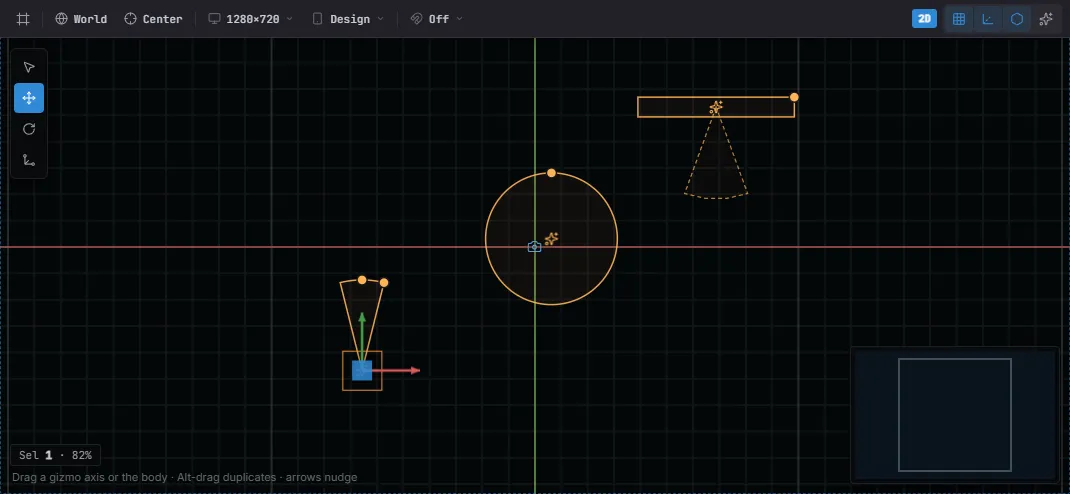
Emitter shape gizmos in the viewport — a cone, a circle, and a rectangle, each drawn where its particles spawn (turn on Preview FX to see them run in edit mode).
EmitterShape sets the spawn region and initial direction:
| Shape | Uses | Behavior |
|---|---|---|
Point |
— | All particles spawn at the entity origin. |
Circle |
shapeRadius |
Spawn inside a disc; direction radiates outward. |
Rectangle |
shapeSize |
Spawn inside a box. |
Cone |
shapeRadius, shapeAngle |
Spawn in a cone — a directed spray (fountains, thrusters). |
The angleSpreadMin…Max arc further constrains the launch direction, so you can
aim any shape (e.g. a Circle that only emits upward with 0…180).
Color & size over life
Section titled “Color & size over life”For most effects, startColor → endColor and startSize → endSize with an
easing curve are enough — these are plain fields, so they work from code and in
the editor. ParticleEasing values are Linear, EaseIn, EaseOut, and
EaseInOut.
For precise control, author a gradient (color) or curve (size multiplier)
in the ParticleEmitter inspector — a list of stops/keys over normalized life t
in 0..1. The engine bakes them into a lookup table the simulation samples by
particle age. The authored data looks like this:
// colorGradient: hot white -> orange -> smoke, fading out.{ stops: [ { t: 0.0, color: { r: 1, g: 1, b: 0.8, a: 1 } }, { t: 0.4, color: { r: 1, g: 0.5, b: 0.1, a: 1 } }, { t: 1.0, color: { r: 0.2, g: 0.2, b: 0.2, a: 0 } }, ],}// sizeCurve: swell in, then shrink away (multiplies the particle's start size).{ keys: [{ t: 0, v: 0.2 }, { t: 0.3, v: 1 }, { t: 1, v: 0 }] }To change the ramp procedurally at runtime, upload a pre-baked lookup table
through the resource — an N×4 RGBA Float32Array for color, an N-scalar array
for size. Pass null to clear it and fall back to start/end + easing:
import { defineSystem, Res, Particle } from 'esengine';
const recolor = defineSystem([Res(Particle)], (particles) => {  const lut = new Float32Array([ /* r,g,b,a, r,g,b,a, … */ ]);  particles.setColorLut(entity, lut);   // or particles.setColorLut(entity, null)});
Sprite-sheet animation
Section titled “Sprite-sheet animation”Point texture at a sprite sheet and set spriteColumns / spriteRows to animate
each particle across the frames at spriteFPS. A 4×4 explosion sheet, played once
over each particle’s life:
.insert(ParticleEmitter, { texture: 'effects/explosion.png', spriteColumns: 4, spriteRows: 4, spriteFPS: 24, spriteLoop: false,});Noise & turbulence
Section titled “Noise & turbulence”Straight-line particles look mechanical. The noise module layers a curl-noise flow field on top of velocity and gravity, so particles wander along smooth, swirling currents — smoke that curls, embers that flutter, magic that drifts.
The field is divergence-free (it’s the curl of a noise potential), which means
particles never bunch into clumps or thin out into gaps the way a raw random jitter
would — the motion stays even and organic. It’s pure CPU math, identical on every
platform (WeChat included), and completely free when noiseStrength is 0.
.insert(ParticleEmitter, { // …emission, lifetime, color… noiseStrength: 120, // how hard the current pushes (px/s) noiseFrequency: 0.01, // smaller = broad, lazy swirls; larger = tight eddies noiseScrollSpeed: 0.5, // let the field drift so the flow keeps evolving noiseOctaves: 2, // 1 = smooth; more = finer, busier turbulence});Tuning tips:
noiseStrengthis the headline dial — start around a fraction of your particles’speedand push up until the wander reads.noiseFrequencysets the swirl size. Rising smoke likes small values (~0.005); sparky, chaotic bursts like larger ones (~0.03).noiseScrollSpeed> 0 keeps a slow, static-looking plume alive; leave it0for a fixed field that particles simply flow through.noiseOctavestrades cost for detail —1–2covers most effects.
Sub-emitters
Section titled “Sub-emitters”A sub-emitter lets one emitter spawn another emitter’s burst at a particle’s position — the classic firework shell that rises and explodes, a rocket trailing smoke puffs, a spark that splits into embers. No per-frame code: you wire a reference and the sim fires the burst on the chosen event.
The child is an ordinary ParticleEmitter entity used as a template — set
rate: 0 and playOnStart: false so it never emits on its own; it only fires when
the parent triggers it. Its burstCount sets how many particles each sub-burst
spawns. Point the parent’s subEmitter at that child entity:
import { SubEmitterTrigger } from 'esengine';
// The burst template — a normal emitter that only fires when triggered.const shell = cmds.spawn()  .insert(Transform, {})  .insert(ParticleEmitter, {    rate: 0, playOnStart: false, burstCount: 44,   // 44 sparks per burst    lifetimeMin: 0.6, lifetimeMax: 1.1, speedMin: 160, speedMax: 340,    startColor: { r: 1, g: 0.85, b: 0.35, a: 1 }, endColor: { r: 1, g: 0.3, b: 0.1, a: 0 },    gravity: { x: 0, y: -150 },  }).id();
// The rocket — on each particle's death, fire the shell burst at that spot.cmds.spawn() .insert(Transform, { position: { x: 0, y: -230, z: 0 } }) .insert(ParticleEmitter, { rate: 2.5, lifetimeMin: 1.4, lifetimeMax: 1.8, speedMin: 560, speedMax: 660, angleSpreadMin: 84, angleSpreadMax: 96, subEmitter: shell, subEmitterTrigger: SubEmitterTrigger.Death, // or Birth subEmitterInheritVelocity: 0.15, // carry a little of the rocket's motion });subEmitterTrigger—Deathfires as each parent particle expires (shell explosions, debris);Birthfires as each is born (a continuous shower of sub-bursts along a stream).subEmitterChance— set below1so only some particles fire the child, thinning out a dense effect.subEmitterInheritVelocity— pass a fraction of the parent particle’s velocity into the burst so the sparks fly with the rocket, not just outward.
In the editor, subEmitter is an entity picker — drop in any emitter entity from
the scene; the reference is remapped automatically when the scene loads.
Per-particle trails
Section titled “Per-particle trails”Turn on trailEnabled and every particle drags a tapering ribbon along its recent
path — comet sparks, tracer rounds, swirling magic streaks. This is distinct from
the standalone TrailRenderer, which trails a single entity; here
each of the (up to thousands of) particles gets its own streak.
.insert(ParticleEmitter, { rate: 40, speedMin: 220, speedMax: 420, lifetimeMin: 0.7, lifetimeMax: 1.2, startColor: { r: 0.6, g: 0.9, b: 1, a: 1 }, endColor: { r: 0.2, g: 0.4, b: 1, a: 0 }, trailEnabled: true, trailWidth: 10, // ribbon width at the particle, tapering to a point behind trailPoints: 8, // how many path points to keep (2..12) trailMinDistance: 5, // record a point every 5 world units of movement});The ribbon takes the particle’s current colour at the head and fades to
transparent along its length, so trails inherit your colour-over-life automatically.
It’s built on the CPU and streamed through the same triangle-strip batch path as
TrailRenderer — no special GPU path — so it sorts and blends like every other 2D
renderable.
Trails are opt-in because they cost more than plain particles: a short position
history per particle (bounded by trailPoints) plus ribbon geometry each frame. Keep
trailPoints modest (6–8 is plenty) and lower maxParticles for heavy trailed
effects.
Force fields
Section titled “Force fields”Where the Noise module is a per-emitter turbulence baked into
one emitter, a force field is an external influence you place in the scene: it’s
its own entity with a ParticleForceField component, and it acts on the world-space
particles of every emitter within range. Wind gusts, black holes, whirlpools,
pockets of still air — drop one in and the whole scene’s particles respond.
import { ParticleForceField, ForceFieldType } from 'esengine';
cmds.spawn() .insert(Transform, { position: { x: 0, y: 0, z: 0 } }) .insert(ParticleForceField, { type: ForceFieldType.Vortex, strength: 450, // acceleration (px/s²); negative flips a Point field to a repeller radius: 320, // 0 = affects the whole scene; > 0 = only particles within range falloff: true, // fade the force to 0 at the radius edge });| Type | Effect |
|---|---|
Directional |
A constant push along direction — wind, updrafts, a current. |
Point |
Pull toward the field (strength > 0) or push away (strength < 0) — gravity wells, explosions. |
Vortex |
Swirl tangentially around the field — whirlpools, tornadoes, galaxies. |
Drag |
Damp velocity inside the zone — a pocket of still air or water that slows particles. |
Fields are pure-CPU: the sim gathers the active ones each frame and folds them into the
same velocity integration as gravity, so there is no new subsystem. A Directional
field uses its direction; Point/Vortex/Drag derive their direction from the
field→particle vector and ignore it.
Two caveats: fields act on world-space particles only (a Local emitter’s particles
move with their emitter and ignore fields), and strength: 0 or enabled: false skips
a field entirely.
Floor collision
Section titled “Floor collision”Turn on collisionEnabled and particles bounce off a horizontal floor plane at
world height collisionFloor — rain splashing on the ground, sparks skittering across
a surface, snow settling. It’s self-contained CPU collision with no physics dependency.
.insert(ParticleEmitter, { rate: 60, speedMin: 200, speedMax: 400, shape: EmitterShape.Cone, shapeAngle: 50, gravity: { x: 0, y: -500 }, collisionEnabled: true, collisionFloor: -200, // world Y the particles land on collisionBounce: 0.5, // 0 = stop dead, 1 = fully elastic collisionFriction: 0.2, // horizontal speed shed per bounce collisionLifetimeLoss: 0.1, // fraction of life burned per bounce (fade as they settle)});When a world-space particle falls below collisionFloor, it’s snapped back to the
plane and its vertical velocity is reflected and scaled by collisionBounce;
collisionFriction bleeds off horizontal speed and collisionLifetimeLoss ages it so
splashes fade out instead of skittering forever.
Simulation space
Section titled “Simulation space”| Value | Particles follow the emitter? | Use for |
|---|---|---|
World (default) |
No — they stay where they were born | Trails, exhaust, sparks left behind a moving object |
Local |
Yes — they move with the entity’s transform | Auras, shields, effects rigidly attached to a mover |
Blend modes
Section titled “Blend modes”BlendMode controls how particles composite over the scene:
| Mode | Effect |
|---|---|
Normal |
Standard alpha blending. |
Additive (default) |
Colors add — glows, fire, magic, light. |
Multiply |
Darkens — smoke, shadow. |
Screen |
Brightens, softer than additive. |
PremultipliedAlpha |
For textures with premultiplied alpha. |
Controlling playback — Res(Particle)
Section titled “Controlling playback — Res(Particle)”Read the Particle resource in a system (or app.getResource(Particle) outside
ECS) to drive an emitter imperatively:
import { defineSystem, Res, Particle } from 'esengine';
const control = defineSystem([Res(Particle)], (particles) => { particles.play(entity); // start / resume emitting particles.stop(entity); // stop emitting (live particles finish) particles.reset(entity); // clear all live particles immediately const n = particles.getAliveCount(entity); // live particle count});| Method | Description |
|---|---|
play(entity) |
Start or resume emission. |
stop(entity) |
Stop emitting; existing particles live out their lifetime. |
reset(entity) |
Kill all live particles and reset the emitter. |
getAliveCount(entity) |
Number of currently live particles. |
setColorLut(entity, lut | null) |
Upload a baked color LUT (see above), or clear. |
setSizeLut(entity, lut | null) |
Upload a baked size LUT, or clear. |
Performance & best practices
Section titled “Performance & best practices”- Budget
maxParticles. It’s a fixed pool; size it to the worst case, not higher. Many small emitters beat one huge one for culling. - Prefer
Additivefor light (fire, sparks, magic) — it hides overdraw and needs no sorting. ReserveNormal/Multiplyfor opaque smoke/dust. - Atlas particle textures and share one
materialso emitters batch. - Spread min/max for natural variety; equal min/max reads as mechanical.
- Reuse emitters via
reset+playinstead of spawning/despawning. - In game code particles advance in play mode; in the editor the Preview FX toggle keeps them live while you author.
See also
Section titled “See also”- Materials & Shaders — custom particle materials.
- Post-processing — bloom over additive particles.
- Assets — loading particle textures and atlases.