Markers & Trigger Areas
A Marker is a named point of gameplay interest — a spawn point, a waypoint, a
door, a pickup location — placed in the editor as a real ECS entity. A Trigger
Area is a Marker plus a sensor collider: a region that fires overlap events when a
body enters it. Together they are Estella’s modern “object layer”: instead of a
parallel data structure you reach through a loader, gameplay objects are plain
entities you select, edit in the Inspector, serialize with the scene, and read with
Query(Marker).
How it works
Section titled “How it works”A Marker is just the Marker component (a type string and a free-form
properties map) on an entity that also has a Transform. On its own it’s a
point — the game asks “where do I spawn the player?” by querying markers of a given
type. Add a static RigidBody and a sensor collider and
the same entity becomes a trigger zone; the Trigger Area preset wires all of
that up for you.
Because a Marker is pure ECS, there is nothing special to load or parse:
- It serializes with the scene like any component.
- It shows in the Inspector, including a key→value editor for its properties.
- It’s
Query-able — one code path reads markers you placed by hand and markers imported from a Tiled.tmjobject layer.
The type vocabulary is entirely yours: spawn, waypoint, door, chest,
checkpoint — the game defines what the strings mean.
Marker lives in the main esengine barrel — no plugin needed to place or query
one. A Trigger Area carries a sensor collider, so it needs physics:
in the editor and web runtime the physics module loads automatically when a scene
uses physics components; in a custom app, add the plugin yourself:
import { PhysicsPlugin } from 'esengine/physics';
app.addPlugin(new PhysicsPlugin('physics.js'));
Place one in the editor
Section titled “Place one in the editor”Create → Common → Marker drops a named point at the scene origin; Create → Physics → Trigger Area drops a sensor region (Transform + static RigidBody + sensor BoxCollider + Marker). A Marker shows a pin gizmo in the viewport; a Trigger Area also draws its collider outline, which you shape with the same collider gizmo as any other body.
In the Inspector, set the marker’s Type and add any number of custom
properties (a key→value map — targetScene: "level2", team: "red", and so on).
Both survive save/load and travel into the build.
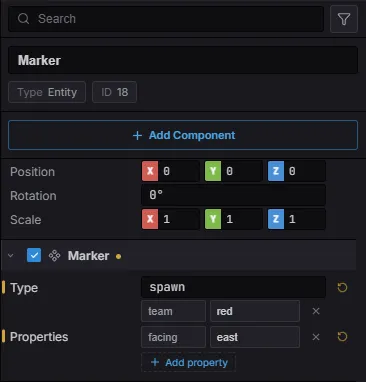
A spawn marker in the Inspector: the Type drives Query(Marker), and each
Properties row is one entry of the free-form string→string map.
Quick start
Section titled “Quick start”Place a few Markers of type spawn in the editor, then read them at startup to
position the player:
import { defineSystem, Commands, Query, Marker, Transform } from 'esengine';
// Runs once: find every spawn marker and place the player at the first one.const placePlayer = defineSystem([Commands(), Query(Marker, Transform)], (cmds, markers) => {  for (const [entity, marker, transform] of markers) {    if (marker.type !== 'spawn') continue;    cmds.spawn().insert(Transform, { position: { ...transform.position } });    // …then chain .insert(Player, {…}), .insert(Sprite, {…}), and so on.    break;  }});
marker.properties carries the per-marker data — read marker.properties.targetScene,
marker.properties.team, and the like as plain strings.
Marker component reference
Section titled “Marker component reference”| Property | Type | Default | Description |
|---|---|---|---|
type |
string | '' |
Gameplay identity — the kind of marker (spawn, waypoint, door, …). Query(Marker) filters on it. Free-form; the game defines the vocabulary. |
properties |
Record<string, string> |
{} |
Arbitrary per-marker data (team, targetScene, event, …), edited as a key→value map in the Inspector. Imported .tmj object properties land here too. |
Trigger Areas
Section titled “Trigger Areas”A Trigger Area is the Create preset for a sensor region: a Transform, a static
RigidBody (bodyType: 0), a BoxCollider with isSensor: true, and a Marker.
Because the collider is a sensor it detects overlaps without a physical response —
nothing bounces off a trigger; it just reports who entered.
Read entries and exits from the PhysicsEvents resource. Each sensor event names the
sensorEntity (the trigger) and the visitorEntity (the body that crossed it), so
you can look up the trigger’s Marker to decide what it does:
import { defineSystem, Res, Query, Marker } from 'esengine';import { PhysicsEvents } from 'esengine/physics';
const onTrigger = defineSystem([Res(PhysicsEvents), Query(Marker)], (events, markers) => {  const markerOf = (e) => {    for (const [entity, marker] of markers) if (entity === e) return marker;    return null;  };  for (const s of events.sensorEnters) {    const m = markerOf(s.sensorEntity);    if (m?.type === 'door') loadScene(m.properties.targetScene);    if (m?.type === 'hazard') damage(s.visitorEntity, Number(m.properties.dps));  }  for (const s of events.sensorExits) { /* left the zone — clear an effect, etc. */ }});
Keep sensors cheap in a busy world by putting triggers and the bodies that should notice them on dedicated collision layers, so each sensor’s mask narrows what it considers. See Collision & sensor events for the full event surface.
Imported from Tiled
Section titled “Imported from Tiled”When a Tilemap loads a .tmj map, its object layers
converge onto the same entities you author by hand — no separate structure to walk:
| Tiled object | Becomes |
|---|---|
| Point | A Marker (its type = the Tiled class, its custom properties → Marker.properties). |
| Rectangle / ellipse / polygon / polyline | A trigger Region — a Marker plus a matching sensor collider (or solid geometry when the object group is named collision). |
| Tile object (has a gid) | A sprite child of the map. |
So one Query(Marker) reads spawn points whether you dropped them in the Estella
editor or drew them in Tiled. (Imported objects are re-derived from the .tmj on each
load, so they exist in play mode only; hand-authored Markers are ordinary serialized
entities.) The raw object-group data is still available through getTilemapSource
if you need a shape’s exact vertices.
Best practices
Section titled “Best practices”- Type by role, detail by properties. A small, stable set of
typevalues the game switches on, with the variable data inproperties— not a newtypeper instance. - Query once where you can. Spawn points, waypoint graphs, and patrol routes are usually read at scene start; cache the result instead of re-querying every frame.
- Reuse one marker vocabulary across hand-authored scenes and imported Tiled maps — the query code doesn’t care where the marker came from.
- Trigger Areas are sensors — for anything you want to block (a wall, a ledge), paint a collision layer or use a non-sensor collider instead.
See also
Section titled “See also”- Tilemaps — collision (obstacle) layers and Tiled object layers that feed the same Markers.
- Physics — sensors, collision filtering, and the
PhysicsEventsresource behind Trigger Areas. - Scenes — Markers and Trigger Areas serialize with the scene.
- Event Binding — run an action when something enters a Trigger Area, authored on the area itself with no code.