Hot Update
A hot update ships a game once, then swaps out its assets — a texture, a sound, a prefab — from a CDN, so running clients pick up the new bytes without re-downloading the package or resubmitting to a store. It’s how a shipped mobile or mini-game title changes content after review.
Estella’s hot update is content-addressed, atomic (all-or-nothing, with a rollback), integrity-checked (tampered bytes are rejected), and transparent to game code (a built-in rebinder swaps the new asset into live sprites for you). The same mechanism runs on Web, Desktop, WeChat MiniGame, and native.
How it works
Section titled “How it works”Every cooked asset ships as <contentHash>.<ext> — an immutable, permanently
cacheable URL. Change one byte and the hash changes, so the asset becomes a
new URL; the old one is simply never referenced again. Nothing is ever
overwritten, so a cache can never go stale.
A hot update is therefore just four steps:
- Fetch the remote manifest (
asset-manifest.json) from the CDN. - Diff it against the manifest the game is running, by content hash.
- Download only the assets whose hash changed (and verify each one).
- Swap the active manifest — refs now resolve to the new URLs.
Because assets are content-addressed, the diff is a pure per-asset hash
comparison and applying it can never corrupt a cached file. The whole flow is
platform-uniform: the same asset-manifest.json drives every target.
Delivery groups
Section titled “Delivery groups”Which assets ship inside the package and which are served from a CDN is a per-folder decision called the asset’s delivery group. Every folder resolves to one of three modes:
| Mode | Bundle | Badge | Ships… | Use for |
|---|---|---|---|---|
| Local | eager | — | inside the package, loaded at boot | the game’s core assets |
| Subpackage | lazy | PKG (purple) |
inside the package, loaded on demand | large optional content, WeChat subpackages |
| Remote | remote | CDN (blue) |
from a CDN, hot-updatable | anything you want to change after shipping |
Only Remote groups are hot-updated — they’re the assets fetched from your CDN against a per-environment root. Local and Subpackage assets are baked into the build. (Subpackages are on-demand within the package; see Assets → Addressable groups.)
Mark a folder for CDN delivery
Section titled “Mark a folder for CDN delivery”In the Content Browser, right-click any folder and pick Delivery → Remote (CDN / hot-update). That’s the whole authoring step — the folder’s every asset (recursively) now ships from the CDN instead of the package.
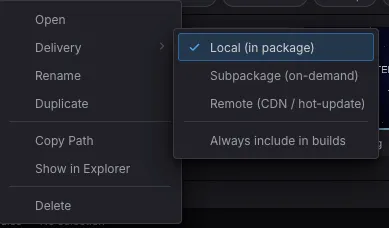
Content Browser → right-click a folder → Delivery → Local / Subpackage / Remote (CDN / hot-update). The choice is written to .esengine/asset-groups.json.
The same submenu carries Always include in builds — an independent toggle that keeps the folder in a build even when nothing in it is reachable from a scene. See Assets.
A folder assigned to a Subpackage or Remote group carries a corner badge so
you can see the delivery layout at a glance — CDN (blue) for remote, PKG
(purple) for subpackage.
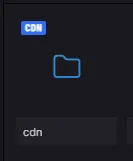
The cdn folder wears a blue CDN badge — its assets are delivered remotely and can be hot-updated.
The delivery decision is decoupled from the folder name — any ordinary folder
can be a remote group. (The legacy convention where a remote/<name>/ or
subpackages/<name>/ folder name implied delivery still works as a zero-config
fallback when a project has no asset-groups.json.)
Set the CDN root
Section titled “Set the CDN root”Remote-group assets need a root URL to fetch from — your CDN. It’s a build
profile setting, so dev and prod can point at different CDNs, and the
export bakes the active profile’s root into the shipped game. Set it in the
Package Project dialog (File → Build…), under Advanced:
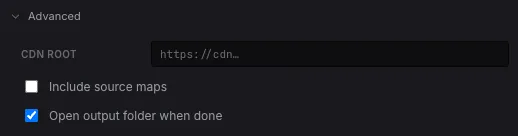
The CDN root field writes the active profile’s remoteRoot to asset-groups.json. Leave it empty to load remote assets same-origin (e.g. for local testing).
.esengine/asset-groups.json
Section titled “.esengine/asset-groups.json”Both settings above are stored in one authored file, the single source of truth the cook and the editor’s Play realm read through one resolver (so they can never disagree about where an asset ships):
{ "version": "1.0", "groups": { "cdn": { "folder": "assets/cdn", "mode": "remote" } }, "activeProfile": "dev", "profiles": { "dev": { "remoteRoot": "" }, "prod": { "remoteRoot": "https://cdn.example.com/my-game" } }}| Field | Type | Description |
|---|---|---|
version |
string |
Config version ("1.0"). |
groups |
Record<name, {folder, mode}> |
Folder → delivery assignments. |
groups.<name>.folder |
string |
Project-relative folder; every asset under it (recursively) joins the group. The longest matching prefix wins when folders nest. |
groups.<name>.mode |
'local' | 'subpackage' | 'remote' |
Delivery mode. |
groups.<name>.alwaysInclude |
boolean |
Ship the group even when nothing in the build reaches it — for assets only your code names (a url, a path, rich-text markup). Off by default. See Assets. |
activeProfile |
string |
Which profile the build uses (key into profiles). |
profiles.<name>.remoteRoot |
string |
CDN root that this profile’s remote-group assets are served from. Empty ⇒ same-origin. |
What the build ships
Section titled “What the build ships”Every Web / Desktop export always writes an asset-manifest.json (the
addressable manifest) next to the game — that’s what a client diffs against for a
hot update. When the active profile has a CDN root, the export also bakes a
hotUpdate block into game.config.json:
{ "hotUpdate": { "remoteRoot": "https://cdn.example.com/my-game", "persistUpdateKey": "esengine:hotupdate" }}The shipped runtime reads this and wires itself up automatically at boot:
remoteRootis applied, so remote-group@uuidrefs resolve to the CDN.persistUpdateKey(defaults toesengine:hotupdatewhenever a root is set) makes the runtime restore any previously-applied update at boot — a returning player starts on the already-updated content, even offline.- The built-in rebinder is installed, so an applied update swaps into live sprites with no game code.
You publish an update by uploading the newly-cooked assets and the fresh
asset-manifest.json to your CDN. Because URLs are content-addressed, uploading
is purely additive — the old files stay valid for clients that haven’t updated.
Triggering an update at runtime
Section titled “Triggering an update at runtime”The runtime is auto-configured, but something has to ask “is there an update?”. That’s a single call the game makes — at boot, behind a Check for updates button, or on a timer.
Quick start
Section titled “Quick start”import { defineSystem, Res, Schedule, Assets } from 'esengine';
async function pullUpdate(assets: Assets): Promise<void> { // 1. Fetch the CDN manifest and diff it against the running one (downloads nothing). const plan = await assets.checkForUpdate({ manifestUrl: 'https://cdn.example.com/my-game/asset-manifest.json', remoteRoot: 'https://cdn.example.com/my-game', }); if (!plan.hasUpdate) return; console.log(`Update available: ${plan.changedAssets.length} files, ${(plan.totalBytes / 1024) | 0} KB`);
// 2. Download + verify every changed asset, then swap the manifest — atomically. const result = await assets.applyUpdate((loaded, total) => { console.log(`Downloading ${loaded}/${total}`); }); if (result.ok) console.log(`Applied — ${result.updated} assets updated`); else console.warn('Update failed, rolled back:', result.failed);}
// Run it once at startup (guarded so the async check fires a single time).let checked = false;const checkForUpdates = defineSystem([Res(Assets)], (assets) => { if (checked) return; checked = true; void pullUpdate(assets);});// app.addSystems(Schedule.Update, checkForUpdates)checkForUpdate is the “is there an update, and how big?” query — it fetches the
candidate manifest and returns a plan but downloads no assets, so
you can show a prompt (N files, K KB) before committing. applyUpdate then does
the download and swap.
Zero-code rebinding
Section titled “Zero-code rebinding”When a scene references an asset by @uuid and that asset lives in a remote
group, applyUpdate does everything — it downloads the new bytes, swaps the
manifest, and the built-in rebinder replaces the old texture in every live
Sprite and Mesh2D on screen. The picture changes on its own; the scene author
writes nothing. (The hot-update-demo example’s game code is literally empty.)
For anything the built-in rebinder doesn’t cover — a texture you bound manually, a
sound, a custom system — subscribe to onInvalidate and rebind yourself:
const unsub = assets.onInvalidate((ref) => { // `ref` was just invalidated by an update — reload it and rebind wherever you use it. void assets.loadTexture(ref).then((tex) => { /* assign tex.handle */ });});API reference
Section titled “API reference”The hot-update surface lives on the Assets resource (Res(Assets)):
| Method | Returns | Description |
|---|---|---|
checkForUpdate(options) |
Promise<UpdatePlan> |
Fetch a candidate manifest, diff it against the active one, and stage it. Downloads no assets. |
applyUpdate(onProgress?) |
Promise<ApplyUpdateResult> |
Apply the staged update atomically: download + verify every changed asset, then swap the manifest, rebind live handles, and persist. onProgress(loaded, total) reports download progress. |
restorePersistedUpdate(key) |
boolean |
At boot, restore the manifest a prior applyUpdate persisted under key. The runtime calls this for you when persistUpdateKey is set. |
setRemoteRoot(url?) |
void |
Point remote-group resolution at a CDN root (undefined clears it → same-origin). The runtime sets this from the build’s remoteRoot. |
remoteRoot |
string | undefined |
The active CDN root (getter). |
onInvalidate(listener) |
() => void |
Subscribe to per-ref invalidations (for custom rebinding). Returns an unsubscribe function. |
loadGroup(name, onProgress?) |
Promise<AssetBundle> |
Load a whole group on demand (the DLC pattern — see below). |
releaseGroup(name) |
void |
Release everything loadGroup(name) acquired. |
CheckForUpdateOptions
| Field | Type | Description |
|---|---|---|
manifestUrl |
string |
URL of the candidate (remote) manifest JSON. |
remoteRoot |
string (optional) |
CDN root the candidate’s remote-group assets are served from. Defaults to the current root. |
UpdatePlan (returned by checkForUpdate)
| Field | Type | Description |
|---|---|---|
hasUpdate |
boolean |
True iff any asset is new or content-changed. |
changedAssets |
AssetChange[] |
New / content-changed assets to download. |
removedAssets |
AssetChange[] |
Assets present before but gone now (informational; never downloaded). |
changedGroups |
string[] |
Distinct groups owning ≥1 changed asset. |
totalBytes |
number |
Sum of changedAssets sizes — the download estimate for a progress UI. |
fromRevision / toRevision |
string | null |
The old / new manifest revisions. |
ApplyUpdateResult (returned by applyUpdate)
| Field | Type | Description |
|---|---|---|
ok |
boolean |
True only when every changed asset downloaded + verified and the manifest was swapped. |
updated |
number |
How many assets were applied (0 on failure). |
failed |
AssetDownloadFailure[] |
Why it rolled back — each { path, reason: 'fetch' | 'integrity' }. |
On-demand groups (DLC)
Section titled “On-demand groups (DLC)”Beyond hot updates, a remote group is also a downloadable content channel: a game can pull a whole group when the player reaches the content it backs, and release it when they leave.
// Player enters "world 2" — pull its remote group from the CDN.const bundle = await assets.loadGroup('world2', (loaded, total) => { showProgress(loaded / total);});// ...later, player leaves:assets.releaseGroup('world2');loadGroup warms the cache through the same typed loaders as everything else, and
releaseGroup reference-counts the release — an asset another scene still holds
survives. See Assets → Addressable groups
for the group model in full.
Integrity, atomicity & rollback
Section titled “Integrity, atomicity & rollback”applyUpdate is two-phase and all-or-nothing:
- Download + verify. Every changed asset is fetched and its bytes are hashed
and compared to the manifest’s
contentHash. A download that fails, or bytes that don’t match (a corrupted or tampered CDN response), is recorded as a failure. The active manifest is not touched during this phase. - Commit. Only if every asset succeeded does the update commit — the manifest and root swap, live handles rebind, and the new manifest persists.
If phase 1 turns up any failure, nothing is applied: the old manifest stays
active (a clean rollback) and applyUpdate returns { ok: false, failed }. A
half-applied update is impossible.
Persistence & offline
Section titled “Persistence & offline”When persistUpdateKey is set (the export does this automatically), applyUpdate
saves the applied manifest to platform storage. At the next boot the runtime calls
restorePersistedUpdate(key) and the player starts directly on the updated
content — even with no network. On native and mini-game targets the verified
bytes are also written to a content-addressed disk cache, so updated assets
load offline without re-hitting the CDN.
Platform support
Section titled “Platform support”| Target | Manifest + diff | CDN fetch | Persist | Disk cache |
|---|---|---|---|---|
| Web | ✅ | ✅ (CORS/CSP apply) | localStorage |
browser HTTP cache |
| Desktop | ✅ | ✅ | ✅ | ✅ (content-addressed) |
| WeChat MiniGame | ✅ | ✅ | ✅ | ✅ |
| Native (iOS / Android) | ✅ | ✅ | ✅ | ✅ |
The manifest diff is pure and platform-agnostic; only the fetch, storage, and disk-cache primitives differ per platform, and the runtime picks the right one.
Best practices
Section titled “Best practices”- Put hot-updatable content in its own folder and mark it Remote — keep the core game local so the package boots without a network.
- Gate the check behind a boot-time run-once guard or a “Check for updates”
button; don’t call
checkForUpdateevery frame. - Show the size.
checkForUpdategives youtotalBytesand the file count before you commit — prompt the player before a large download on mobile data. - Handle
ok: false. A failed update rolls back cleanly; retry later rather than assuming success. - Use profiles. Point
devat a test bucket (or empty for same-origin) andprodat your real CDN, so a build ships the right root automatically. - Version by manifest URL. A staged rollout / A-B channel is just a different
manifestUrl— hand different clients different manifests off the same CDN.
See also
Section titled “See also”- Assets — references, the manifest, typed loaders, and the group model.
- Building & Exporting — where the CDN root and
asset-manifest.jsoncome from. - WeChat MiniGame — how subpackages map to the delivery groups here.