Materials & Shaders
A material is a shader plus parameters. Renderers that support materials —
Sprite, SpineAnimation, ParticleEmitter, Mesh2D, and UIVisual — expose a
material handle field; set it to draw with your own shader instead of the default.
How it works
Section titled “How it works”You author an .esshader that declares its tunable parameters with #pragma param.
The engine reflects those into a std140 uniform block, so the CPU can set them by
name and they reach the GPU safely. A Material binds a compiled shader to a set of
parameter values; assigning its handle to a renderer’s material field draws that
renderer with it.
Built-in shader templates
Section titled “Built-in shader templates”You rarely start from a blank file. The Content Browser’s New Material submenu
creates a material from a built-in template — the same list ships in code as
BUILTIN_SHADER_TEMPLATES:
| Template | builtin: id |
What it does |
|---|---|---|
| Unlit | sprite-unlit |
Texture × vertex color × u_tint. The plain default. |
| Lit | sprite-lit |
Lit by the scene’s 2D lights; u_tint + optional u_normalMap. |
| Hit Flash | sprite-hit-flash |
Blends toward u_flashColor by u_flash — drive it from code for damage blinks. |
| Outline | sprite-outline |
Colored silhouette outline (u_outlineColor, u_outlineWidth in texels). |
| Dissolve | sprite-dissolve |
Noise burn-away with a glowing edge (u_progress 0→1). |
| Pixelate | sprite-pixelate |
Quantizes UVs to a u_pixels grid. |
| UV Scroll | sprite-uv-scroll |
Scrolls the texture by u_scrollSpeed × time. |
A new material references its template by id — it stores shader: "builtin:sprite-unlit"
and writes no shader file to disk. The engine compiles the built-in from in-code source
(the runtime loader, the cook step, and the editor all resolve builtin:<id> the same way),
so a fresh material draws immediately with nothing extra to manage. A real .esshader only
lands on disk when you convert the material to a unique shader (below) or create a
shader yourself.
Choosing & sharing shaders in the editor
Section titled “Choosing & sharing shaders in the editor”Select a material in the Content Browser and the Details panel opens its inspector with a
Shader section at the top, above the parameters. The Shader dropdown lists every
built-in template (as Built-in · Unlit, Built-in · Lit, …) alongside every .esshader
in your project — pick one to rebind the material.
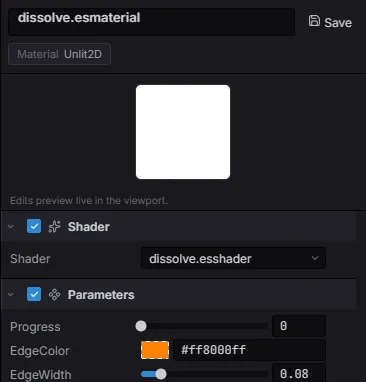
The material inspector: the Shader section with its picker (here dissolve.esshader), above the Parameters reflected from that shader’s #pragma params.
Switching re-runs shader reflection: the parameter list below rebuilds from the new shader’s
#pragma params, so the inspector always matches the bound shader. Because the old shader’s
parameters no longer apply, switching clears the material’s parameter values — re-tune
them for the new effect.
- Share one shader across materials. An
.esshaderis a first-class asset (badge SHD). Point several materials at the same.esshaderfile and they share one compiled shader — edit the source once and every material that references it updates. That is why the picker lists your project shaders next to the built-ins. - Convert to Unique Shader. While a material still references a
builtin:template, the section shows a Convert to Unique Shader button. It copies the built-in’s source into an editable<material>.esshaderbeside the material and re-points the material at it — your parameter values carry over. Reach for it the moment you want to hand-edit a built-in effect. - New Shader. To author a shader from scratch, use the Content Browser’s New Shader
entry (a submenu — pick a built-in template to start from). It writes a standalone
.esshaderyou can then select from any material’s Shader dropdown.
The .esshader format
Section titled “The .esshader format”One file holds every stage plus its metadata, separated by pragmas:
| Pragma | Meaning |
|---|---|
#pragma shader "Name" |
Display name. |
#pragma version 300 es |
GLSL version line for every stage. |
#pragma domain <D> |
Unlit2D (default), Lit2D, PostProcess, UI. Lit2D injects the lighting uniforms + helpers. |
#pragma param … |
A reflected material parameter (table below). |
#pragma switch NAME [default(on)] |
Material-facing static permutation toggle (a #define). |
#pragma feature NAME |
Engine-chosen compile-time variant keyword. |
#pragma vertex / #pragma fragment … #pragma end |
Stage bodies. The vertex block is optional for 2D domains — the engine injects the canonical stage. |
#include "path" |
Textual include (resolved by the host). |
Fragment-only authoring
Section titled “Fragment-only authoring”2D sprites bake their world transform into the batch vertices, so every 2D shader
shares one vertex stage. Omit #pragma vertex and write only the fragment; these
varyings arrive ready to use:
| Varying | Type | Value |
|---|---|---|
v_color |
vec4 |
Per-instance tint (the sprite’s color). |
v_texCoord |
vec2 |
Texture UV. |
v_worldPos |
highp vec2 |
World-space position (Lit2D domain only). |
The sprite’s texture is u_textures[0] (declare uniform sampler2D u_textures[8];
— units 0–7 belong to the batch; texture params bind above them automatically).
Declaring parameters with #pragma param
Section titled “Declaring parameters with #pragma param”#pragma param u_tint color default(1, 1, 1, 1)#pragma param u_intensity float default(1.0) range(0, 4) ui(slider)#pragma param u_mask texture default(white)
// … your GLSL fragment code, reading u_tint / u_intensity / u_mask …| Param type | GLSL | Value shape | Notes |
|---|---|---|---|
float / int |
float / int |
number |
Scalar knob; range(min,max) + ui(slider) for the inspector. |
vec2 / vec3 / vec4 |
same | [x, y, …] |
Vector knob. |
color |
vec4 |
[r, g, b, a] |
RGBA, 0..1; color picker in the inspector. |
texture |
sampler2D |
texture handle | default(white | black | flatnormal) fallback when unset. |
Params live in an engine-generated std140 block, initialized from their default(…)
values — a material that never sets a param still draws correctly.
Injected uniforms & helpers
Section titled “Injected uniforms & helpers”The engine injects these into every compiled .esshader — never declare them yourself:
| Injected | Available | What |
|---|---|---|
u_time |
always | vec4 frame clock: .x elapsed seconds, .y delta seconds. |
u_viewport |
always | vec4 canvas: .xy size in pixels, .zw = 1/size (screen UV = gl_FragCoord.xy * u_viewport.zw). |
| MaterialConstants block | when the shader has params | Your #pragma param values. |
applyLighting2D(albedo, N, worldPos) |
Lit2D | Applies every scene light (+shadows); returns the lit color. |
sampleNormal(map, uv) |
Lit2D | Unpacks a tangent-space normal map (RGB → [-1,1], normalized). |
shadowFactor2D(worldPos, target, softness) |
Lit2D | Occlusion factor toward a point (used by applyLighting2D). |
A #pragma switch selects a static shader permutation baked into the material at
compile time (via the features argument to compileShader).
Create & apply in code
Section titled “Create & apply in code”Compile the shader once (not per frame), make a material, then point a renderer at it:
import { Material } from 'esengine';
const shader = Material.compileShader(tintShaderSource);const tintMat = Material.create({  shader,  uniforms: { u_tint: [1, 0.6, 0.2, 1], u_intensity: 1.5 },});
import { defineSystem, Query, Mut, Sprite } from 'esengine';
const applyMaterial = defineSystem([Query(Mut(Sprite))], (q) => { for (const [entity, sprite] of q) { sprite.material = tintMat; // the material handle }});Update parameters at runtime
Section titled “Update parameters at runtime”Material.setUniform(tintMat, 'u_intensity', 2.5);const v = Material.getUniform(tintMat, 'u_intensity');Material API reference
Section titled “Material API reference”| Method | Description |
|---|---|
compileShader(esshaderSource, features?) |
Compile an .esshader (reflects #pragma param); returns a shader handle. |
createShader(vertexSrc, fragmentSrc) |
Compile a raw GLSL vertex/fragment pair (no reflected params). |
create({ shader, uniforms }) |
Build a material binding a shader to parameter values. |
setUniform(material, name, value) |
Set a reflected parameter at runtime. |
getUniform(material, name) |
Read a parameter’s current value. |
MaterialOptions
Section titled “MaterialOptions”Material.create(options) takes the full render state, not just shader + uniforms:
| Field | Default | Description |
|---|---|---|
shader |
— | Shader handle from compileShader / createShader (required). |
uniforms |
— | Initial parameter values by name; textures via Material.tex(textureId). |
blendMode |
BlendMode.Normal |
How the material composites (Normal, Additive, Multiply, …). |
depthTest |
false |
Test against the depth buffer. |
depthWrite |
true |
Write to the depth buffer. |
cull |
CullMode.None |
Triangle culling mode. |
switches |
{} |
Enabled #pragma switch names — the static permutation this material was compiled for. |
Each state field also has a runtime setter — setBlendMode, setDepthTest,
setDepthWrite, setCull — and Material.createInstance(source) builds a cheap
variant that inherits everything from a parent material and stores only the diffs
you set on it.
CullMode
Section titled “CullMode”| Value | Meaning |
|---|---|
CullMode.None |
Draw both faces (the 2D default). |
CullMode.Back |
Cull back faces. |
CullMode.Front |
Cull front faces. |
ShaderSources
Section titled “ShaderSources”For the raw createShader path, ShaderSources ships ready-made ES 3.0 GLSL
using the batch vertex layout (vec3 position + vec4 color + vec2 texCoord,
with u_projection / u_model uniforms) — pair a vertex with its fragment:
| Source | Stage | What it does |
|---|---|---|
ShaderSources.SPRITE_VERTEX |
vertex | Passes position, color, and UV through. |
ShaderSources.SPRITE_FRAGMENT |
fragment | texture(u_texture, uv) × v_color. |
ShaderSources.COLOR_VERTEX |
vertex | Position + color only (no UV). |
ShaderSources.COLOR_FRAGMENT |
fragment | Flat vertex color. |
These are not the .esshader templates — no #pragma param reflection; use
them as starting points for Material.createShader(vertex, fragment) meshes.
Building graphs in code
Section titled “Building graphs in code”The editor’s material graph is not a separate pipeline — it’s a visual frontend
that generates a .esshader. compileMaterialGraph(graph) walks the node DAG
from the output and emits the same shader source you’d write by hand (both the
GLSL fragment and its WGSL twin), so a graph material runs on either backend and
its const/texture nodes become ordinary reflected #pragma params. That means you
can author graphs entirely in code — the graph is plain data:
import { compileMaterialGraph, Material, type MaterialGraph } from 'esengine';
const graph: MaterialGraph = {  name: 'TintedSprite',  output: 'out',                     // id of the output node  nodes: [    { id: 'tex',  type: 'textureSample', params: { name: 'u_albedo', default: 'white' } },    { id: 'tint', type: 'constColor',    params: { name: 'u_tint', value: [1, 0.6, 0.2, 1] } },    { id: 'mul',  type: 'multiply',      inputs: { a: 'tex', b: 'tint' } },    { id: 'out',  type: 'output',        inputs: { color: 'mul' } },  ],};
const shader = Material.compileShader(compileMaterialGraph(graph));const mat = Material.create({ shader });Material.setUniform(mat, 'u_tint', [1, 0, 0, 1]);   // graph params are ordinary params
compileMaterialGraph throws on a cycle, a missing node or input, or an output
root that isn’t an output node.
Node types
Section titled “Node types”GraphNodeType covers inputs, params, and math (NODE_SPECS holds each type’s
ports and editable literals — the same schema the editor’s palette reads):
| Node | Output | What |
|---|---|---|
uv / screenUV |
vec2 |
Texture UV / canvas-normalized screen UV (0–1, y-up). |
vertexColor |
vec4 |
The sprite’s per-instance tint. |
time |
float |
Engine frame clock in seconds. |
constFloat / constColor |
float / vec4 |
A reflected material param (params: { name, value }). |
textureSample |
vec4 |
Samples a texture param at a UV (params: { name, default }). |
multiply / add / lerp |
widened / vec4 |
Arithmetic; scalars broadcast against vectors. |
oneMinus / saturate / sin |
input type | 1 − x / clamp 0–1 / sine. |
smoothstep |
input type | smoothstep(edge0, edge1, x) — edges are node literals. |
noise |
float |
Procedural value noise over a UV (scale literal). |
panner |
vec2 |
uv + time × speed — scrolling UVs (speedX / speedY literals). |
Editing operations
Section titled “Editing operations”For tooling (or generating graphs procedurally), the SDK exports pure operations — each returns a new graph, leaving the input untouched:
| Function | Does |
|---|---|
newMaterialGraph() |
A starter graph: one white textureSample wired to output. |
addNode(g, type, x, y) |
Adds a node with sensible default params; returns { graph, id }. |
connect(g, fromId, toId, toSlot) |
Wires an edge; returns g unchanged if it would create a cycle or the slot is unknown. |
disconnect(g, toId, toSlot) |
Clears an input connection. |
moveNode(g, id, x, y) |
Canvas layout only — the compiler ignores positions. |
removeNode(g, id) |
Removes a node and every edge touching it (the output node can’t be removed). |
Custom geometry
Section titled “Custom geometry”Materials aren’t limited to component renderers: the Geometry API
(Geometry.create with a GeometryOptions vertex layout, plus createQuad /
createCircle / createPolygon helpers) builds handle-based meshes you draw
immediately with Draw.drawMeshWithMaterial(geometry, material) — the full
reference lives in Custom Drawing.
Best practices
Section titled “Best practices”- Compile shaders once at startup and reuse the handle — never in a per-frame system.
- Share one material across renderers that use the same shader + params so they batch into fewer draw calls.
- Prefer the editor’s material graph for authoring; it generates the
#pragma paramshader and lets you assign the material visually. The code API here is for procedural materials. - Drive animated effects via
setUniformon a shared material rather than recreating materials.
See also
Section titled “See also”- Post-processing — full-screen effects (a separate pipeline).
- Assets —
loadMaterialand shader handles. - Particles — assign a custom
materialto an emitter.