Event Binding
A wire says: when this entity sees this event, run this action on that entity. It is a row of data on the emitting entity — no callback, no script file — so laying out a button and making it do something happen in the same place.
click ─▶ ui.setPage(tabs, settings) on "This entity"click ─▶ ui.setPage(badge, on) on "Card"Wires are deliberately not a visual programming language. A row has no branches and no expressions; when something genuinely needs logic, the row names an action that hands off to a state machine — the editor Estella already has for graphs.
A wire in the inspector
Section titled “A wire in the inspector”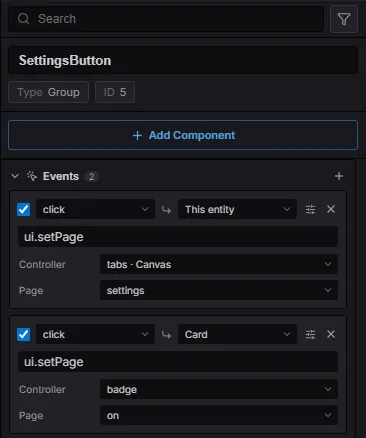
Two wires on a button: both fire on click, one switches a controller on the button’s own
ancestor chain, the other targets the Card entity by name.
Select any entity that can emit — a UI node, an Interactable, a collider — and the
Events section lists its wires. Each row reads left to right:
| Part | Meaning |
|---|---|
| ☑ | Row enabled. An unchecked row stays in the data and never fires. |
| Event | The event type to listen for (click, change, trigger_enter, …). |
| ↳ Target | Which entity the action runs on. This entity by default, or another by name. |
| Action | A registered action name — the same palette the FSM and behaviour-tree editors use. |
| Parameters | Whatever that action declares. An action with none gets a single free-text argument. |
| ⚙ | Reveals Condition (a registered condition that must pass) and Once. |
The data
Section titled “The data”A wire is the EventBinding component, so it serializes into scenes and travels with
prefabs like any other component — no new asset type:
import { EventBinding, UIEventType } from 'esengine';
world.insert(button, EventBinding, {  rows: [    { event: UIEventType.Click, action: 'ui.setPage', params: { controller: 'tabs', page: 'settings' } },    { event: 'trigger_enter', target: 'Door', action: 'ui.setVisible', params: { visible: true }, once: true },  ],});
EventBindingRow |
Description |
|---|---|
event |
Event type to listen for. Any string — the built-ins are only the well-known set. |
target |
Name of the entity the action runs on. Omitted = the entity carrying the row. |
action |
Registered action name. |
params |
The action’s declared parameters by name. |
arg |
The same input in canonical string form ("tabs:settings"). Either form runs. |
guard |
Registered condition that must pass for the row to run. |
once |
Run at most once per play session. |
enabled |
false keeps the row inert without deleting it. |
Wires fire in play mode only — the editor never runs your actions while you author.
Targets resolve by name, nearest first
Section titled “Targets resolve by name, nearest first”target is an entity name, searched outward: the row’s own entity, then its subtree,
then each ancestor’s subtree, and finally the whole scene. Nearest wins, which is what keeps
two instances of the same prefab from wiring into each other — a Close button inside
dialog A finds dialog A’s Panel, never dialog B’s.
A name that matches nothing is reported in the inspector (the target reads red) and warns at runtime instead of failing silently.
Actions
Section titled “Actions”An action is a named function in the shared registry — the same one .esfsm state hooks and
.esbt leaves resolve against. Register once, and the name shows up in all three palettes.
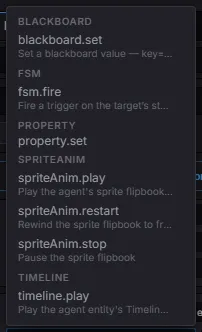
The palette groups by namespace., and the engine’s own actions carry a one-line
description.
These ship with the engine:
| Action | What it does |
|---|---|
ui.setPage |
Switch a UI controller to a page. |
ui.setVisible |
Show/hide a UI subtree (UINode.display). |
property.set |
Write any component field, addressed as Component.dot.path. |
fsm.fire |
Fire a trigger on the target’s state machine. |
blackboard.set |
Set a blackboard value. |
timeline.play · timeline.pause |
Drive a timeline on the target. |
spriteAnim.play · spriteAnim.restart · spriteAnim.stop |
Drive a sprite flipbook. |
Your own actions
Section titled “Your own actions”One registration makes a name authorable everywhere:
import { registerAction } from 'esengine';
registerAction('game.award', {  params: [    { name: 'kind', type: 'enum', options: [{ label: 'Coin', value: 'coin' }, { label: 'Star', value: 'star' }] },    { name: 'amount', type: 'number' },  ],  run: (ctx, bb, arg, params) => {    grantReward(ctx.entity, params!.kind as string, params!.amount as number);  },});
Declaring params is what turns the editor’s text box into a dropdown and a number field.
ctx is the same context an FSM action gets — entity, world, commands, plus the
blackboard.
Which events fire
Section titled “Which events fire”Widgets emit the standard set (UIEventType), and events bubble, so a row on a panel
hears its buttons:
click · press · release · hover_enter · hover_exit · focus · blur ·
change · submit · drag_start · drag_move · drag_end · scroll · select · deselect
Physics contacts reach the same channel (PhysicsEventType), so a
trigger area is wired exactly like a button — both participants get
the event, each told about the other:
collision_enter · collision_exit · collision_hit · trigger_enter · trigger_exit
The vocabulary is open: emit your own name from anywhere and a row can listen for it.
import { EntityEvents } from 'esengine';
app.getResource(EntityEvents).emit(chest, 'looted', { gold: 12 });
When a wire needs logic
Section titled “When a wire needs logic”A row runs one action; it has no “if” and no sequence. That is a deliberate ceiling, and
fsm.fire is the way through it — the click fires a trigger, and the entity’s
state machine decides what it means:
click ─▶ fsm.fire(start) on "Hint" → Idle ──start──▶ Running onEnter: property.set(…)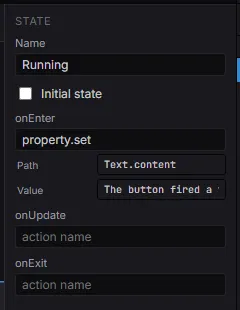
The same parameter controls, in the state-machine editor: property.set declares path
and value, so the hook shows two fields instead of one opaque string.
An action declares its parameters once and every authoring surface shows them — an event row, an FSM state hook, a behaviour-tree leaf.
Two ways to write the same input
Section titled “Two ways to write the same input”Every action keeps a canonical string form. { controller: 'tabs', page: 'settings' } and
"tabs:settings" are projections of each other, and the registry converts between them, so:
- data authored before an action declared its parameters keeps running, unchanged;
- an action that only reads
argstill receives it when a row is authored as parameters; - the editor can show real controls for a row that stores a plain string.
You never choose: the inspector writes parameters, hand-written data may use either.
Example
Section titled “Example”examples/ui-events is the whole feature in one project — two tab buttons, a cross-entity
badge, and a Start run button that hands off to a state machine. Its src/main.ts is
empty; every behaviour in it is authored data.