Assets
Every asset in a project has a stable UUID. Scenes and prefabs reference assets by UUID; at build time the engine cooks only what your game reaches, the runtime resolves references through a manifest, typed loaders turn a reference into a usable handle, and reference counting frees what’s no longer used. This guide covers each piece.
Referencing assets
Section titled “Referencing assets”In code, reference an asset by its project-relative path — readable, and what you’ll normally write:
const tex = await assets.loadTexture('textures/player.png');The editor, by contrast, serializes references into scenes and prefabs as a
stable UUID (@uuid:<uuid>) so a reference survives the file being renamed or
moved. Both forms are accepted by every loader and resolve to the same path — you
don’t hand-write @uuid: refs, the editor does. resolveRef(ref) returns the
resolved path for either.
Loading by type
Section titled “Loading by type”The Assets resource has a typed loader per asset type. Each returns a handle or
id you put on a component. For example, load a texture and show it on a Sprite:
import { defineSystem, Query, Mut, Res, Sprite, Assets } from 'esengine';
const loadArt = defineSystem([Query(Mut(Sprite)), Res(Assets)], async (q, assets) => { const tex = await assets.loadTexture('textures/player.png'); // { handle, width, height } for (const [entity, sprite] of q) { sprite.texture = tex.handle; }});| Loader | Returns |
|---|---|
loadTexture(ref) |
{ handle, width, height } |
loadAudio(ref) |
{ bufferId } |
loadFont(ref) |
{ handle } |
loadMaterial(ref) |
{ handle, shaderHandle } |
loadSpine(skeletonRef, atlasRef?) |
{ skeletonHandle } |
loadTilemap(ref) / loadTileset(ref) |
{ sourceId } / { tilesetId } |
loadTimeline(ref) |
{ timelineId } |
loadPrefab(ref) |
{ data } |
There’s also a generic load<T>(type, ref) when you’re driving the type
dynamically, and register(loader) to add a loader for a custom asset type.
The manifest
Section titled “The manifest”The runtime resolves @uuid references to file paths through a manifest:
assets.setManifest(manifest); // usually the runtime does this for youThe manifest is produced by the cook (below). getManifest() returns the active
one. Refs that aren’t in the manifest fall back to a direct path lookup.
Addressable groups (lazy loading)
Section titled “Addressable groups (lazy loading)”Assets under a subpackages/<name>/… folder form a lazy group <name>;
everything else is the eagerly-loaded main group. Load a group on demand — with
progress — and it downloads before its assets load (on WeChat this triggers
wx.loadSubpackage; on the web it’s a no-op download):
const bundle = await assets.loadGroup('level2', (loaded, total) => {  console.log(`${loaded}/${total}`);});
// ...player leaves the area the group backs:assets.releaseGroup('level2');
releaseGroup is the symmetric other half: every asset the group acquired is
released through its type’s canonical channel, so reference counting decides
what happens — an asset another scene or group still holds survives, and one
nobody holds drops to the evictable warm cache. Bouncing back into the area is
then absorbed by the warm caches instead of the network.
loadByLabel(...) loads assets tagged with a label instead of a folder group.
This grouping is what maps onto WeChat subpackages for
on-demand download.
When the set of assets you want to warm isn’t a group or label — say, the next
area’s textures while the player is still in this one — preload takes an
explicit ref list, infers each asset’s type (manifest, then file extension),
and loads through the same typed channels with bounded concurrency:
const { failed } = await assets.preload( ['textures/boss.png', 'audio/boss-theme.mp3', 'maps/arena.estilemap'], (loaded, total) => console.log(`${loaded}/${total}`),);It never rejects — refs that can’t be typed or fail to load are reported in
failed. The eventual real loads then hit warm caches (or revive resident
textures) instead of the network.
Cooking, compression & content addressing
Section titled “Cooking, compression & content addressing”At build time the cook walks the dependency graph from every scene in the build (the Package dialog’s Scenes in build list), culls anything unreachable, stages the reachable files, and writes the manifest. Along the way it can:
- Compress textures — encode PNGs to GPU-ready KTX2 (Basis Universal), which the runtime transcodes to the best format the device supports (ASTC → ETC2 → S3TC, falling back to RGBA8), mip chain included. Per-asset Import Settings decide this, with a tab per platform (below), so a texture can be compressed harder for a phone than for the web; the Package dialog’s Compression switch only chooses whether to honor those settings or skip them all.
- Content-address — name each shipped file by a hash of its bytes, so URLs are immutable and identical files dedupe to a single copy. On by default for Web/Desktop.
- Auto-atlas — put loose PNGs in a
<name>.atlas/folder and the cook packs them into atlas pages (with the frame UVs written into the manifest), so many small sprites ship as one texture and batch in one draw call.
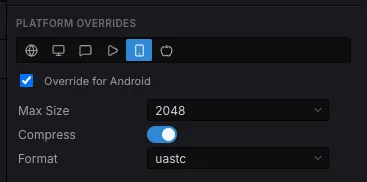
A texture’s Platform Overrides: each target gets its own tab, and a platform that overrides nothing follows the Default settings above it.
Shipping what only code names
Section titled “Shipping what only code names”Reachability is what keeps a build from shipping everything — and it is blind to anything your code names at runtime: a texture in rich-text markup, a clip played by url, a prefab spawned by path. Those get culled, and nothing warns you, because the editor serves the project straight off disk and never needs the manifest. The first symptom is a silent button or a missing image in a real build.
Declare the folder instead. In the Content Browser, right-click it and pick
Delivery → Always include in builds — the same menu that sets local /
subpackage / remote delivery, writing to the same .esengine/asset-groups.json:
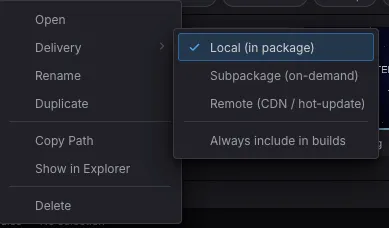
Right-click a folder → Delivery. The three modes decide where an asset ships from; Always include in builds decides whether it ships at all.
{ "version": "1.0", "groups": { "markup-images": { "folder": "assets/textures", "mode": "local", "alwaysInclude": true } }}It is Unity’s Resources folder and Unreal’s additional cook directory, in the
model this project already had. Off by default, deliberately.
Lifetime & reference counting
Section titled “Lifetime & reference counting”Loaded assets are reference-counted: every load*() counts as one
reference and needs a matching release*() (scene loading does both for you).
An asset shared by two scenes survives the first scene’s unload and is freed
only when its last holder releases it.
A released asset isn’t destroyed immediately, either. Textures and decoded audio buffers stay resident as evictable cache entries, and if the same asset is loaded again (re-entering a scene, streaming an area back in) it is revived in place instead of re-fetched and re-decoded. A byte-budgeted LRU evicts the oldest unreferenced entries once residency exceeds the budget, and an OS memory warning drops the whole warm cache at once (held assets are untouched). You generally don’t manage this by hand — reference and despawn entities normally.
The texture budget defaults to 64 MB (RuntimeConfig.textureCacheBudget,
also settable as textureCacheBudget in the build config); decoded audio has
its own 32 MB mirror (audioCacheBudget — see the
audio guide).
Texture memory & budgets
Section titled “Texture memory & budgets”Textures are the budget that matters — they dominate GPU memory. The engine
applies RuntimeConfig.textureCacheBudget at startup; size it for your game
with setTextureBudget (the single game-facing surface over the C++ pool —
there is no parallel TS-side budget to drift from it), and watch residency with
getResourceStats:
import { setTextureBudget, getResourceStats, trimTextureCache } from 'esengine';
setTextureBudget(256 * 1024 * 1024);   // 256 MB texture budget
const stats = getResourceStats();      // null before the engine initializes// stats.textureBytes          — resident texture bytes (held + evictable)// stats.textureBudget         — the current budget (0 = eviction off)// stats.textureEvictableCount — warm-cache entries awaiting revive/evict// …plus shaderCount / textureCount / vertexBufferCount / indexBufferCount//  and cacheHits / cacheMisses
const freed = trimTextureCache();      // drop every evictable texture now
The “GC” here is the LRU described above: once textureBytes exceeds
textureBudget, the C++ pool evicts the least-recently-used unreferenced
textures until it fits — held textures are never touched. setTextureBudget(0)
disables the warm cache entirely (every texture frees the moment its last
reference is released), and trimTextureCache() frees all evictable entries at
once, returning the count — the engine calls it on OS memory warnings; call it
yourself before a known memory spike.
Two small helpers round out the surface: getTextureDimensions(handle) returns
a texture’s { width, height } (cached on the TS side after the first query),
and evictTextureDimensions(handle) drops that cached entry — the asset system
does this when a texture is truly freed, so you only need it if you destroy and
recreate textures around the asset system’s back.
For watching these numbers frame-over-frame in the editor and at runtime, see Profiling. Per-texture sampling/filtering parameters (pixel-art nearest vs. smooth linear) are covered in the Sprites guide.
Best practices
Section titled “Best practices”- Reference by path in code, let the editor write
@uuid:— never hand-author UUID refs. - Preload with
loadGroup/loadByLabelat level boundaries so play doesn’t stall mid-scene. - Put on-demand content under
subpackages/<name>/so it becomes a lazy group (and a WeChat subpackage) instead of bloating the main bundle. - Let cooking cull + compress — reachable-only staging and PNG→KTX2 keep the shipped bundle small; don’t ship raw PNGs you can cook.
- Mark folders your code loads by name as Delivery → Always include in builds, or reachability culling will drop them from the build the editor never needed a manifest to run.
- Set a texture budget on memory-constrained targets and trust reference counting for the rest.
See also
Section titled “See also”- WeChat MiniGame — how addressable groups map to subpackages.
- Scenes — scenes reference assets and are cooked as entry points.
- Materials & Shaders —
loadMaterialand shader handles.