Android & iOS
Android and iOS package your project as a real native app: the engine’s C++ core compiled to arm64, rendering through an embedded Dawn (WebGPU → Metal on iOS, Vulkan on Android), with your game scripts running on an embedded JS engine (QuickJS-ng). It is not a WebView and not a wrapper around the web build — there is no browser in the process.
The authoring model is identical to every other target. The same scenes, the same components, the same TypeScript. Nothing in a project is mobile-specific.
Two platforms, one runtime
Section titled “Two platforms, one runtime”Android and iOS are offered as two targets, not one “Mobile”, because they package through entirely different toolchains (Android SDK + NDK vs. Xcode) — one row could not tell you what to run, whether this machine can run it, or where the package comes out.
They do share one runtime and one export payload. The engine, the SDK and the
game runtime all live in the app binary, so what an export writes is app
content — your scenes, scripts and cooked assets — rather than a runnable
package the way dist-web/ is.
| Android | iOS | |
|---|---|---|
| Graphics | Vulkan (via Dawn) | Metal (via Dawn) |
| Export output | dist-android/ |
dist-ios/ |
| Assembled by | aapt2 + apksigner (Android SDK/NDK) |
Xcode |
| Assembly host OS | any desktop OS | macOS only |
| Result | a signed .apk |
an Xcode project you open, sign and run |
Prerequisites
Section titled “Prerequisites”The Package dialog distinguishes two kinds of missing prerequisite, and they are not the same severity:
- A missing engine runtime means the package cannot be produced at all.
- A missing native toolchain does not. The export still writes the app’s content; only the final assembly needs the toolchain, and that step can run on another machine — an iOS build always does when the editor is on Windows.
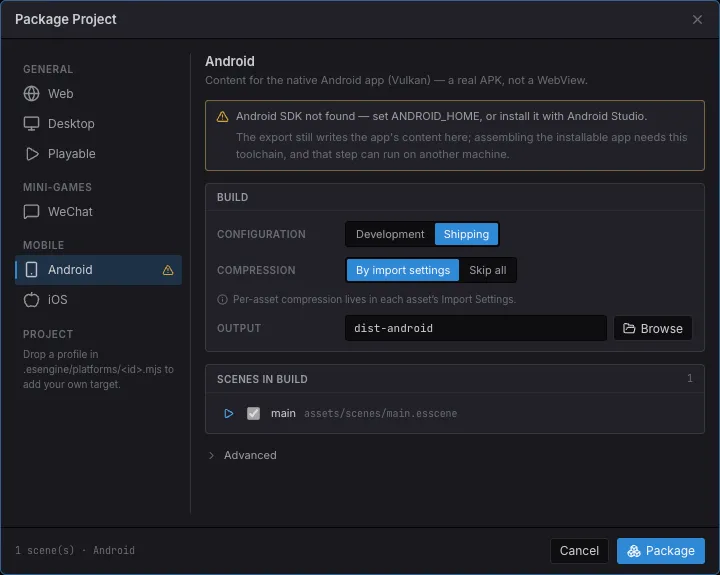
Package Project → MOBILE → Android. The warning names the missing piece and says exactly how much it blocks: the content is written either way.
-
Build the native host once. Dawn and QuickJS are multi-GB / separate projects, so they are fetched rather than vendored. The one-time recipe (and the exact
cmakeinvocations) is innative/README.md. -
Install the platform toolchain.
- Android — Android SDK + NDK r28. The editor finds it via
ANDROID_HOMEor Android Studio’s default install location. - iOS — macOS with Xcode. Apple ships no toolchain for other operating systems, so the dialog says so rather than pretending otherwise.
- Android — Android SDK + NDK r28. The editor finds it via
-
Check the dialog. The target’s row carries a warning triangle until the probe passes, and the panel names what is missing.
Exporting
Section titled “Exporting”- File → Build…, then pick Android or iOS under MOBILE.
- Choose a build config and an output folder (
dist-android/dist-iosby default). Source maps are not offered — there is no browser devtools to consume them. - Check Scenes in build as you would for any target.
- Package. The export cooks assets, bundles scripts, and writes the app’s
content plus an
app.config.jsoncarrying the app’s identity.
Then assemble the app around that content:
# Android — writes a signed APK (debug keystore unless --keystore says otherwise)node build-tools/cli.js native --package --content dist-android
# iOS (on a Mac) — writes the Xcode project around the contentnode build-tools/cli.js native --target ios --package --content dist-iosApp identity
Section titled “App identity”A native app has OS-level properties the engine never reads — the runtime cannot rotate a phone, and a store keeps a bundle id forever — so they are declared for whoever assembles the app, in Project Settings → Packaging:
| Setting | What it becomes |
|---|---|
| Application ID | The Android manifest package and the iOS bundle id (reverse-DNS). Left empty it is derived from the project name; a published app should set its own. |
| Android Version Code | The integer Google Play orders builds by — it must increase with every upload. The version users see comes from the project version. |
| Orientation | Project Settings → Display → Orientation, one project-wide setting every target honors. Left unset it follows the design resolution’s aspect. |
The export writes these into app.config.json beside the content — deliberately
not in game.config.json, which is what the runtime reads.
What runs on a device
Section titled “What runs on a device”Everything. The mobile targets compile the whole engine source list, and the
three subsystems that ship as separate WebAssembly side modules on the web
(Box2D, the Spine runtime, the MPEG-1 video decoder) are compiled into the app
binary instead — a device has no dynamic-linking story and no reason for one.
app.sideModules still answers for them, so the runtime’s own feature gating
behaves exactly as it does in a browser.
| Subsystem | On device |
|---|---|
| Sprites, tilemaps, particles, post-processing | Native (Dawn) |
| Text, bitmap text, rich text | Same atlas + layout as the web; glyphs rasterized from the OS font |
| Physics (Box2D) | Compiled in; solved across worker threads |
| Spine | Compiled in — one runtime version per binary (-DESTELLA_SPINE_VERSION) |
| Video | Compiled in (cooked at build, decoded on device) |
| Audio | Native mixer (miniaudio) — CoreAudio / AAudio |
| Text input | The platform’s soft keyboard is the field’s editing surface |
| Networking | The OS network stack (NSURLSession / HttpURLConnection) |
| Compressed textures | KTX2 transcoded to the device’s format (ASTC → ETC2 → BC), with mip chains |
| Lifecycle | onShow / onHide and OS memory warnings reach the app |
If a future build ever does drop a subsystem, the export names it — with the scenes that use it — instead of quietly shipping a package missing half a scene.
What only bites on a device
Section titled “What only bites on a device”These are the differences worth knowing before your first device build. Each one shipped broken at least once because the editor serves a project straight off disk and never notices.
Assets only your code names get culled
Section titled “Assets only your code names get culled”A build ships what it can reach from the entry scenes. That is right for anything a scene names — and blind to anything named only in code: a texture in rich-text markup, a clip played by url, a prefab spawned by path. Those get culled, and the first you hear of it is a silent button or a missing image on the phone.
Mark the folder in the Content Browser: right-click → Delivery → Always
include in builds. It writes alwaysInclude into the same
.esengine/asset-groups.json that already decides local / subpackage / remote
delivery:
{ "version": "1.0", "groups": { "markup-images": { "folder": "assets/textures", "mode": "local", "alwaysInclude": true } }}Off by default, deliberately — reachability is what keeps a build from shipping everything. See Assets.
Tune textures for the platform where memory is tightest
Section titled “Tune textures for the platform where memory is tightest”Per-asset Import Settings have a tab per platform, mobile targets included — so a texture can be compressed harder for a phone than for the web without touching the source PNG. See Assets.
Your game script is interpreted
Section titled “Your game script is interpreted”The engine runs native at full speed; only your game script runs on QuickJS, which has no JIT (Apple’s rules leave no other option, and Android is kept identical rather than divergent). A per-entity loop written in TypeScript is the one thing that costs meaningfully more here than in a browser — prefer the engine’s own systems and bulk APIs over hand-written per-entity iteration in the hot path.
The first launch after an install
Section titled “The first launch after an install”Parsing the SDK bundle on a device takes ~14 s, and a compile cache does not exist until one launch has paid for it — which would be the launch right after an install. So the bytecode is built with the app and rides along in its assets: fresh-install-to-first-frame is ~0.6 s rather than 14.4 s. It is best effort (it needs a compiler for the build machine); a machine without one still produces a working app that compiles on first run.
See also
Section titled “See also”- Building & Exporting — every target, the cook options, and the Package dialog.
- Assets — reachability culling, delivery groups, and import settings.
- Screen & Design Resolution — designing for a phone’s aspect.
native/README.md— the host’s architecture and the full build recipe.