时间轴
时间轴是一段 Sequencer 动画——随时间排布的关键帧轨道,可以移动 Transform、切换精灵、
触发音频、开关实体或驱动 Spine。你在编辑器的 Sequencer 里编辑它,用 TimelinePlayer 组件
附加,并通过 Timeline 资源控制播放。因为一条时间轴能同时驱动很多东西,它是过场与脚本化
序列的工具。
TimelinePlayer 组件把实体指向一个时间轴资源。通常在编辑器里设;用代码则以 Commands 插入:
import { defineSystem, Commands, TimelinePlayer } from 'esengine';
const attach = defineSystem([Commands()], (cmds) => { cmds.spawn().insert(TimelinePlayer, { timeline: 'timelines/intro.estimeline', playing: true, speed: 1.0, wrapMode: 'once', });});| 属性 | 类型 | 默认 | 说明 |
|---|---|---|---|
timeline |
asset | '' |
时间轴资源(.estimeline)。 |
playing |
boolean | false |
播放旗标——拉起播放,放下暂停。对已播完的片段拉起 = 从头重播。 |
speed |
number | 1 |
播放速率倍率。 |
wrapMode |
string | 'once' |
'once'、'loop' 或 'pingPong'(驼峰写法——其它值会静默地只播一次)。 |
finished |
boolean | false |
'once' 片段播完时闩为 true;下次播放时清除。运行时只读。 |
组件旗标就是播放控制本身:引擎每帧把它们调和进内部时钟,所以任何翻动
playing 的一方——你的代码、检视器、AI 动作——
都经同一条通道驱动片段。
读 Timeline 资源来驱动某个实体的时间轴:
import { defineSystem, Query, Res, TimelinePlayer, Timeline } from 'esengine';
const control = defineSystem([Query(TimelinePlayer), Res(Timeline)], (q, timeline) => { for (const [entity] of q) { timeline.play(entity); timeline.pause(entity); timeline.stop(entity); timeline.setTime(entity, 1.5); // seek to 1.5s const t = timeline.getCurrentTime(entity); const playing = timeline.isPlaying(entity); }});| 方法 | 说明 |
|---|---|
play(entity) |
开始或恢复播放(已播完的片段从头重播)。 |
pause(entity) |
暂停,保留当前时间。 |
stop(entity) |
停止、重置到开头并清除 finished 闩。 |
setTime(entity, seconds) |
定位到某时间(scrub 所有轨道)。 |
getCurrentTime(entity) |
当前播放头时间(秒)。 |
isPlaying(entity) |
是否正在播放。 |
这些方法写穿到 TimelinePlayer 的旗标——timeline.play(e) 和 player.playing = true
是同一条通道上的同一个操作。
时间轴是一组每帧一起求值的轨道:
| 轨道 | TrackType |
驱动 |
|---|---|---|
| 属性 | Property |
组件字段关键帧——位置 / 旋转 / 缩放及任意数值点路径。 |
| 精灵帧 | AnimFrames |
随时间切换精灵表帧。 |
| 精灵剪辑 | SpriteAnim |
在某时刻启动一个命名 anim-clip。 |
| 音频 | Audio |
在关键帧触发一次性声音。 |
| 激活 | Activation |
按区间开关实体。 |
| Spine | Spine |
把 Spine 动画作为片段播放。 |
| 标记 | Marker |
命名时间标记。 |
| 自定义事件 | CustomEvent |
带 payload 的命名事件,供你自己的系统消费。 |
在 Sequencer 里创作
Section titled “在 Sequencer 里创作”双击一个 .estimeline(或打开选中实体的时间轴),就在 Sequencer(关键帧动画编辑器)里
创作它。**摊开表(dope sheet)**把每条轨道及其关键帧沿一条共享、可拖动的播放头排开;加轨道、
拖关键帧,然后 Save。
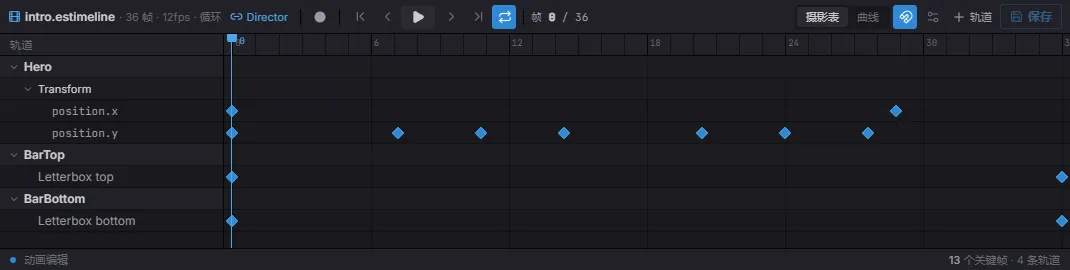
摊开表:一轨一行(这里是某 Transform 的 position.x / position.y,加两条黑边激活轨道),关键帧是菱形,播放头可拖动,顶部是走带控制。
切到 Curves 标签可塑形关键帧之间的插值——拖动值曲线及其切线手柄,做出摊开表表达不了的缓动:
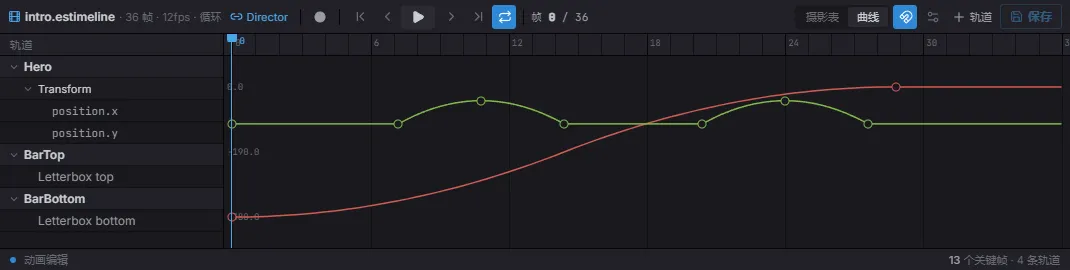
曲线编辑器:每个关键帧通道变成一条可编辑曲线(这里 position.x 缓入、position.y 起伏),每个关键帧带切线手柄。
用代码构建时间轴
Section titled “用代码构建时间轴”.estimeline 文档就是普通数据——用 TimelineAsset 类型加上 TrackType /
InterpType / WrapMode 常量,可以完全在代码里构建。用
registerTimelineAsset(path, asset) 注册后,任何 timeline 指向同一路径的
TimelinePlayer 都会像播放编辑器资产一样播放它:
import {  defineSystem, Commands, registerTimelineAsset, TimelinePlayer,  TrackType, InterpType, WrapMode, type TimelineAsset,} from 'esengine';
const slideIn: TimelineAsset = {  version: '1.1',  type: 'timeline',  duration: 2,  wrapMode: WrapMode.Once,  tracks: [{    type: TrackType.Property,    name: 'Slide in',    childPath: '',                       // '' = the player entity itself    component: 'Transform',    channels: [{      property: 'position.x',      keyframes: [        { time: 0, value: -200, inTangent: 0, outTangent: 0, interpolation: InterpType.EaseOut },        { time: 2, value: 0, inTangent: 0, outTangent: 0 },      ],    }],  }],};
const attach = defineSystem([Commands()], (cmds) => {  registerTimelineAsset('code/slide-in', slideIn);  cmds.spawn().insert(TimelinePlayer, {    timeline: 'code/slide-in',    playing: true,    wrapMode: 'once',  });});
Keyframe 是 { time, value, inTangent, outTangent, interpolation? }。以某
关键帧起始的分段用该关键帧的 interpolation:Hermite(默认——切线驱动曲线)、
Linear、Step、EaseIn、EaseOut 或 EaseInOut。属性轨道按 childPath
解析目标实体(子实体名以 / 分隔;空 = 播放器实体本身),把通道的点路径字段写到
命名组件上。
播放采用播放器组件的 wrapMode 字符串;数值型 WrapMode 常量用在资产和纯求值
API 里。映射与行为:
WrapMode |
播放器字符串 | 越过终点后的行为 |
|---|---|---|
WrapMode.Once(0) |
'once' |
停在 duration,停止,闩上 finished。 |
WrapMode.Loop(1) |
'loop' |
回绕(time % duration)。 |
WrapMode.PingPong(2) |
'pingPong' |
每周期先正放再倒放。 |
applyWrapMode(time, duration, mode) 就是这个纯映射——对绝对时钟时间返回
{ time, stopped }。
采样与序列化
Section titled “采样与序列化”求值器是纯 TypeScript,播放与编辑器 scrub 共用——你也可以自己调用:
| 函数 | 说明 |
|---|---|
sampleTimelineInWorld(asset, time, world, rootEntity, opts?) |
在 time 求值所有属性轨道并把结果写进 world(即 scrub 操作)。 |
sampleTimeline(asset, time, rootEntity, deps, opts?) |
同上,但注入 SampleDeps(world / 组件查找 / 子实体解析)——用于测试和工具。 |
evaluateChannel(channel, time) |
单个属性通道在 time 的值;端点截断。 |
serializeTimelineAsset(asset) |
资产转为可 JSON 化对象(.estimeline 文档形状)。 |
serializeTimelineToJson(asset, indent?) |
美化打印的 .estimeline JSON 字符串(indent 默认 2)。 |
采样只覆盖属性轨道;事件型轨道(音频、标记、自定义事件)在播放中按边沿检测触发, 采样不会触发它们。
- 在 Sequencer 里编辑——时间轴资源持有轨道,代码只负责播放与定位。
- 过场用
wrapMode: 'once',环境/待机序列用'loop'。 - 用
setTimescrub 来预览,或把过场与玩法状态同步。 - 当很多属性/实体需要同步动画时用时间轴(而非补间);一次性的单属性手感用 补间。