输入
在系统里通过 Input 资源读取输入。它跟踪按住状态以及本帧的边沿(按下 / 释放),
所以每帧查询它——边沿只在变化发生的那一帧为真。
import { defineSystem, Res, Input } from 'esengine';
const keys = defineSystem([Res(Input)], (input) => {  if (input.isKeyDown('KeyW'))       { /* held down */ }  if (input.isKeyPressed('Space'))   { /* pressed this frame */ }  if (input.isKeyReleased('Escape')) { /* released this frame */ }});
按键用 DOM code 字符串:KeyW、KeyA、ArrowUp、Space、Escape、Digit1……
const mouse = defineSystem([Res(Input)], (input) => { if (input.isMouseButtonPressed(0)) { /* left click this frame */ } const screenX = input.mouseX, screenY = input.mouseY; // screen pixels const wheel = input.scrollDeltaY;});按键:0 = 左,1 = 中,2 = 右。
世界空间里的鼠标
Section titled “世界空间里的鼠标”input.mouseX / mouseY 是屏幕像素。要世界坐标——用于放置或命中实体——读 UICameraInfo,
它暴露已投影到世界里的光标:
import { defineSystem, Commands, Res, Input, UICameraInfo, Transform } from 'esengine';
const spawnAtCursor = defineSystem(  [Res(Input), Res(UICameraInfo), Commands()],  (input, camera, cmds) => {    if (!camera.valid) return;    if (input.isMouseButtonPressed(0)) {      cmds.spawn().insert(Transform, {        position: { x: camera.worldMouseX, y: camera.worldMouseY, z: 0 },      });    }  });
固定步长(物理)
Section titled “固定步长(物理)”FixedUpdate 系列的系统以固定节奏运行——比步长短的帧运行零次,追赶时运行多次。
*Pressed / *Released 边沿已考虑这点:一个边沿只会被恰好一个固定步(第一个
在它到达之后的步)消费,所以在物理角色控制器里读的跳跃,不会在快帧里丢失、也不会
在慢帧里触发两次——你无需自己缓冲。
// Schedule.FixedPreUpdate —— 边沿被可靠地投递。const jump = defineSystem([Query(Mut(CharacterController)), Res(Input)], (players, input) => { for (const [, cc] of players) { if (cc.isOnFloor && input.isKeyPressed('Space')) cc.velocity.y = JUMP_FORCE; }});输入动作(InputMap)
Section titled “输入动作(InputMap)”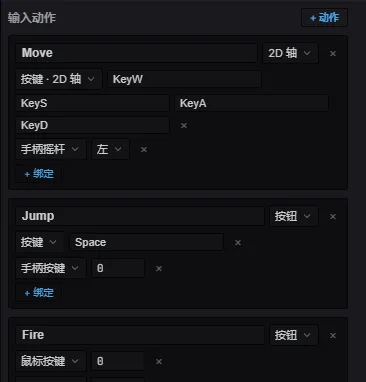
输入映射编辑器:命名动作(Move / Jump / Fire),每个都能挂任意多个键盘、鼠标、手柄绑定。
写死的按键检查会把设备细节散落进玩法代码。输入映射给每个动作起一次名—— 键盘 / 鼠标 / 手柄绑定随便挂多少个——玩法按名字查询动作:
import {  defineInputMap, Button, Axis2D,  Key, Keys2D, Stick, GpButton, GamepadButton,} from 'esengine';
export const Controls = defineInputMap({  Move: Axis2D(Keys2D('KeyW', 'KeyS', 'KeyA', 'KeyD'), Stick('left')),  Jump: Button(Key('Space'), GpButton(GamepadButton.South)),});
defineInputMap 自己注册每帧求值(在输入轮询之后、Update 之前),映射立即可用
——在任何系统里导入并查询:
const dir = Controls.axis2d('Move'); // { x, y },长度 ≤ 1if (Controls.pressed('Jump')) { /* 本帧边沿 */ }| 查询 | 返回 |
|---|---|
down(name) |
按住——动作幅度 ≥ 0.5。 |
pressed(name) / released(name) |
本帧边沿。 |
value(name) |
button 0..1 · axis -1..1 · axis2d 的幅度 0..1。 |
axis2d(name) |
{ x, y } 方向(超过 1 时归一化)。 |
动作是 Button(…)、Axis1D(…) 或 Axis2D(…);各接任意数量的绑定,多个绑定
求和(再钳制),键盘与手柄自然共存:
| 绑定 | 供给 | 含义 |
|---|---|---|
Key(code) |
button / axis | 一个键盘键。 |
MouseButton(b) |
button / axis | 一个鼠标键。 |
GpButton(btn, pad?) |
button / axis | 一个手柄键(扳机给模拟值)。 |
GpAxis(axis, pad?, scale?) |
axis | 一根原始手柄轴。 |
Keys1D(neg, pos) |
axis | 两个键 → 带符号的 1D 轴。 |
Keys2D(up, down, left, right) |
axis2d | 四个键 → 2D 方向。 |
Stick('left' | 'right', pad?) |
axis2d | 一根手柄摇杆(上 = +y,与 Keys2D 一致)。 |
这些构造函数只是普通可序列化数据之上的糖——Binding 是一个带标签的联合类型,
一个动作则是 type 加它的绑定列表:
import { type Binding, type ActionDef } from 'esengine';
const jump: ActionDef = {  type: 'button',                          // 'button' | 'axis' | 'axis2d'  bindings: [    { kind: 'key', code: 'Space' },        // Key('Space')    { kind: 'gpButton', button: 0 },       // GpButton(GamepadButton.South)  ],};
Binding kind |
字段 | 构造函数 |
|---|---|---|
key |
code |
Key |
mouse |
button |
MouseButton |
gpButton |
button、pad? |
GpButton |
gpAxis |
axis、pad?、scale? |
GpAxis |
keys1d |
neg、pos |
Keys1D |
keys2d |
up、down、left、right |
Keys2D |
stick |
stick: 'left' | 'right'、pad? |
Stick |
因为绑定就是数据,这一份模型同时也是改键与持久化格式:toJSON() / loadJSON()
只往返绑定本身(每动作一个 Binding[]),而 toAsset() 序列化整张映射——连动作类型
一起——成一个 InputMapAsset({ version, actions }),即 .inputmap 文件的内容。
loadJSON 会忽略映射里不存在的动作,所以已删除动作的陈旧存档数据永远不会复活它。
改键与持久化
Section titled “改键与持久化”绑定是普通的可序列化数据,所以按键设置界面写起来很小:
// "按任意键…"——捕获下一个按键 / 手柄键(鼠标需显式开启)await Controls.rebind('Jump'); // 替换;{ append: true } 则追加Controls.save('controls'); // 持久化到平台 Storage// 启动时:Controls.load('controls'); // 重新应用已存的绑定(如有)rebind / listenForBinding 接受一个 ListenOptions,选择捕获监听哪些设备族:
keyboard 和 gamepad 默认开,mouse 默认关——这样按下“改键”按钮的那次点击
不会被捕获成绑定。轴类输入永远不会被捕获;改键只面向离散输入。
getBindings / setBindings 以编程方式查看和编辑绑定;cancelListen() 中止
挂起的捕获(以 null 解析)。
数据驱动的映射(.inputmap)
Section titled “数据驱动的映射(.inputmap)”整张映射也能序列化为资产:在编辑器内容浏览器里新建 Input Map,然后用
loadInputMapAsset(json) 代替 defineInputMap 构建。toAsset() 从代码产出
同样的格式。
GestureDetector 把原始触摸变成点按 / 长按 / 滑动 / 捏合回调。基于 Input
资源构建一次,在系统里驱动:
import { defineSystem, Res, Input, Time, GestureDetector } from 'esengine';
let gestures: GestureDetector | null = null;
const gestureSystem = defineSystem([Res(Input), Res(Time)], (input, time) => {  if (!gestures) {    gestures = new GestureDetector(input);    gestures.onTap       = (x, y) => { /* 屏幕 px */ };    gestures.onLongPress = (x, y) => { /* 原地按住约 0.5 s */ };    gestures.onSwipe     = (dir, speed) => { /* 'left' | 'right' | 'up' | 'down' */ };    gestures.onPinch     = (scale, cx, cy) => { /* 逐帧的双指缩放系数 */ };  }  gestures.update(time.delta);});
点按 = 0.3 s 内、移动小于 10 px;滑动需 ≥ 50 px 且 ≥ 200 px/s;捏合报告双指 间距逐帧的缩放系数及中心点。
输入路由(分层)
Section titled “输入路由(分层)”原始平台事件在落进 Input 资源之前,会先经过 InputRouter——一条三层的
责任链:
- 编辑器——工具(gizmo、框选拖拽)最先认领。
- UI——组件和对话框认领落下来的部分。
- 游戏——隐式的:就是
Input资源本身。玩法只会看到没有被上游处理器 消费的事件。
处理器回调返回 true 即消费该事件——它既不更新 Input,也不再传给后面的层。
返回 false / 什么都不返回则放行。因为消费是按事件粒度的(而不是一个全局的
“编辑器激活”开关),工具可以只认领它真正关心的:框选拖拽在按住期间消费指针移动,
但让滚轮穿透到相机;模态框消费 Escape,却不管方向键。
引擎的 UI 插件已经占据了 UI 层——isPointerOverUI() 和防点击穿透正是靠它工作的。
只有在做工具、或把引擎嵌进宿主应用时,你才需要自己写处理器:
import { inputRouter, type InputHandler } from 'esengine';
const modalHandler: InputHandler = {  onKeyDown(code, mods) {    if (code === 'Escape') { closeModal(); return true; }   // consumed  },  onPointerDown(button, x, y, mods) {    return isInsideModal(x, y);   // claim clicks on the modal, pass the rest  },};
const release = inputRouter.setUIHandler(modalHandler);// when the modal closes:release();
inputRouter 是模块级单例;setEditorHandler / setUIHandler 每层安装一个
处理器,并返回一个注销函数(注销只移除你的处理器,不会碰更新的那个)。
InputHandler 的所有方法都是可选的:
InputHandler 方法 |
签名 |
|---|---|
onKeyDown / onKeyUp |
(code, mods) |
onPointerMove |
(x, y, mods) |
onPointerDown |
(button, x, y, mods) |
onPointerUp |
(button, mods) |
onWheel |
(deltaX, deltaY, mods) |
onTouchStart / onTouchMove |
(id, x, y) |
onTouchEnd / onTouchCancel |
(id) |
mods 是一份 Modifiers 快照——{ shift, ctrl, alt, meta }——由路由器从
按键事件跟踪(任何时候也可以读 inputRouter.currentMods)。在释放修饰键的那个
key-up 边沿,处理器看到的它仍是按住的,与 DOM event.shiftKey 的语义一致。
抛异常的处理器按未消费处理,坏掉的工具不会吞掉全部输入。
| 分组 | 方法 |
|---|---|
| 键盘 | isKeyDown(code)、isKeyPressed(code)、isKeyReleased(code)。 |
| 鼠标 | isMouseButtonDown(b)、isMouseButtonPressed(b)、isMouseButtonReleased(b);mouseX / mouseY、scrollDeltaY。 |
| 触摸 | isTouchActive(id)、活动触点的 touches map。 |
| 手柄 | isGamepadConnected(pad?)、isGamepadButtonDown(btn, pad?)、isGamepadButtonPressed/Released(btn, pad?)、getGamepadAxis(axis, pad?)。 |
| 指针 | isPointerOverUI() —— 光标在 UI 元素上方。 |
*Down 读按住状态;*Pressed / *Released 是本帧边沿。
- 每帧轮询——边沿(
*Pressed/*Released)在渲染帧里持续一帧,在FixedUpdate里持续一个固定步(见上)。 - 用
isPointerOverUI()守卫世界点击,点按钮时不要也命中游戏世界。 - 世界坐标用
UICameraInfo,而非裸mouseX/Y,让拾取尊重相机。 - 手柄
pad默认 0——本地多人传索引。